



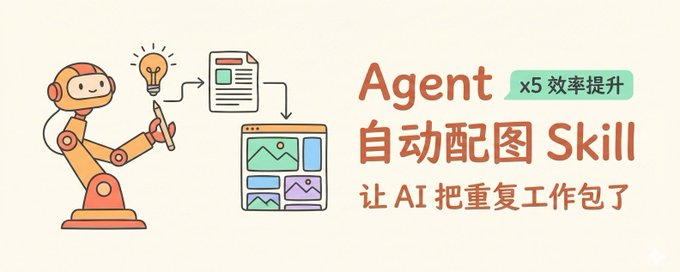
It's a headache to finish a long article。
You need a picture, to write a hint, to generate, to select, to insert... an article of three thousand words with five or six graphs, which alone will take half an hour。
I've been messing with one Agent SkillGet Agent to help me with the whole thing. Throw the article to it, and it analyses itself where the drawing is needed, what style it should be drawn, and then a single sheet is generated and inserted in the corresponding position. All I need to do is say, "Strike this article."
This Skill helped。
Let's talk today about how this Skill of the article was designed, and by the way, the Agent Skills, a powerful function that many people ignored。
What's Agent Skills
Let's start with an analogy. You got a new assistant. Smart is smart, but you don't know anything about business. Every time you set up a mission, you have to explain from the beginning: what tools we use, what processes we use, what attention we have..
Agent Skills is a training manual -- you write this down, and Agent flips it out when he needs it, and you don't have to repeat it。
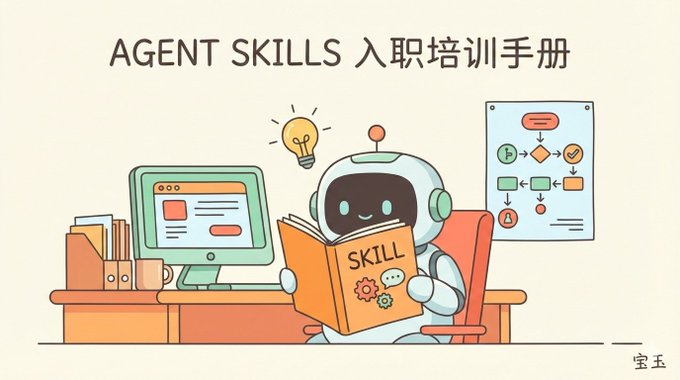
Technically, Skill is a folder with a file called SKILL.md. Agent only remembers its name and profile (about 100 tokens) when it is started, and it really takes time to read the details and it's "forget it out." It's called the Gradual Load, and the advantage is you can load a bunch of Skills without blowing up context windows。
So what's the difference between it and the traditional hint
The main problem with traditional hints is that they do not have the capability to execute scripts, and you load them all at once. Agent Skills initially loads only one not available name and introduction for 100 token, activates to load and loads only SKILL.md files and needs more to load。
And Skill can call other Skills, so you can combine your abilities。
THE DIFFERENCE BETWEEN MCP
MCP is the protocol used to harmonize tools to call, and Skill can direct Agent to call MCP。
Design idea for Skill
The idea of placarding the article is to look at a few questions:
Where do you want to go? What style? How? How do we fit in
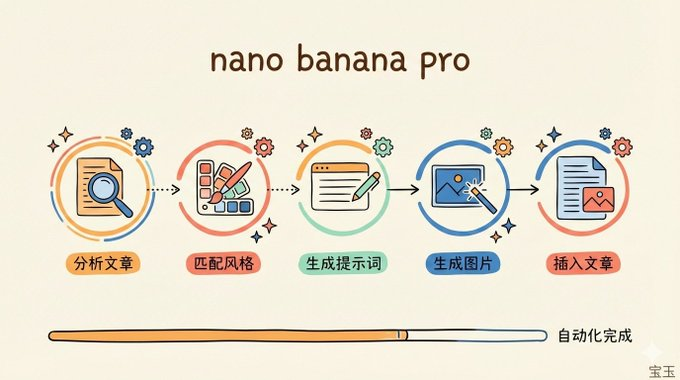
I designed this, Skyll, to break these questions down into steps:
The first step is to analyse the structure of the articles and find out where “visual aids are needed”. For example, abstract concepts need visualization, processes need graphics, core arguments need to be strengthened — these are graphics, and reading experiences raise a level。
Step two, automatically match the style of the illustration with the content of the article. I have set nine styles: tech (technologies), warm (hot relatives), mimal (simplified), playfulful (favorite graffiti), notion (wieldy style) each defined colour, elements, and applicable scenes. Agent will automatically choose between the subject of the article, and of course you can specify it manually。
The third step is to generate a message file for each image, which can be kept as a record and facilitate subsequent Agent calls。
Step four, call the image to create Skill, send it the default system hints and each one of them, generate a picture and save it。
Step five, get Agent to insert the picture into the article position. This step is kind of like "magic," the first time I put this in Skill with a taste of mind, and I didn't think that Agent was smarter than I thought, and it inserted the picture in the right place, and it was sweet enough to add a picture。
The whole process came down, and an article went from "pure text" to "tween text" -- basically for a few minutes, and the main speed bottlenecks were still generating pictures。
SKILL.md. How
An entry point for Skill is the SKILL.md file, in two parts: head capital information and text command。
The head meta-director said:
- —name: article-illustrardescription: analyze the content of the article and automatically generate an illustration where a graph is required. use it when the user requests an article and an illustration. i don't know
name is the only sign for Skyll, description is the profile. These two fields are read when Agent starts, and are used to determine when "this Skill should be called." So you need to write down the trigger conditions, such as "use when the user requests to frame the article and generate an illustration."。
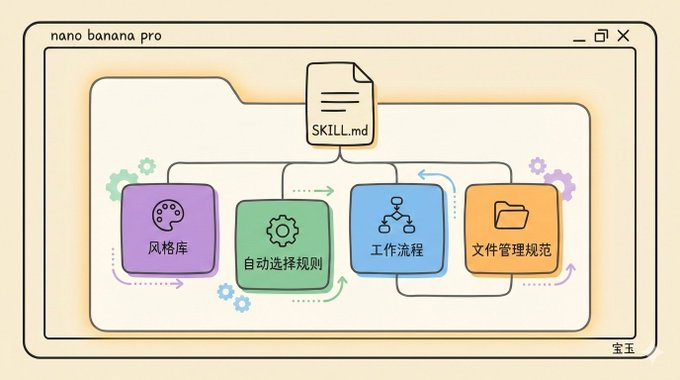
The body instruction is a specific operational manual. My graph, Skyll, in the text, has these plates:
- Style library: Lists all possible styles, including colouring, visual elements, applicable scenery. Agent needs to flip this section when you choose style。
- Automatic selection rules: What content signals correspond to what style. For example, there are frequent "AI" algorithms "data" in articles that select "tech" styles; "personal growth" "emotional" "life" styles that select "warm" styles。
- Workflow: One step at a time — first to analyse the article, then to identify the graph location, then to generate the graph scheme, then to write a reminder, then to call the generation tool, then to insert the article, and then to summarize the final output。
- Document management norms: where pictures are stored, where hints are kept, how files are named。
As my hints are not very long at this time, most of them are in SKILL.md, and if more styles exist in the future, they can be reduced by using the "progressive load" design approach。
For example, the style library has nine styles, each with thousands of words added to the detailed parameters. But if the user asks only to use the tech style, Agent only needs to read the tech part, the other eight are not loaded。
This is done in a simple manner: the detailed parameters are broken down into separate documents and only indexed in the body. Agent reads with a bash command when it needs to, and does not need to skip. This ensures the integrity of the information without wasting the context。
Design of hint templates
The key to creating the image is the hint. I designed a single stymprompt template for this Skill that exists prompts/system.md:
- Creates cartoon-style information illustrations, following the following norms: image specification-type: information illustration-direction: horizontal-scale: 16:9-style: hand-drawing core principles -- keeping a hand-drawing sense throughout -- prohibiting the appearance of writings or photographic elements -- if it involves sensitive or copyrighted persons, creating alternative images of similar styles, not rejecting the generation of -- simple information, highlighting keywords and core concepts -- leaving sufficient white for visual scanning -- keeping a clear visual level..
When each image is generated, Agent assembles the final hint based on this template, combining the specific presentation theme, selected style parameters。
Why write this template alone
Because the binding conditions for image generation are common (e.g., scale, hand-drawing style, no physical elements) and the content changes. Extracting the generics would reduce duplication and facilitate harmonization。
Workflow details
Run the whole process like this:
- user input command, e. g. /article-illustrator path/to/article.md –style tech
- Agent reads articles, analyzes structures, and identifies the location where the graph is needed. The criterion is: does this place add a map that helps understand or is it pure? You can help understand. You can't。
- select the style by the –style parameter. if not specified, scan the article content and automatically match it with the default rule。
- Generates a mapping scheme that lists the location, purpose, visual content, file name of each image。
- a detailed reminder for each diagram to save to imgs/prompts/ directory。
- The image generation tool (I'm using Gemini) is called one by one, and the creation failure is automatically repeated。
- Inserts the resulting picture into the article's corresponding position, the format being! \\Description。
- Output Summary: What style, how many images have been generated, where are the plugs。
The whole process Agent judged itself and carried it out, and I just had to take a last look at the results. If I'm not satisfied, either retick the card, or let Agent adjust for himself, for example:
- "It's too small. Add a few."
- "Add a little text description to the second graph"
- “Add a flowchart to chapter II”
Some design options
In writing this Skill, there are a few decisions worth talking about。
Why set nine styles instead of having Agent free? Because style consistency is important. An article with five diagrams would look messy if each one was random. A pre-set style library that guarantees consistency and gives users a choice。
Why do you say "no less"
On the one hand, it's a little more space I've chosen, and on the other hand, it's easier to delete than new generation。
Of course, the value of illustrations is to reduce the cognitive burden, not as much as possible, but as much as it helps to understand the message, so I wrote something like this in Skill:
- "Schematics serve content: additional information, visualization, visualization, and repetition of visualized information in articles"
How
If you've got Claude Code like this Agent, just tell Agent:
- Help me install Skills from gitsub.com/JimLiu/baoyu-skills
If you just need a mapping skill, tell it:
- Help me install the graphing skills for this post: Github.com/JimLiu/baoyu-skills/blob/main/skills/baoyu-article-illistr/SKILL.md
Of course, this image, Skyll, relies on Image Generation, Skyll. If your environment does not have access to Gemini or other image generation tools, or any other image generation skills, you need to fix this block first. Otherwise, it will be able to generate the hints manually to produce the map。
Final Thoughts
Agent Skills is an undervalued function. A lot of people are still at the "Ai chat" stage, and they don't realize that they can teach it their work processes, their field of knowledge, and make it an assistant who really understands your business。
The map is just one example. In the same vein, you can write an auto-generated Skill, a code review, a research report Skill... the core is to write down the "right way to do this" in your head and give it to Agent for execution。
If you have any repetitive work, try to ask yourself: Can this process be abstract as a Skyll