



Hello, I'm the ark。
I'VE GOT A REGULAR MOVE EVERY MORNING: I'VE GOT NEWS FROM MORE THAN 20 WEBSITES, FILTERING, SORTING, WRITING IN DAILY NEWSPAPERS. THE WHOLE PROCESS DOWN, 40 MINUTES LESS。
Then I gave it to you Claude Code MADE AN AI DAILY SkillI DON'T KNOW. NOW ALL I NEED TO DO IS CALL AN AI DAILY NEWSPAPER, WHICH CAPTURES DATA, SORTS, DRAFTS, TURNS IT INTO PICTURES. FORTY MINUTES BECAME A SENTENCE。
This Skill wasn't given to me. I made it myself. Without a code, the core is a Markdown file。
How? I'm going to use two of my Skill cases to talk about how Skill started from scratch. No code, no programming。
I, Skills, what is it
One sentence: Skill is the skills manual for AI。
Take a metaphor. You go to the restaurant, the cook has basic skills, can cut and cook. But to make a particular dish, he needs a recipe. The recipe tells him what to eat, what to fire, what to order。
Skyll is an AI recipe. Claude Code can do anything, but you give it a Skill, and it knows what to do, what to do, what to do, what to output。
One folder, one file at the core
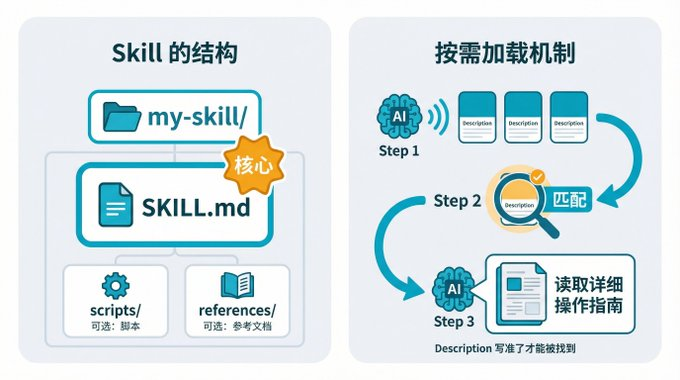
Skill has a very simple structure:
you know, my-skill/
Ideas - SKILL.md # Core: Tell AI how to work
Ideas - scripts/ # Options: Scripts to run
Optional: Reference documents, templates
The most important is SKILL.md. This document is in two parts:
The first part is metadata, including name, description, trigger conditions. For example, my AI daily, Skill, depicts a synthesizing 20+AI source that generates daily AI daily。
Part two is the operating guideTELL AI EXACTLY HOW TO WORK。
_Other Organiser
This field is particularly critical. AI doesn't come up and finish all your Skills, and it looks at Decrimtion and thinks it's a match before it reads the details。
It's like you're looking at App at the app store, and the results show only one line of profiles. The profile is correct, and the user will only light it. Discription is vague, and AI doesn't match your Skyll, it's nothing。
Claude Code and OpenClaw Skills: One set, two places
If you're using Claude Code and OpenClaw at the same time, there's good news: the Skyll structure on both sides is almost identical, and the core is a SkyL.md。
My own way of doing it was to use Claude Code to develop and test Skills, run through and deploy to OpenClaw. Claude Code is easy to detect immediately. Once it's stabilized, thrown into OpenClaw's workspace, it can be triggered by flying books, micro-intelligence。
A Skill for two platforms。
Two, five steps, building a Skill from 0
Make Skill sound like he's writing code. Actually, no。
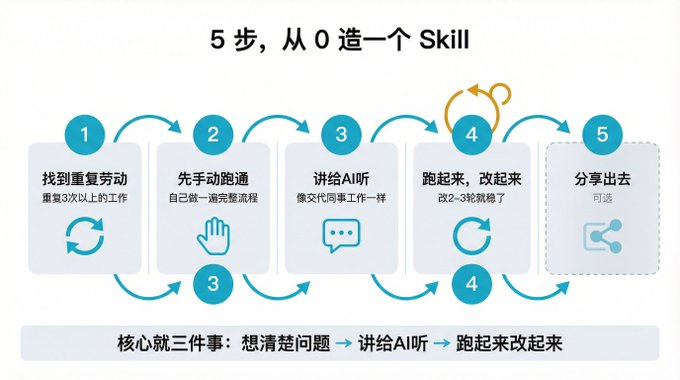
THERE ARE THREE THINGS AT THE CORE: THINK CLEARLY, TALK TO AI, RUN AND CHANGE。
Split into five steps。
Step one: find your duplicate work
The starting point is not "I want to do XX Skill," but "I spend too much time on XX things every day."。
A simple test: You do this over and over three times, and every time the process is similar, you can think of it as Skill。
I'm doing the AI Daily Skill's starting point. More than a dozen websites were opened every morning, from Venture Beat to HuggingFace, to GitHub Trending, two months after that, and it finally became unbearable。
Step 2: Run through it manually
A lot of people will skip this step, but I've had it。
When I did the AI Daily, the first edition was bad. It's because I went straight to AI to build Skill and I didn't know what the whole process was. The details of which sources should be captured, which should be thrown, what kind of output format should be, and how to cut the screenshots should not be expected to run manually。
So it's recommended that you do the whole process manually before you let AI build Skill. Write down exactly what each step is doing. This manual process is the best document you need for AI。
STEP 3: TELL AI WHAT YOU NEED
It's like talking to colleagues. You don't have to write the code
Help me create a Skill that captures news every day from 20 AI sources in a daily newspaper by category and ends up in pictures。
AI will ask for details when it is received. What's the trigger word? The output format is Markdown or HTML? Should I cut the picture
As soon as you're done with the answer, the need is clear. AI will help you generate a standard SKILL.md。
Remember to check if Description is accurate after generation. As I said before, this field determines if AI can find your Skyll correctly。
Step four: Run, change
Skill was created after a run。
It's probably the first time you're out of the picture. It may be the capture data with noise, it may be the classification logic is wrong, it may be the output format is not good。
That's normal. Change it, run it again. It's usually two to three rounds that are basically stable。
My experience is that the first two rounds were mainly a major problem of repair (process failure, missing key steps) and the third started with fine-tuning (formatization, optimization)。
Step 5: Sharing out (optional)
Feel your Skill good to share with GitHub or ClawHub. Let people use it。
Of course, this step is entirely optional. It's enough to use it。
III. Case of combat: my AI daily, Skyll
The methodology is over. Let's see what happens in the real scene。
Why
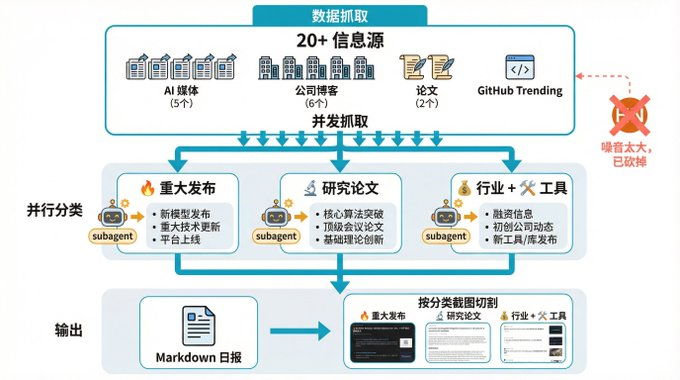
As mentioned earlier, more than 20 sources of information per day are extracted from AI News. These sources include Venture Beat, TechCrunch, The Verge, OpenAI Blog, Anthropic Blog, HuggingFace Papers, GitHub Trending, etc。
Manually, it takes more than half an hour to open the sites, sweep the titles and sift out valuable content. Not to mention sorting out and making a daily newspaper format。
final result
NOW ALL I HAVE TO DO IS SAY AN AI DAILY, AND THE WHOLE PROCESS RUNS:
- Script from 20+ source and fetch data
- multiple subagents to handle different classifications in parallel (significant publications, research papers, industry business, tool applications)
- Summarize generated Markdown daily
- Rendering as Newsletter HTML
- Automatically cut to multiple pictures by category
From the trigger to the map, I don't have to do the whole thing。
The pit of the iterative process
This Skill wasn't a good one, changed a lot of wheels. It's a little more impressive。
At first I added Hacker News to the source. The idea is that HN has a lot of technical content and should have a lot of AI-related. A few days ago, it didn't seem right, HN was too multiplicity, AI had a low percentage of related posts, and a lot of non-AI content was mixed in. There are always a few completely irrelevant items in each of the resulting daily newspapers. I didn't go to optimize the filter logic and cut off this source。
There's the problem with the screenshot. Once the daily newspaper is produced, it needs to be rendered into a good-looking page and intercepted to social platforms. It began with an entire long picture, but a daily newspaper was so extensive that it was too long to be seen in a micro-letter. It was later cut by category: each large title was the boundary, and the long map was reduced to multiple. Today's headline, major publication, research paper. Each picture is in the right amount of information, and it's a lot better to send a reading。
GitHub Trending also stepped on the pit. None of the above items are necessarily AI-related, and project names and profiles are frequently miscalculated. Then a layer of proof was added: once the project was captured, read its README content, and the combined judgment was not really AI-related, unrelated, direct skipping. With this change, the quality of the GitHub project recommended in the daily newspaper has improved considerably。
Core feeling
Every time I run, I find new problems and then run. Once the core process is stabilized, it's comfortable, and there are minor adjustments。
IV. THE CASE OF FIGHTS: STAYING ON SOMEONE'S SHIPS
The second case is my article profile, Skyll. I didn't start from scratch this time。
Causes
I often need a graph for a public article. It is particularly difficult to find or make drawings manually and the quality is unstable. I want a Skill that automatically analyzes the content of the article, decides what kind of picture it should be, and then directly generates it。
the baoyu-article-llustrator who discovered the jade
I looked for a circle, and I found that Master Bothub opened his own media skills, and there was an article on it
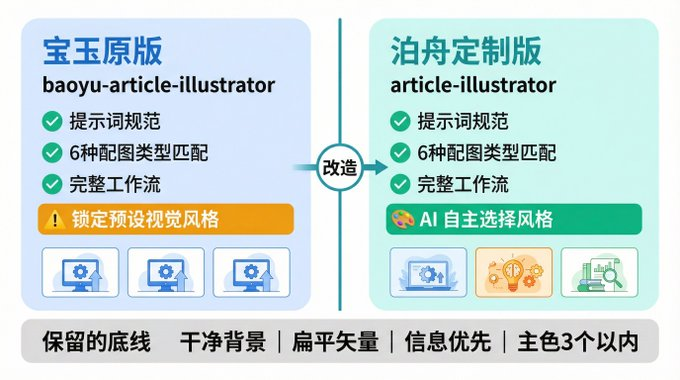
Look at his program, and I think he's doing a very good job with his hint. There are structured prompt templates for each distribution type, with clear requirements for layout, data, colour, scale, not just a word for AI to guess。
the matching logic of the graph type is well thought out. the article contains data and indicators that match the informationgraph. there are steps and processes that match the flowchart. show a comparison, match the comparison. show up the structure, match the framework. it's not a headshot that decides what to use, it's a set of signal matching rules。
the whole workflow is also very consistent: analyze articles, confirm settings, generate outlines, write prompt, generate pictures, insert articles, and walk through the middle。
What have I changed
I don't agree with one of the design versions: he's locked into a predefined visual style。
I think different articles should have different visual expressions. Technical articles are suitable for the blue purple sense of technology, narrative articles are suitable for the warm tone, and tutorials are suitable for the card step style. Locking in a style equals all articles to one look。
So I made an adjustment: hand over the style decision to AI. AI, after reading the article, makes an autonomous determination of what visual style the article is for, and then details it in Prompt。
THERE ARE, OF COURSE, A BOTTOM LINE: CLEAN BACKGROUND, FLAT VECTORS, PRIORITY INFORMATION, NO MORE THAN THREE MAIN COLORS. BUT ABOVE THESE BOTTOM LINES, AI CAN PLAY FREE。
The effect is clear. Technical articles produce a sense of technology, and individual graphs are warmer than usual。
A revelation of this
I've only changed the style strategy. A large amount of time was saved from a zero-sum construction。
And that's the fastest way to build Skill in a lot of times: to find a basic version of the spectrometer, and make it our personal customized version。
V. Recommendations after several pedestals
1. Description
Again. Description is the first level of AI matching Skill. It's too broad, like, "a useful tool," and AI doesn't know when to use it. It's too narrow, for example, to write only one trigger word, but not enough coverage。
All right, Discription, just say this in one sentence. For example, my daily, Skyll, says "Consolidate 20+AI information sources, generate daily AI daily, short, specific, matched."。
2. Manual run and seal
If you haven't done this manually, just let AI generate Skill, out of something that probably doesn't work. Because you don't know what the whole process is, and it's even more impossible for AI to know。
Run through it manually, write down the process, then let AI seal up as Skyll. This order cannot be reversed。
A Skyll solves a problem
Don't be greedy. A Skill wants to do five things, and everything turns out to be normal。
My approach is to tear down the big missions into multiple Skills. The daily newspaper is Skyll, with a map of Skyll and a layout of Skyll. They're independent, they're iterative。
4. Theory mentality
The first edition must be imperfect. Leave it alone. Just change it。
Two to three rounds are almost stable. First two major repairs, third rotation details。
Six, three recommended Skills
Tell me how to build Skill, and finally recommend three Skills that I think should be installed. These three aren't about doing something specific, but about getting your AI to find tools, make tools, review tools。
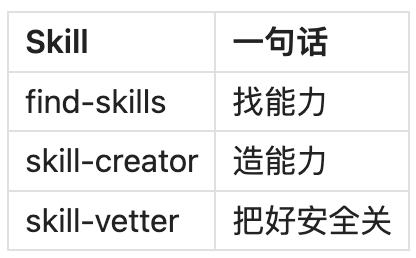
find-skills: skills discoverers
ClawHub on over 10,000 Skills, you can't turn one over。
After loading the find-skills, you said to AI, "I want to perform the XX function," it automatically searchs, recommends, installs you. It's like putting AI in a position to find its own tools。
That's how I found the map when I made Skyll。
skill-creator: skills creator
ClawHub can't find what you want? Make yourself one。
In skill-creator, you describe demand in a natural language, which helps you generate standard SKILL.md, which is directly available. No code, no format specifications。
This Skill is equivalent to a standardized cover for the third step。
skill-vetter: skills security reviewer
Install any third party Skill before the security doorman。
It automatically detects if there is a red flag signal in Skill: suspicious requests for authority, unusual orders, unknown outside calls. Help you assess risks and identify potential problems。
Don't feel redundant. ClawHub mixed up with the OpenClaw community before the supply chain attack and malicious Skill tampered with user profiles. Play third party Skill clean before it takes 30 seconds。
Combination logic for three Skills
find what you can find-skills and make it yourself if you can't find it. either way, load before skill-vetter sweeps。
From 40 minutes a day to a day to a day. is not a high-level technology, it is a SKILL.md file。
If you have some kind of repetitious work that gives you a headache, you can try to make it Skill. Let's find out if there's anything available first. If you can't find one, make one。
A Skill solves a specific problem, slowly saving up, and your AI is getting better and better。