




I'm two now Claude Code Max Plan runs at the same time, plus Codex handles parallel tasks, and over the past four months this package has been used to combine 20 or 30 SEO stations, set up a content production system, and made a lot of projects. The Cordex has recently improved its ability, and many of the tasks I have put on Codex have run, but Claude Code remains my master tool -- it is the starting point for the entire AI programming workflow。
but at first i didn't know anything, but i started by knocking on the first line of the terminal. i stepped on a lot of pits and spent a lot of money. this piece, which i want to know from the beginning, from installation to real use, will help you to get a few months less to bend。
Claude Code, what is it
If you've been chatting with Claude in the browser, you've only used it for approximately 101 TP3T。
Claude in the browser is you asking it questions and it answers you. Claude Code is completely different -- it works directly on your computer. Read your file, change your code, run your script, help you deploy. Your whole project can see it, without a piece of pasting。
The difference between these two things, to tell you the truth, I was scared when I cut it。
Now Claude Code has three forms:
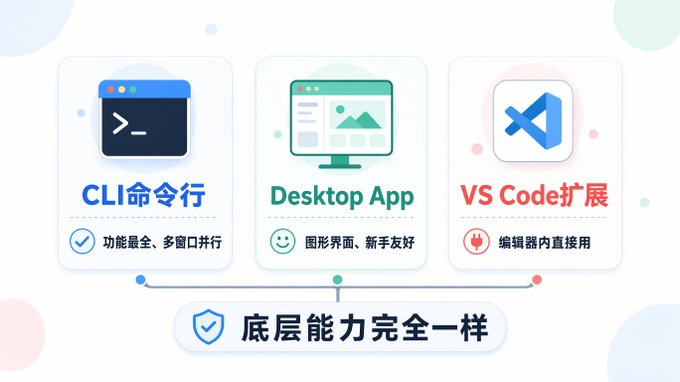
CLI(command line) - Enter claude in the terminal. This is the most primitive and fully functional way. I use this most of my life。
Desktop App - A new version of desktop application for April 15 with a graphical interface to support multiple parallel sessions. People who don't want to touch the terminal can start with this。
VS Code Extension - In the editor, the code is written directly on the sidebar。
The bottom capacity of the three forms is the same, and no one is better. If you're a programmer or not afraid of the terminal, go straight to the CLI, experience the best. If you see the big black terminal window, Desktop App is perfectly fine. The interface just changed in April. I myself have been using the CLI because it is efficient to run different missions with several end-windows。
How
I'M NOT GOING TO WRITE A DETAILED TUTORIAL AT THIS STAGE, BECAUSE SINCE 2026, THE INSTALLATION OF SOFTWARE IS GOING TO ASK AI DIRECTLY。
You sent the phrase "Mac / Windows, install Claude Code CLI" to any AI that will teach you step by step. Any errors in the middle, a screenshot is sent to AI, and it can help you。
THIS PROCESS ITSELF IS WORKING WITH AI, AND IT'S MUCH MORE USEFUL THAN WHAT I'VE WRITTEN。
This can be done in all three forms: CLI is a command line installation, Desktop App downloads on the official web, VS Code expands on the plugin market search installation. Concrete steps to AI。
Subscription scheme
I don't think that much of this is written, but that's the worst part of it -- how much does it cost
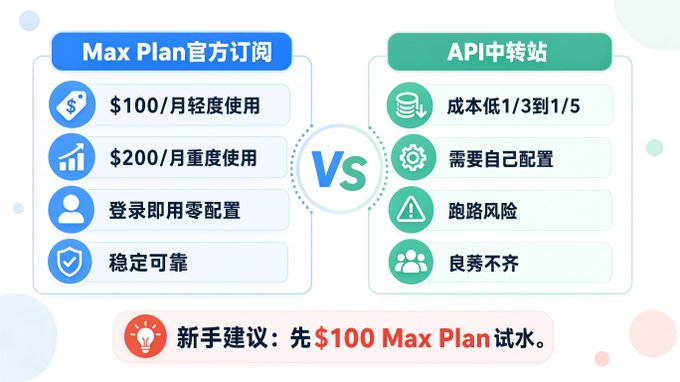
Max Plan ($100 or $200/month) — Official subscription, simplest, ready for login. $100 has been used light enough, $200 I can run all by myself. I'm now two $200 Plans at the same time, one TP4T400 per month。
API transit station - No subscription to official Plan, directly to third party API. Cost is much lower and effectively avoids wind control, but needs to be configured. A friend with a limited budget or a friend who really doesn't want to get involved. Some of the claude model prices at transit stations are probably official between one third and one fifth. And the problem is that there's not enough of them, and they have to have their own real and silver tests to get out of the no-go-round. I have been using transit stations since mid-year, and there are no fewer than 10 that have just witnessed, and two or three that have been cut with herring, thousands of dollars, and friends really need to be careful. I feel like finding a good stop, like a blind date
Newcomers suggest: If you just want to try the water, use the official $100 Max Plan. You don't have to do anything. You can use it. We'll see if we can cut the stop。
Finish the first thing
The first thing I've seen is say, "Do me a website," "Do me a xx."。
Not no, but you're gonna waste Claude Code's strongest ability。
The first thing you should do when you're finished is get a CLAUDE.md file。

CLUDE.md is the most fundamental difference between Claude Code and normal AI chatting. It's a file in your project root directory, Claude Code reads it every time it starts. It's the same rule you set for AI, the first thing it reads at work every day。
Without CLUDE.md's Claude Code, it's a new employee who doesn't know anything. It's different。
Step one: Write it directly with someone else
You don't have to write from zero. GitHub has a lot of high-quality CLUDE.md templates to search for "CLAUDE.md template" or "everything claude code" to find a pile。
For example, there's an open source project called Everything Claude Code (Anthropic hackers won the award), which contains a complete CLUDE.md template, Agent configuration, Skyll module, Hook Automation, and can be used in full。
The newcomers directly cline a project of this kind, copying its CLUDE.md into your own project root directory, can immediately feel the difference between Claude Code。
Step 2: Change to fit for yourself
It took a few days to find out that someone else's CLUDE.md had rules that weren't suitable for your project and that you needed rules that it didn't have. This is the time to change。
How? The simplest way: speak directly to Claude Code。
For example, you found that every submission code was written in English, but you wanted to write it in Chinese -- tell it directly "In the CLAUDE.md article: Submit information in Chinese." It's going to fix it on its own。
And, for example, you think it's too radical to change the code, and it's always a large-scale re-engineering, and you can say, "In the case of CLAUDE.md, add a new article: the change should be small, one function at a time, before I confirm it."。
Claude.md is alive. In the process, if you feel wrong, add a rule, and Claude Code makes a mistake and adds one. My own CLAUDE.md has been transformed over the months into a non-exhaustive document that includes project structure, workflow, code specifications, deployment modalities, voucher management。
The central idea is that you don't need to put it in place once, and you just need to add a rule to every time it makes a mistake. The longer it takes, the better it gets to you. Of course, there's a lot of rules to sort out, but you must have had a lot of experience with him then。
Let's get to work
When CLUDE.md is finished, cd goes to your project directory, enter claude, and you can start。
The biggest difference between Claude Code and regular chat AI is that it can perform the operation. You can say:
- "Look at the catalogue structure of this project."
- "src/index.ts
- "Do me a script for deployment to Cloudflare Pages."
- help me delete all console. logs
It reads documents, changes documents, runs orders. I'll tell you what it's going to do before every operation. Just press back and confirm。
And there's another thing I've spent a lot of time learning: don't give it a big job at once. And it says, "Do me a complete electrician website," and it's probably not working. But say, "Help me make the log-in page first, using Next.js + Tailwind," and it works well。
The task of dismantling is simple and really needs to be done. But once the feeling of breaking down your mission comes up, Claude Code's output quality will have a qualitative leap, and then you'll understand what I'm saying。
Skill: Claude Code is a really powerful place
A lot of people have spent some time asking, "Claude Code, it's really stronger than talking in a browser, but can we be stronger?"
Yes, my friend! Yes! That's Skill
Skill, what is it
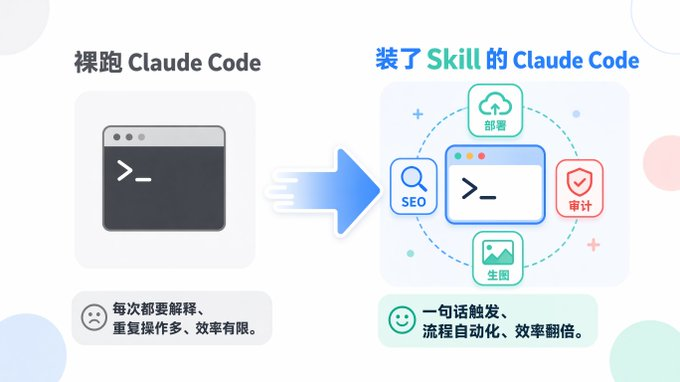
Simply put, Skyll is the way you taught Claude Code. You write the whole process of a task into a Markdown file, and Claude Code will come up with something like this later。
Take an example. I have a deployment, Skyll, which has a whole set of processes, "Reading vouchers, build projects, deploy to Cloudflare, validate deployment." Every time I deployed, I had to explain to Claude Code how, where, and with what orders. And with this Skill, I said, "Design," and it knew what to do。
And I have a SEO audit, Skill. One line of command it can sweep all the SEO questions on a website — technology SEO, Schema tags, page quality, external chain status, final output of a report. If I do this manually, it'll take about two or three hours。
You don't have to write for yourself. Use someone else's
And that's the most important thing: GitHub has a lot of ready-made Skylls on it, just go right ahead。
Searches for “claude code skills” can find a variety of - SEO audits, code reviews, content creation, data analysis, automated deployment. It's all drawn up from other people's battles, proven。
Installation is not complicated. Most of Skill is a Markdown file that you put under ~/.claude/skills/ directory. Some of the more complete Skills will attach scripts and configuration files, cline down and press README。
The Skills that I'm using now are about 30 or 40, covering deployments, SEOs, content creation, photo generation, code review, database operations. Half of it was found on GitHub, and the other half was written on the basis of need, and one of the important points that I think is whether or not to use Claude code is to start producing skills for myself, but to do so is to produce good skills, which is more advanced, and I think it is better to write at the step。
How do you find the good Skill
Some of the sources I think are reliable:
- GitHub search for “claude code skills” or “claude code eyecome”, sorted by star
- Check "claude code skill" for "skill"
- Everything Claude Code has a full set of verified Skill collections
- the Dbs skill series of dontbesilent. I used a lot of his Skill when I wrote the article
Important Reminder: Skill used to do a security audit
That must be said. Skill is essentially an order that Claude Code will follow. There are outlaws who bury the back door in the Skyll -- like having Claude Code send your API Key to an external server, or carry out dangerous orders without your knowledge。
My own way of doing it: any Skill that comes from outside, pretends to have Claude Code do a security audit. Just say to it, "Ask this Skill file for me to see if there is a security risk, if there is any out-of-country data, if there is a risk order. " Claude Code is very capable of reading code, and most of the obvious back door it can sweep out。
Several other criteria for judgement: Star too few items are used with caution, projects without README are not used, and external URLs that you don't understand are found in the Skill file. It's a good circle, but it's a good one。
Use Skill to change after
Claude Code, who doesn't play Skill, is like a phone that just came out of work -- can call and text, but you don't think it's something. Claude Code with Skyll, like a phone full of Apps -- it suddenly became a tool to do anything。
My feeling is that Claude Code ran naked and dressed up Skill ran, completely two things. And if you use Claude Code to think, "That's the way it is," probably because it's not。
Custod Comand, by the way
And there's another thing about Skill called Custod, lighter than Skill. Fits to turn a simple duplicate operation into a slash command。
For example, when I do my content, I do my own / record, / in-depth / title, / create these commands, enter a slash and trigger. The practice is simple: to delegate a Markdown file, the name of which is the command name, to the .claude/committees/ directory。
How do you understand the difference between Skill and Comand? I don't know. I don't know. Skill is a complete set of capabilities, Comand is a quick operation. First you put someone else's Skill on it, and when you find out that this operation I'm doing every day, you get a Command. Don't worry, it'll be natural。
It's an easy pit for a rookie

If you don't write, CLUDE.md will start working
This is the most I've ever seen. When Claude Code was finished working directly, a week of work discovered that its output quality was volatile -- sometimes particularly good, sometimes completely lost. And then I think, "Claude Code is like that."。
It's not that it can't, it doesn't know what you want. You don't give it the rules, it only guesses. After writing CLUDE.md, there's a visible increase in output stability。
It's a big job
I made that mistake when I started using it. It helps me make a complete data board, which results in a lack of consistency in the style of what comes out, a misnamed database field, a confused interface design. Then I learned to take it down -- to do the database design for me, to do the back-end interface, to run through and to do the front-end. In the same project, the quality of delivery varies from one small step to another。
Back up, back up, back up
Claude Code really kills your data when he's demented. No kidding. I've been there。
With respect to the code, it is important to use the guit, and the guit warehouse must be pushed to the cloud. It's only local git community without push, and the hard drive is gone. Claude Code had problems changing the code -- changing it to break the profile and delete something that should not be deleted. You can roll back with the guit and rewrite without the gint。
Databases are special, they can't give. If you have a database on your project, you have to do a timed backup alone. My practice is to back up key data files every four hours and synchronize them to Google Drive. Claude Code sometimes writes scripts that overwhelm data -- I once made it write a new data-processing script that directly covers the output files of the old script that is running, and the data is gone. Backup for all data files after that。
summarizes: guit + push cloud on the code, database timed backup, data file first bak. all three were replaced by bitter history。
Account Wind Control
If your IP isn't clean, Anthropic may have a cover. I myself, Claude, did not have any problems with the account (people are clean in Singapore IP), but there were a lot of seals in the circle. Someone sealed almost 20 nodes a month。
It is recommended to use residential IP or stable independent VPS. If at home, this cost is included. Scientific Net + Pure IP is a prefix to Claude Code, not optional。
My real feelings
From ChatGPT at the end of 2023 to Cursor in 2024 and then to 2025 and then to April 2025 with Claude Code, three switchings. And the reason I stayed at Claude Code was simple: it really helped you finish one thing, not give you a code to stick it up. Now, of course, the codex is almost crazy, and the codex's wind is clearly more friendly, and it's really coole code, a poor friend of the leprechaun's might as well try the codex, and I'm sure I'm going to make it more practical。
Claude Code is not a tool for me to complete a line of code, it's more like an engineering partner. I gave it a mission to read the whole project, understand the dependency between dozens of documents and complete a set of operations. Once used to it, it doesn't come back。
The most important thing for a rookie is two things:
- Get a good CLAUDE.md
- learn to use skill
Claude Code can already do a lot for you. The rest of those steps, they'll come out with nature。