



Still saying "AI VideoPeople change their faces every frame?"
Then you're probably still using the old 2024 method。
IN 2026, THE AI VIDEO WAS GENERATED, AND THE MAN-CONFORMITY TECHNOLOGY HAS GONE THROUGHThree-generation evolution:
|
|
|
|
|
|---|---|---|---|
|
|
|
|
|
|
|
|
|
|
|
|
|
|
|
Today, I put on the latest 2026 3 Large reference model Everything:
- Subject Reference Mode - Single-person lock-in, for close-up and single-person scenes
- Role Reference Mode — IP-CLASS PEOPLE HOLD, CROSS-SCENES DON'T FAIL
- Full Reference Mode - Multi-modular integrated control, professional creator matching
Each model is clear:What's the principle, how it works, which tool is the best, where the hole is。
AFTER READING THIS, YOUR AI VIDEO CHARACTER'S CONSISTENCY WENT STRAIGHT FROM BEING BARELY VISIBLE TO BEING PROFESSIONAL。
Model I: Subject Reference - The most accurate single-person lockout
The subject reference is currently one of the most accurate character-locking techniques, none。
It's different from the nature of the map
|
|
|
|
|---|---|---|
| AI UNDERSTANDING |
|
|
| Character consistency |
|
|
| One word |
|
|
What tools support the subject reference
|
|
|
|
|
|---|---|---|---|
| Vidu Q3 |
|
|
|
| Seedance 2.0 |
|
|
|
| AI 2.0 |
|
|
|
| General, 2.6 |
|
|
|
Vidu Master Reference Practice (most recommended)
Vidu 's main reference is the current industry pole, which was achieved after version 1.5SINGLE SUBJECT 95%+ ACCURACY.
Step 1: Prepare high-quality reference maps
The quality of the reference map directly determines the locking effect, and the criteria are strict:
|
|
|
|---|---|
|
|
|
|
|
|
|
|
|
|
|
|
|
|
|
💡 Professional skills: BETTER USE THE "STANDARD MAP" CREATED BY AI AS A REFERENCE MAP, RATHER THAN A PHOTO OF THE PERSON. AI GENERATES A CLEARER IMAGE CHARACTER AND BETTER LOCKING。
Step 2: Enable subject reference
- Enter VIDU Studio, choose "Image to Video"
- Upload ready reference maps
- Waiting for the system to parse the subject (to show "Subject Analyzed" complete)
- Note "Reference Charactor Locked" on the top right corner. Locked
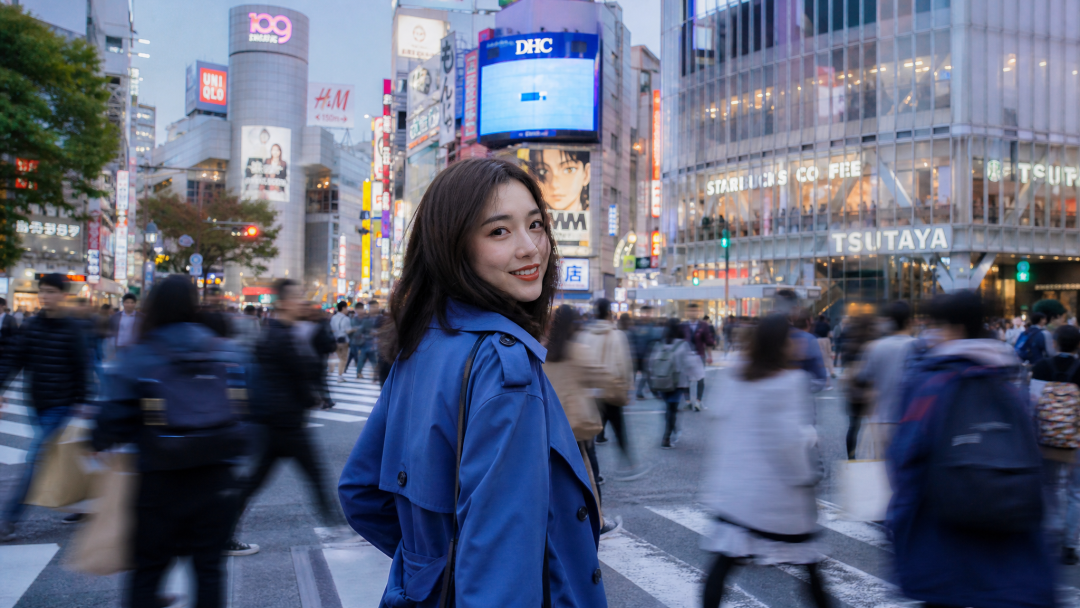
Step 3: Call with @grammatical precision
This is the core game of the subject reference -- to bind people in the hint:
@Serial number
@Figure 1 Put on a blue windsuit, turn around and smile at the Tokyo Shibuya intersection, the background is blurry and the camera is moving slowly
Three priorities:
- @Figure 1 to put on the hintFirst
- It's only about actions, scenes, camerasStop describing people
- Don't write "like" or "like" or "like" or "like" or something
A multi-person scene @
@Figure1 Reach out to @Figure 2
- ⚠️ Notice: Generates a maximum of 3 support @subject calls at a time, more than solves the failure or integration of characters。
3 intensity levels for main reference
|
|
|
|
|
|---|---|---|---|
| Strong Lock | @Figure 1
|
|
|
| Center Lock | @Figure 1
|
|
|
| Weak Lock |
|
|
|
💡 Experience: DO NOT PURSUE 100% SIMILAR. SIMILARITY AROUND 90% IS THE BEST BALANCE POINT - BOTH RECOGNITION AND NOT RIGIDITY OF MOVEMENT DUE TO THE DEATH OF THE LOCK。
Model II: Role Reference - IP
The role reference, by definition, is dedicated toROLE IP Designed reference mode。
Core differences with subject reference
|
|
|
|
|---|---|---|
| Lock what |
|
|
| Level |
|
|
| suitability |
|
|
Take a chestnut -- you have a little new reference for crayons:
- Subject ReferenceThe generation of the new ones is similar to the position, expression and angle in the picture
- Role Reference: You can do anything you want, anything you want, anything you want, anything you want to wear
ROLE REFERENCES ARE BETTER FOR SERIAL CONTENT, IP ACCOUNTS, SERIAL STORIES- Because what you need is this character, not this picture。
What tools have role reference functions
Universality 2.6 - Best role playing
ALI IS THE FIRST VIDEO MODEL TO SUPPORT ROLE-PLAYING IN THE COUNTRY AND IS NOW THE MOST APPROPRIATE TOOL TO DO AN IP。
|
|
|
|---|---|
|
|
|
|
|
|
|
|
|
|
|
|
Steps:
- Select Role Play mode
- Upload reference video (10-30 seconds best, with multiple angles and expressions)
- Enter a playtip (support mirror script format)
- One key to generate a full video with role, voice and performance
PixVerse — Best in multisession narratives
The Character Ref function of PixVerse is designed for multi-photo narratives:
- Supporting 50+ Snippets to keep roles aligned
- It's for a series and a series
- It works better with multiple frames
Pika Labs - Animation / Second Führer
One of the best tools for the consistency of the binomial role is the first choice of the opera creator。
Role Reference Progress Method
Play Number One: Flow of role files
Professional creators do this now:
|
|
|
|
|---|---|---|
|
|
|
|
|
|
|
|
|
|
|
|
|
|
|
|
Zenium How: Pick your face first, then take a picture with multiple angles, then finish the file — a logic with actors。
Play II: Emoticon migration
With a role reference, you can control the role expression:
- There's no need for a vague description of "happy expression."
- I'm going to use "@smear stares" and "@smiling eyes." This expression label
- You can even upload an emoticon reference video to recapitulate the same face
Play III: Multiplaying
2.6 Support 2-3 role interaction:
- Upload references for each character separately
- WRITING HINTS IN "PERFORMANCE A + ACTION + ROLE B + RESPONSE"
- AI AUTOMATICALLY HANDLES SPACE RELATIONS AND VISION COMMUNICATION

- Zenium Example"Sitting at the stone table, shaving with your left hand, holding a glass with your right hand, looking at him on the table with a cat on his head, shiking candles, inside the ancient windhouse."
- (UPLOADING OF ROLE REFERENCES FOR CUSTOMS PLUMS AND CATS, AI AUTO-GENERATED INTERACTIVE SCENES)
Mode III: Multimedia Reference - Professional creator matching
If the main reference is a "snipers" and the role reference is a "rifles" — the full reference model is a "missile system"。
It's not a reference to an element, it's a simultaneous referencePictures, videos, audioFOR A VARIETY OF MATERIALS, AI AUTOMATICALLY LEARNS AND RESETS:
|
|
|
|---|---|
|
|
|
|
|
|
|
|
|
|
|
|
|
|
|
One word: YOU GIVE AI A BUNCH OF REFERENCE MATERIAL, AI GIVES YOU A SET OF STYLE, A STABLE CHARACTER, A QUALITY PROFESSIONAL。
What tools support universal reference
Seedance 2.0 - the strongest full reference at present
The multi-model reference for Seedance 2.0 is the industry ceiling:
- Maximum support 12Reference file (photogram + video + audio mix)
- AI AUTOMATIC IDENTIFICATION OF REFERENCE TYPES, EXTRACTING SEPARATE FEATURES
- Supporting reference combination strategies, different combinations responding to different scenarios
Wan 2.7 - Command Edit+Multiform
A hundred degrees of Wan 2.7 feature: Supports "directive editing" - when generated, you can continue to modify the text without regeneration。
3 gold combination formulas with full reference
Combining formula 1: Role + scene + action (short play tag)
|
|
|
|
|---|---|---|
|
|
|
|
|
|
|
|
|
|
|
|
APPLICATION: AI SHORT PLAY, DRAMA VIDEO, CHARACTER STORY
Zenium How: Three graphs, two scenes, short scripts。
COMBINING FORMULA 2: MIRROR + MUSIC + ORAL (MV / PROMOTIONAL)
|
|
|
|
|---|---|---|
|
|
|
|
|
|
|
|
|
|
|
|
APPLICATION: MV, PRODUCT PROMOTIONAL FILM, ORAL VIDEO
Zenium How: NINE LENSES, TWO MOUTHS, MV。
Group formula 3: style + mirror + sound (creative video)
|
|
|
|
|---|---|---|
|
|
|
|
|
|
|
|
|
|
|
|
Application: creative short films, art videos, advertising films
Zenium How: Three sound effects, creative matching。
Full Reference Operational Steps (as in Seedance 2.0)
Step 1: Collate reference material
"Performance-Scene-Action-Voice" preparation material with clear names:
Reference material/
ideas - role - female heads.png
ideas - role - female master side.png
i miss the role of the hostess
ideas-café scenes.jpg
ideas - scene - rain night street.jpg
└ - actions _ walking.mp4
Step 2: Batch upload reference file
All reference files are uploaded once in the "Alternative Reference" model of Seedance 2.0. The system automatically classifies: person, scene, action, style, audio。
Step 3: Write prompts in @grammatics
Similar to the subject reference but more flexible:
@Girl_Girl walked into a café from the rain, took her umbrellas and fell, found a seat by the window
I ordered a cup of coffee, looked out the window, my eyes were kind of blue, warmed yellow, cold blue
Rain night, film quality, background music: gentle jazz
Step 4: Reconciliation of reference weights
Advanced function: The impact intensity of each category of reference can be reconciled separately -
|
|
|
|
|---|---|---|
|
|
|
|
|
|
|
|
|
|
|
|
|
|
|
|
💡 Professional tip: FULL REFERENCE IS NOT AS GOOD AS MORE. TOO MANY REFERENCES MAKE AI CONFUSED, BUT QUALITY FALLS. GENERAL 5-8 reference documentsis the best number。
⚡ Progress technique: First-end frame control + multi-frame reference
In addition to the three reference models, there are two new 2026 functions that allow for the consistency of character to take another step。
Techniques I: End frame control (Keyframe-to-Video)
IT'S THE "KING BANG" FUNCTION OF THE 2026 AI VIDEO, NONE OF WHICH。
Rationale: UPLOAD FIRST FRAME AND LAST FRAME, AI AUTOMATICALLY PRODUCES INTERMEDIATE TRANSITION VIDEO。
|
|
|
|---|---|
|
|
|
It's like "back and forth insurance" for people。
Operational steps (in the case of Vidu):
|
|
|
|---|---|
|
|
|
|
|
|
|
|
|
|
|
|
|
|
|
Applicable scenarios:
- ROLE FROM SCENE A TO SCENE B
- Looks from anger to sadness
- Processes from integrity to fragmentation
- From vision to close-up
- ⚠️ Hide the pitIT'S A FIRST-END FRAME THAT HAS THE SAME CHARACTER -- IT'S NOT A LONG-HAIRED END-OF- HAIR FRAME, IT'S A SHORT HAIR, IT'S UNDERSTOOD BY AI TO BE A SHORT HAIR, AND IT CREATES A STRANGE MIDDLE。
Skills II: Multiframe Reference
The first frame is two key frames. Multi-frame reference 2-20Key frame。
Rationale: GIVE AI A SET OF KEY FRAMES, AI ALIGNS THEM, AND PRODUCES A LONG SHOT IN THE END。
When
- Complex action sequences (e.g., martial arts, dance)
- Long shot (one shot over 10 seconds)
- Needing precise control of the mirror trajectory
% of gold with multiple frame reference:
|
|
|
|
|---|---|---|
|
|
|
|
|
|
|
|
|
|
|
|
2026 Consistency of mainstream tool figures
|
|
|
|
|
|
|
|
|---|---|---|---|---|---|---|
| Vidu Q3 |
|
|
|
|
|
|
| Seedance 2.0 |
|
|
|
|
|
|
| General, 2.6 |
|
|
|
|
|
|
| AI 2.0 |
|
|
|
|
|
|
| Wan 2.7 |
|
|
|
|
|
|
| PixVerse |
|
|
|
|
|
|
| Pika Labs |
|
|
|
|
|
|
3 Principles for Selection of Tools
|
|
|
|
|---|---|---|
|
|
Vidu |
|
|
|
General, 2.6 |
|
|
|
Seedance 2.0 |
|
⚠️ Hole avoidance guide: seven common mistakes for character consistency
PIPE ONE: POOR REFERENCE MAP QUALITY
THE REFERENCE FIGURE IS THE FOUNDATION. THE MAP, THE LIGHT, THE ANGLE, THE MASK -- YOU GIVE AI A BUNCH OF BAD REFERENCES, AND THE FAIRY CAN'T SAVE IT。
- ✅ Correct approach: 10 minutes to make a standard person map, 100 times more useful than later。
PIPE II: I'M LOOKING AT TOO MANY PEOPLE, AI, AND I'M GIVING YOU "INTEGRATION ODD."
MANY PEOPLE THINK THAT THE MORE THE REFERENCE, THE MORE THE REFERENCE, THE MORE THE CHARACTER REFERENCE, THE MORE THE AI GETS MIXED UP, THE MORE THE "FOUR UNLIKE"。
- ✅ Correct approach: Single person with 1 primary reference + 2 supporting reference; multiple person must be clearly distinguished by @ syntax。
Pit three: Too much movement, face to face
Whatever the mode of reference, the movement will fall -- this is the physical limit of current technology。
- ✅ Correct approach: Important scenes with small, slow moves; large action scenes with visions or back shadows to avoid face。
Pipe Four: The scene is too different. The character is "changed."
THE SAME PERSON, IN WARM AND COLD LIGHT, SEEMS TO BE COMPLETELY TWO. AI'S UNDERSTANDING OF LIGHT IS NOT YET HUMAN。
- ✅ Correct approachThe content of the series is as luminous as possible; indeed, it needs to be changed, with the addition of the phrase “to keep the person in the same colour”。
Pipe Five: One way and death
Only subject reference? People like wood. Only character references? Details are easy to float. Only with the key words? All by luck。
- ✅ Correct approach:Third floor—Reft to define the profile + to set the end of the frame at both ends + to set the details of the keyword, and to use the best combination。
PIPE SIX: SEEKING 1001 TP3T
THE REAL ACTORS ARE ACTING, WITH DIFFERENT IMAGES, ANGLES AND FACES, AND THE VIEWERS DON'T FEEL "CHANGED." SO IS AI VIDEO..THE NATURAL VARIABILITY OF 80% + 20% = THE BEST VIEWING EXPERIENCE。 HARD PURSUIT OF 100% IS CONSISTENT, WITH THE RESULT THAT ACTIONS ARE RIGID, EXPRESSIONAL, LIKE WAX。
Pipe 7: Using old version tools, no new functionality known
A lot of people are still using the old 2024-2025 method, and they don't know that the 2026 reference is so powerful. And those who want to do good, they will surely profit from their means. Using tools and methods, efficiency increases by more than 10 times。
🎬 FULL FIELD CASE: 3 CAMERA-BUILDING CONSISTENT AI SHORT PLAY HOST
With so many theories, a full-scale battle。
Target: Make a 3-scenes video of the old wind shorts, and the hostess keep the same people and the same style in 3 shots。
Tool Set: Vidu (main reference) + Clip (late-termination)
Step 1: Production of standard human reference maps
First, there must be a high-quality reference map — the basis for all consistency。
The young woman of the ancient wind, around 20 years old, the face of the goose, the eyes of Dan, the high nostrils, the thin lips, the long hair of the black
In a silver hairbar, wearing a light blue veiled man with a white embroidered collar, white skin, cold air
EYES WITH A BIT OF BLUE EYES, HEAD-TO-HEADS, FACE-TO-FACE LENSES, SOFT AND NATURAL LIGHT, FILM SENSES, 8K SUPER CLEAR, PURE COLOR BACKGROUND
Generate 4-6 sheets, select the most satisfactory one, save it as。
homemaker_standard reference chart.png
- 💡 Chile: The selection is not just about "sweet" but about "unsure" - the five officials are clear, the light is even, and there are no strange angles and expressions。
Step 2: Camera I - The hostess walks in the garden (main reference mode)
|
|
|
|---|---|
| Lens Description |
|
| tool |
|
| Reference Image | homemaker_standard reference chart.png |
Operation:
- Uploading reference diagrams, waiting for the system to parse the subject (show "Subject Analyzed")
- Enter the prompt word:
@Figure 1 Walking slowly in the old wind garden with plum trees and fake mountains, morning fog, soft and morning light
Through the leaves, the meso scene, the side, the movement, the quality of the film, the light gold, the cold poetic atmosphere
- Generation time: 8 seconds
- EXPECTED EFFECTS: THE PROFILE OF THE PERSON AND REFERENCE FIGURE 90% OR MORE IS CONSISTENT, THE MOVEMENT IS NATURAL AND THE PICTURE IS STABLE。
Step 3: Camera two -- smile back
It's a big shot, and it's easy to crashFirst End Frame ControlTo lock both ends。
|
|
|
|---|---|
| Lens Description |
|
| tool |
|
| Policy |
|
Operation:
- First Frame: Intercept a clear image of the side of the walk in a Step 2-generated video
- End Frame: Generates a picture of the hostess' smile (maintaining the same person as the person in the head)
- Upload headline and ending frame
- Enter a transitional hint:
The character slows down, the body slowly turns in the direction of the lens, the head lifts up, the mouth turns up
With a light smile, the eyes were softer from the blues, and the twirl was swaying as they turned
Clothes and fabrics have natural wrinkles
- Generation time: 6 seconds
- 💡 Skill: The last frame best uses the front frameChange it outinstead of regeneration. The "same image" is much more consistent than the "two different pictures"。
Step 4: Lens Three - Special Pistol (Fact Reference + Full Power Mode)
A close-up camera requires the highest degree of consistency of character and uses role references to ensure the accuracy of the five officials。
|
|
|
|---|---|
| Lens Description |
|
| tool |
|
| References |
|
Enter spectrophs:
Speculation 1 [0-3 seconds], the master's hand gently lays on the old chords, her fingers are long, her fingernails are light powder
The camera moved slowly upwards, showing the low eyes of the hostess, and the eyes focused and calm。
Camera 2 [3-6 seconds] Periphery, the hostess slightly lowers her head and drops a few threads over her cheeks
The horns of the mouth had a faint smile, warmed the yellow candles and cast a soft shadow over her face, and the moonlight was spilled over her outside the window。
Generation time: 6 seconds
Step 5: Collapse and Harmonize
After all three shots were generated, the import clipping was finally unified:
|
|
|
|
|---|---|---|
|
|
|
|
|
|
|
|
|
|
|
|
|
|
|
|
|
|
|
|
Common problems and solutions in the field
|
|
|
|
|---|---|---|
|
|
|
|
|
|
|
|
|
|
|
|
|
|
|
|
|
|
|
|
🎯 Core approach:
Personal consistency is not achieved by a particular technique, but is the result of a three-tiered superimposed "good reference map + correct model + lateral uniform monetization."。
Each floor is 80 minutes, three floors is more than 95 minutes。
Summarizing the evolution of the 2026 identity:
|
|
|
|
|
|---|---|---|---|
|
|
|
|
|
|
|
|
|
|
|
|
|
|
|
|
|
|
|
|