



I've been working on this clip for more than two months, and it's no less than 10. In the article, I will give my friends as much detail as possible about the full process and details。
You can go over the article and send it directlyCodexLet AI make you Skyll。
Hi, my friends, I'm here to submit
Last week, I wrote an introductory article on Codex, thanking my friends for their presence and for having reached over a million people on Twitter。
A lot of friends at the time asked me if the automation clips mentioned in the article could be shared
This is how we're going to do autoclips using Codex to maximize the efficiency of video creation。
Bottom logic of the workflow
Whether it's about content or electricity, the simplest way to get the flow is if you want to get it fastI'll take the money.
Because the charge is market-tested, the flow is basically not bad as long as it is kept up fast enough。(Of course, the difference between copying and moving. I'm not sure
At the heart of this workflow is the copying of money。
If you see an explosive video, you want to do one of your own with this rhythm and structure. It's traditional for you to manually cut a reference video, find material, card time, subtitles, and a video could take two or three hours。
But with this workflow, you just have to be ready to look at the video and your own material library, the rest of which Codex can do for you。
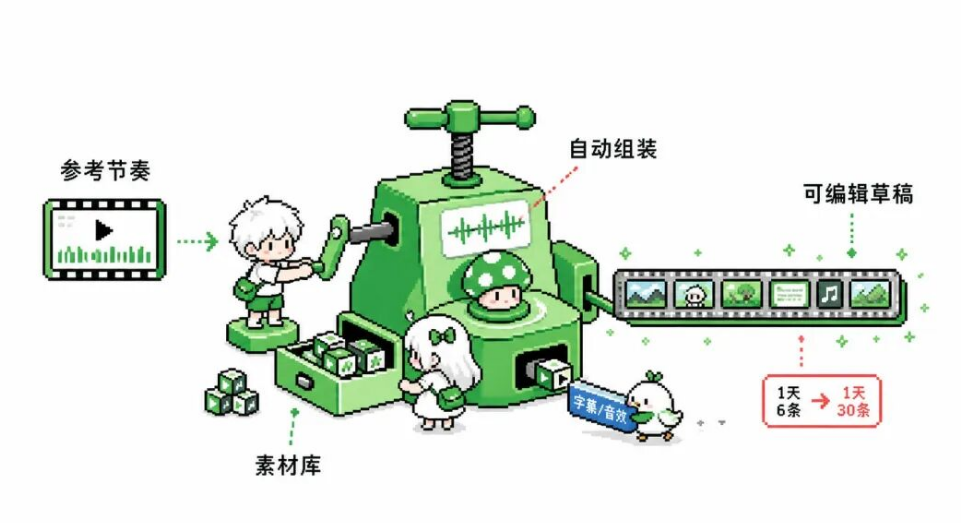
Codex will automatically identify every shot of the reference video to switch points, automatically find the most matching material from your material library, automatically generate sounding and subtitles, and finally give you a draft clip that can be opened for editing。
The whole process could take a few minutes。
I usually use this work stream when I'm making a video of the vibrating tape。
Without Codex, the same video had to be cut out six times a day. But with Codex, I just need to find a suitable blast video for reference, then get the product material ready, and the rest is automatic generation, auditing, fine-tuning。
The light and looseness of the day allowed 30 clippings, which increased efficiency at least five times。
But let's be clear hereIt's an auto-production, not a product.
It is appropriate for a video that requires a mix of materials, such as electric carriers, marketing promotions, collating Vlog, etc。
The reference video provides the structure and rhythm, your material library provides the image, the voice and subtitles are automatically generated, and finally the film is automatically generated。
If you want to do high-quality original content, you need very fine lenses, complex reruns, delicate emotional expressions, which may not fit well。
Because of the logic of automatic matching, it is not possible at this time to have that precise semantic understanding and emotional manipulation。
I'm now working on how to optimize the process in the original video and share it with friends when it stabilizes。
Workstream preparation
OK, GO BACK TO THE AUTOMATED EDITING WORKFLOW. AND I'M GOING TO MAKE IT VERY CLEAR, STEP BY STEP, HOW THIS WORKSTREAM WORKS. YOU NEED TO GET TWO THINGS READY BEFORE THE OFFICIAL START。
1. Installation of matching tools
This workflow is based on Codex, so you need Codex first. If you haven't used Codex, you can read the Codex introductory article that I wrote last week: Codex is very simple, five minutes to learn Codex99%
Specifically, these core tools are needed for this workflow:
- FFmpeg: used to process video splitting, synthesis, formatting these bottom operations. This is the basis of the whole process and must be installed。
- Python Environment: As the whole process is written in Python, at least Python 3.8 or more versions are required。
- Dubbing Tools: The most stable is the byte bean bag speech model, which is less expensive and stable, if you want an automatic voice; if you want to clone a voice, use VoxCPM, a free open-source voice cloning tool。
- Clipping: The resulting draft is in a cutout format, so you need to install a specialized clipping version on your computer。
Of these tools, FFmpeg and Python are the core dependencies that have to be。
You can copy the following to Codex to check the environment and install the missing tools:
Please check the environment for automated video clips:
1. Check if FFmpeg has been installed, if not, please help me install2. Check if Python version > = 3.8, if not installed or upgradedCheck if a specialized version of the clipping has been installed and if not, please let me download the linksInstallation of Python Dependency Package: opencv-python, Numpy, billow
After the check, tell me what is installed and what needs to be handled manually。
If you need a voice, see what you need. If you want to do the electrician video, the bean bag voice model is the most stable。
IT'S BASED ON A CLIPPING OF CO-SOURCES, BASICALLY FROM THE CLIPPINGS, FROM THE BEAN BAG VOICE MODEL. AND IT'S NOT VERY EXPENSIVE, AND NORMALLY WE GENERATE A VIDEO FOR ABOUT A MINUTE, AND IT COSTS ABOUT 4-8 CENTS。
If you want to use your own voice or to clone others, use VoxCPM as a free open source tool。
Finds this plaque in Github and then sends the link to Codex for installation。
2. Create folders
You need to build a project folder after you've packed these. I'm usually organized around this structure:
Project Folders/ assets/ # your material library work/ # workspace, where each clip creates a date folder final/ # final product AGENTS.md # Project Profile
the asets folder is your material library, and you put in all the material you can use。
THE MATERIAL HERE CAN BE AI-GENERATED OR YOU CAN FILM IT YOURSELF, BUT IT HAS TO BE PREPARED IN ADVANCE, BASED ON REUSABLE MATERIAL。
The material could then be classified by different categories。
FOR EXAMPLE, WITH THE MATERIAL, YOU CAN DISTINGUISH BETWEEN THE DIMENSIONS OF APPEARANCE, FUNCTION, SCENE, AND, FURTHER, BETWEEN THE CREATION OF AI AND THE ACTUAL FILMING。
work folders are workspaces, where you build a date folder, such as 2026-07-05, every time you make a new video, and then place reference videos, generated intermediate files, and final drafts in this folder。
AGENTS.md is a project profile that records the objectives, output specifications, acceptance standards of your project. This document is important because Codex will understand your project needs on the basis of this document and then make you a video that fits the requirements。
PS: MY OWN AGENTS IS A LITTLE LONG, SO I PUT IT AT THE END, SO IT DOESN'T AFFECT READING. FRIENDS CAN REFER。

ScriptworkScreen
1. Dismantling reference videos
Once the work is done, the real editing process can begin。
The first step is to dismantle the reference video。
The central purpose of this step is:Split the reference video into a single shot and then extract the key frame of each shot as a basis for matching the material behind it。
You need to find a video you want to reference. This video can be either an explosive video, or a video that you've cut out for yourself。
download it down, put it in a work folder, write a file name that can be easily searched and distinguished。
And then copy the following to Cordex:
I need to dismantle a reference video。
Reference video location in@ (entry your file name, Codex will automatically search)
Please help me with these:1. Identification of video lens switching points with FFmpeg (through frame differential analysis)2. Extract key frames for each camera and save them as pictures3. Tracks to extract the video, save separately4. generate a recipe.json file that records the start, end, duration, key frame path of each shot5. If there is a case, create a voice-based text based on the audio, and by lens sequence, the file requires a master to avoid error
Upon completion, as requested by AGENTS.md, save it to the corresponding folder and tell me how many shots were identified and let me confirm whether the cut was reasonable。
this recipe.json file is the core of the whole process。
It records the complete structure of the reference video, the material behind which is matched, the voice is generated and the draft is produced on the basis of this document。

When you're done, you'll see a bunch of little video clips and screenshots in the corresponding folder。
Open it and make sure the split is reasonable. And if there's something that's not right, like cutting a full shot into two parts, or if there's no opening of both, you can have Codex adjust。
In most cases, however, automatic identification results are available。
2. Screening and matching materials
This is the most critical step in the whole process and the best place to reflect the value of automation。
The traditional thing is you have to go one shot at a material library, find the right material and drag it to the time line. This process is time-consuming and easily leaves out some more appropriate material。
But with this workflow, you just have to tell Codex where your material library is, it'll automatically help you do visual matching。
Here's a hint. You can send it directly to Codex:
I need to match the material from the material bank。
Project information:-recipe.json path: (previous dismantlement path)/recipe.json- material library path: asets/- output path: work/ (your save path)
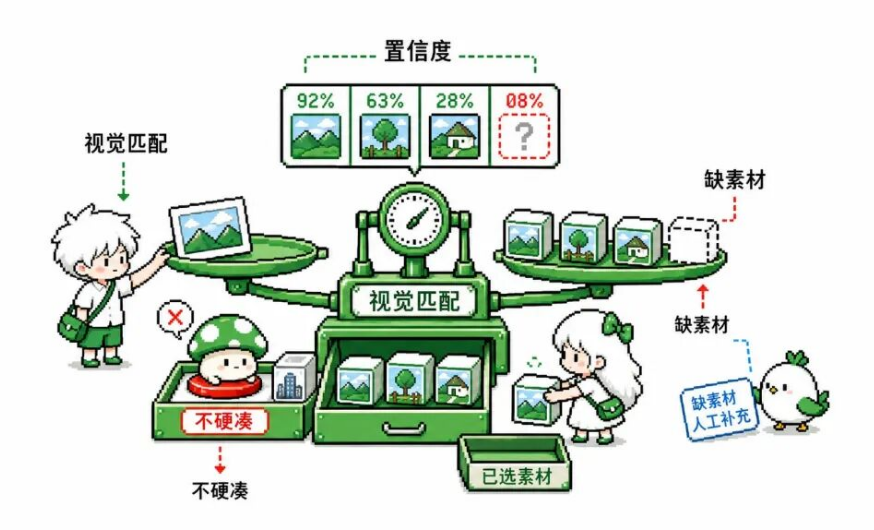
Match requirements:1. read key frames for each camera in recipe.json2. Cross-referenced material library to extract key frames for each material3. To recommend the most compatible material by visual means, such as colour, brightness, structure, etc. (to give confidence points)Application of these rules: - to avoid a three-symphony sequence6. generate fragment_plan.json and matches.jsoncopy selected material (not moving) to folders such as metral/fragment01/, fragment02/
Important principle: If the matching confidence of a shot is below 0.6, mark as "missing material", do not use irrelevant material。
When it's done, tell me what matches the results and list which lens missing material needs to be manually replenished。
And the logic of the match is that Codex will read the key frames for every camera in the reference video, and then go through your material library and extract key frames for every material. These visual features of colour, brightness and image are then calculated for the similarity of each material and reference lens, giving a matching score。
High score material is recommended as a priority。
And there are some of the rules that are mentioned in the hints, which I sum up in practical use. Without these limitations, the auto-matched video could appear to be monotonous and the audience would know that it was created by the machine。
After matching, Codex will generate a fragment_plan.json and matches.json。
the need for each shot is documented by fragment_plan.json. what kind of scene, what kind of action, what kind of scene, what kind of material must be avoided. this file is for matching algorithms。
the final match results are recorded by matches.json. which material is used for each shot, what's the confidence levelTo perfect match, with sub-optimal selection)。
Here's a very important principle:It's better to leave empty material than to use irrelevant material。
In my earlier version, to make every shot have material, it automatically lowers the standard of matching, and you can't find it, just fill it in. As a result, the video generated looked strange, and some of the shots clearly did not match the context。
Then I changed the logic, and if the match of a shot is too low, it's directly marked as missing material, to be replenished manually. This would have resulted in a much better quality of video, although some more manual work had been done。
When matching is complete, Codex copies the selected material to the corresponding folder and saves it by category according to the number of shots in the reference video。
Note here that emphasis must be placed on replicating, not moving, to avoid Codex destroying your raw material。
When you're done, you can check the match results. If some footage is not satisfactory, Codex can be replaced or replaced manually。
3. Generate sound
After the selection of the material is completed, the next step is to generate a voice。
When we started dismantling the video, we actually got Codex to extract the file, and each case had a camera。
Because Codex usually uses OCR or ASR for extraction, it's hard to get 100% accuracy, so you need to check if there's any problem with the following。
As soon as there is no problem, send the following hint to Codex:
i need to create a voice for the video. audio text is @ (your case.txt)
Require:1. CALL THE BEAN BAG TTS INTERFACE TO GENERATE AN INDEPENDENT VOICE FILE FOR EACH SHOT2. Actual duration of reading each generated voice file3. If the length of the voice is not consistent with the length of the frame of the reference video, the length of the record is different4. collapse all clips into a complete audio file: final_voice.mp35. update of recipe.json to record the true voice
When it's done, let me try it out and confirm the naturality and speed of the voice。
Codex will read the actual length of each voice file and adjust the rhythm of the video。
For example, one shot actually reads five seconds, but it's only three seconds in the reference video, and in the eventually generated video, it's going to be stretched to five seconds, and it's going to make sure that the mix and the image match。

After the sound is produced, it is recommended that you hear it and confirm the naturality and speed of the voice。
4. Generation of drafts and clippings
THE PRODUCTION OF THE CLIP DRAFT IS THE MOST COMPLEX PART OF THE PROCESS BECAUSE THE CLIP DRAFT IS IN A VERY STRICT FORMAT AND THE MATERIAL PATH, TIME AXIS, METADATA ID INFORMATION MUST BE FULLY ACCURATE, OTHERWISE THE OPENING WILL MISS OR DISPLAY ABNORMALITY。
I STEPPED ON A LOT OF PITS HERE. FOR EXAMPLE, THERE ARE THREE KEY IDS IN THE CLIP DRAFT: CONTENT ID, METADATA ID, ROOT INDEX ID, WHICH MUST BE CONSISTENT AND CANNOT DUPLICATE EXISTING DRAFTS. IF THE ID CONFLICTS, EITHER OPEN THE FAILURE OR COVER YOUR PREVIOUS DRAFT。
There's a problem with the material path. The material path recorded in the draft clip must be absolute and the document must be real. If you move the material, the draft won't open。
The rules to avoid these problems, I've written them in a hint, you can copy them。
I need to generate the final video and clip draft。
Input information:-recipe.json:work/recipe.json-meatches.json:work/masches.json- material path: work/material/- phrase files (optional): work/voice/final_vice.mp3- subtitle text (optional): work/script.txt
Output:rendering preview video: work/remix.mp4subtitles: work/captions.srt3. draft clipping: work/jianying_draft/
Require:1. collapse material in order according to type.json and matches.json2. Use the length of the voice as the basis, if any; otherwise, the length of the reference video3. generate subtitle files in .srt format4. Generate a draft format that can be opened by creating a clip, note: - CONTENT ID, METADATA ID, ROOT INDEX ID MUST BE CONSISTENT AND UNIQUE - The material path must be absolute and the file is real - All materials are copied to the project folder to avoid failure of the path
Directly generate draft clippings and, upon completion, remind me to review and confirm。
The first generation takes longer, about 10 minutes. When you're done, you can open the clip and check。
Mainly check these points:
- Can the draft be properly opened
- Is it possible that the material can be displayed properly
- The timeline, right? Is the time and sequence of each shot consistent with expectations
- Subtitles right? Did you cover the key
- Is the voice and image synchronized

If there is a problem, go back to the step check, see whether the material matches, or the voice-producing or the draft format。
Let Codex optimise one by one。
Final Thoughts
Here, the whole workstream is gone。
From reference video, to decomposition analysis, to material matching, to voice production, to final draft clipping, the whole process may be 20-30 minutes。
If your material library is ready, you can even do five minutes of a video。
The most important thing is to run through the whole flow of work, and you can tell Codex, "Do me a favor and wrap it up as Skill." Next time, you don't need such a complicated process to call Skill to make it。
Oh, by the way, this is the AGENTS.md template, you can look at it。
# AGENTS.md
## TARGET
One sentence explains what this project is going to accomplish。
## CONTENTS
The root directory only maintains a stable structure, and the process files generated by a single clip are placed in the working folder for the current day。
- `AGENTS.md ' : Long-term context of the project, recording objectives, directories, processes, output and acceptance standards。- `assets/`: pre-prepared product material, scene material, character material, AI clips and other reusable material. Cuts only from here, without moving or destroying the original file。- `work/ ': video projects being produced or pending approval. each clip here creates a working-day folder。- `final/`: video has been completed and confirmed for passage and moved here from `work/ ' to avoid overloading the work area。
create a working folder for the day under `work/ ' at each clip:
``text 'work/ YYYY-MM-DD/ reference-YYYY-MM-DD.mp4 video_clips/ script.txt mineral/ #fragment01/ #fragment02/ i'm glad jianying_draft/
Synchronising folder
- `Reference-YYYYY-MM-DD.mp4 ' : Full reference video provided by users as a basis for overall order, rhythm, duration, audio and dismantling. If there are more than one mission on the same day, a short title or serial number may be added after the date。- `video_clips/`: video clips and frame of reference obtained after self-dismantling the reference video as a basis for visual order and material matching。- `script.txt ' : oral/subtitle/script text from reference video, user case, oral or audio file; empty or non-created when there is no file。- `maternal/fragment NN/`: candidate or approved material for the current clip screened and copied from `assets/ ' 。- `voice/ ' : voice by clip, clean human voice, segment voice and adjoining finished audio。- `jianying_draft/`: draft clipping, draft inspection report and necessary backup for the current draft. creates only if you need to generate a draft clip。
Key source rules:
- Full reference video is the basis for audio, overall sequence and total duration。- `video_clips/ ' are the basis for visual order and visual matching。- `material/fragmentNN/` is the source of production material after the revision。- Use each of the time periods for the actual completion of the voice as a basis for the image and subtitles, when generating a voice。- `recipe.json ' and `masches.json ' are machine-readable bases for core automated processes。
## PROCESS
Process path:
Read reference video, poach reference images, poach text, poach text, poach raw material, poach sound, poach, poach, produce drafts and clips
1. Read reference video: create a working-day folder under `work/YYYY-MM-DD/ ' , save the reference video provided by the user as `reference-YYYY-MM-DD.mp4 ' 。blank reference images: dismantling reference videos using automatic lens cut-off and key frames, fragments and frames saved to `video_clips/ ' , structural data stored in the working folder on the day。3. extract text from the text of the text of the text of the article from the reference audio, the user file or the audio file and save it as `script.txt ' 。4. Screening of raw materials: Read `assets/ ' , visual matching with frame and frame of material, saving the candidate results in the working folder for the current day, and copying the adopted material to `maternal/fragmentNN/ ' 。5. generating voice: by default, new voice is generated using a soybean-packed voice model, and the voice and synthetic audio are saved to `voice/ ' 。6. generation of drafts of drafts and clippings: production of drafts with filtering material and new voice and creation of drafts of clippings to be saved to `jianying_draft/ ' for user to open for clearance。
## OUTPUT
saves the generic output configuration; a single special requirement is based on the current user command and the results of the skill execution。
- Video ratio: 9:16 vertical。- resolution: 1080 x 1920。- frame rate: 60fps。- Document naming rules: `YYMMDD-platform-produd-serial number.mp4 ' , priority for abbreviations in English to avoid excessive or uncoded file names。- Default audio: no original reference audio is maintained and new voice is used。- Default audit: generate draft clippings for user access。- default archiving: after confirmation by the user, move from `work/ ' to `final/ ' 。
## ACCEPTANCE
Video Qualification Criteria:
- There are available materials for each visual clip; missing material and low-confidence footage must be clearly exposed。- It doesn't have to be hard to get。- Material images and products, scenes, actions, scenes, angles, light, product visibility and graphics are broadly compatible。- File and folder names can only serve as clues and can ultimately be seen。- Copy material, do not move or destroy raw material。- The identification of duplicate material with content fingerprints does not allow for different documents to be considered different。- Try to avoid repetition of folders from the same source within three continuous lenses。- Side-by-side footage to avoid clearly overlapping rooms, images or semantic scenes。- LINKED AI CLIPS OR SAME ROLE CLIPS SHOULD REMAIN IN CONTINUOUS IDENTITY。- maintain `1.00x ' , as a piece of visual velocity, unless the user expressly requests a rate change; short materials can be filled in a set setting and are not stretched hard by the speed。- The fractional, resolution and frame ratio corresponds to the generic configuration of this document; the length and number correspond to the current user requirements or the current task settings。- The deviations in the length of a piece of time and reference or in the duration of the objective should be to the extent acceptable, with a clear deviation to be specified。- Subtitles must be semantic and unmechanical in the part they belong to。- Subtitles do not block product subjects, key actions or important information。- If you use a symphony, use the actual symphony as a basis for the image and subtitles。- The voice is to check the beginning, the middle boundary, the longest stop, the closest subtitle and the end。- NO COMPLETION OF DRAFT ASR, TTS, VOICE CLONING OR CLIPPING IS CLAIMED, UNLESS THE CORRESPONDING TOOL IS ACTUALLY RUNNING AND THE OUTPUT CAN BE VERIFIED。- If a draft is generated, a new editable draft must be created, which does not override the original or encrypted cache。- THE CONTENTS OF THE DRAFT CLIP ID, METADATA ID AND ROOT INDEX ID MUST BE CONSISTENT AND THE VOLUME DRAFT ID CANNOT BE REPEATED。- The material path for the clipping of the draft must exist and the range of media sources must not exceed the real time。