



People change their faces, and they think they're not very precise。
When the scene was in disarray, the word “consistent” was added to the introduction。
If the fight isn't good, then the word “heat” “film sense” “shock” becomes more full。
The colours are not uniform, and after that add the word "advanced colours"。
But those who have actually done the whole project know that the hint can only solve part of the problem。
IF THERE WERE NO ASSETS IN THE PRECEDING PERIOD, EACH IMAGE AND EVERY SHOT OF AI SEEMED TO BE RECHARGING. IT DOES NOT KNOW WHAT THE FACE OF THE ROLE IS, DOES NOT KNOW WHETHER THE SIDE FACE IS THE SAME, DOES NOT KNOW WHETHER THERE IS A PATTERN ON THE BACK OF THE DRESS, DOES NOT KNOW WHAT THE LEFT SIDE OF THE ROOM IS, DOES NOT KNOW WHAT THE RIGHT SIDE IS, AND DOES NOT KNOW WHAT FORM A SKILL IS RELEASED。
the reason whyAI VideoTO STABILIZE, IT IS NOT TO WRITE A LONG HINT, BUT TO PREPARE THE INFORMATION THAT AI NEEDS TO UNDERSTAND。
THAT'S WHAT AN AI ASSET MEANS。
THE AI ASSET IS NOT JUST A FEW REFERENCE MAPS, NOR IS IT A GOOD ONE IN THE FOLDER. IT'S MORE LIKE CREATING A VISUAL MANUAL FOR AI. IT TELLS AI WHO IT IS, WHAT IT LOOKS LIKE, WHAT IT WEARS, WHAT IT USES IN WHAT SPACE, WHAT IT USES, WHAT IT SHOULD KEEP。
When this information is sufficiently clear, the hint will really work。
THIS SECTION MAKES IT CLEAR FROM SCRATCH WHAT TO DO WITH AI ASSETS, WHAT TO PREPARE FOR, WHAT TO DO WITH CHARACTERS, SCENES, PROPS, PALETTES, AND WHERE TO FIND THE EASIEST PIT TO STEP ON。
I. WHY IS AI GONNA HAVE TO MAKE ASSETS FIRST
A LOT OF PEOPLE START MAKING AN AI VIDEO WITH AN ERROR: THEY THINK A ROLE MAP CAN PRODUCE A WHOLE PICTURE。
For example, you create a very happy hostess, with a nice face and a nice costume, and then you take this picture and do all the shots in the back. The first one may be okay, the second side is changing, the third side is changing, the fourth side is big, the face is changed to another person。
It's not a model that's deliberately insensitive, but you give it too little information。
WHEN AI SEES A PICTURE, IT CAN ONLY KNOW WHAT THIS CHARACTER LOOKS LIKE AT THIS ANGLE, AT THIS LIGHT, AT THIS LOOK. IT DOES NOT KNOW THE SHAPE OF THE PERSON ' S SIDE FACE, NOR THE HAIR OF THE BACK OF THE HEAD, NOR THE DETAILS OF THE BACK OF THE CLOTHES, MUCH LESS HOW HER FACE CHANGES WHEN SHE MOVES。
so you write "one girl" "same character" and "same character" has only a limited effect。
A truly effective way is to break the role into a manageable asset in the early stages。
People need face assets, make-up assets, face-action assets。
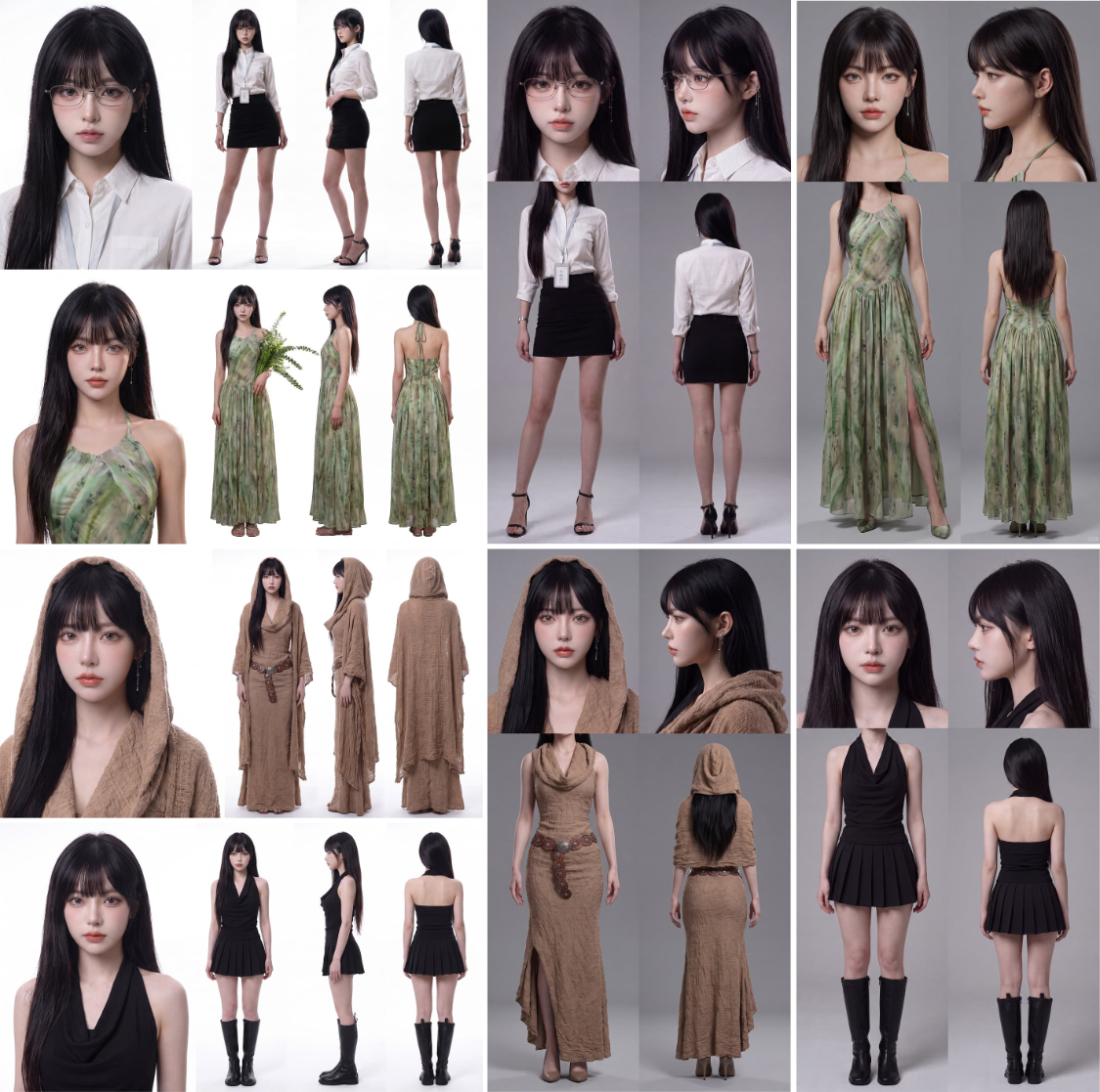
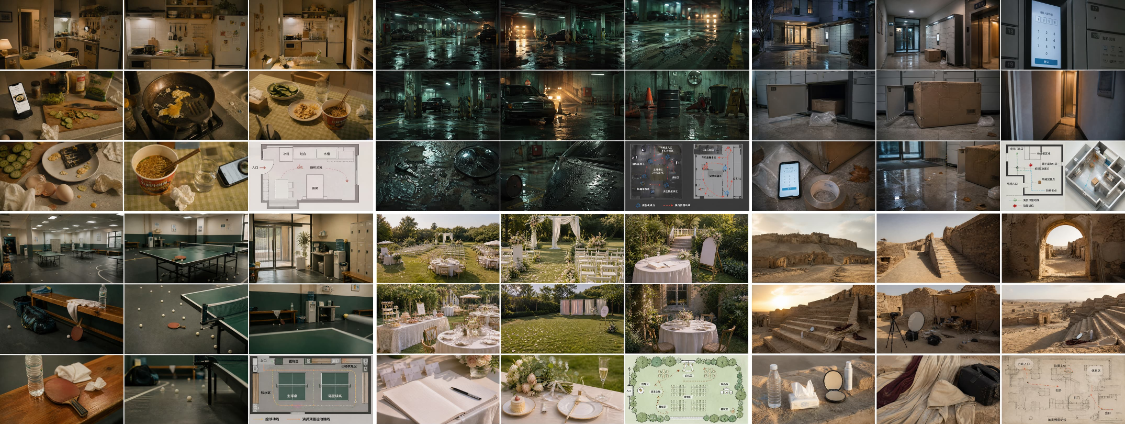
The scenes need to have multiple angles of assets and space layouts。
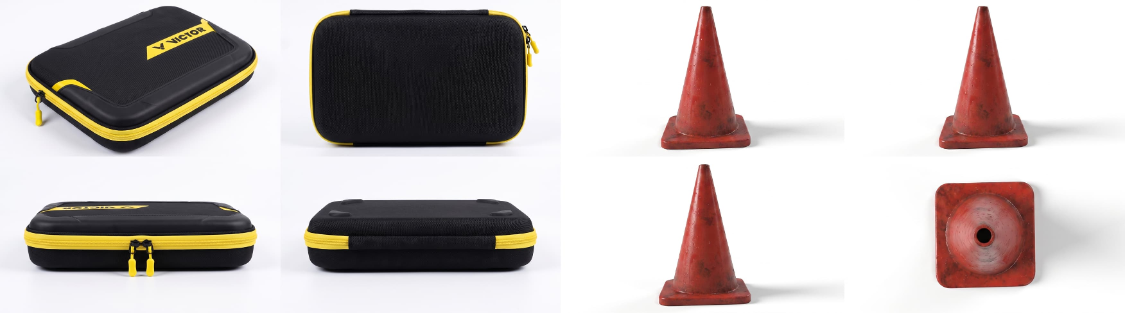
Proofs require physical and virtual props。
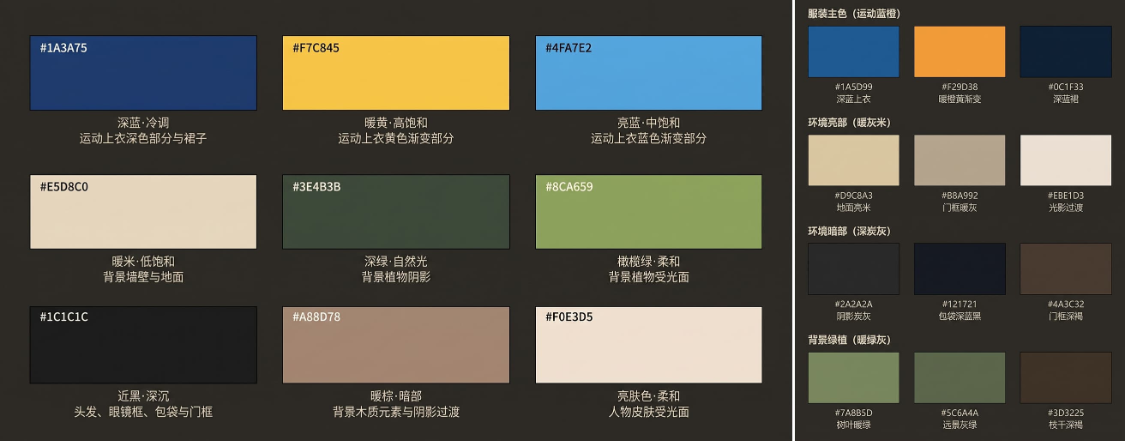
Colour panels need to have colours, properties and use scenery。
THIS IS HOW AI IS GENERATED, NOT BY IMAGINATION, BUT BY EXTENSION IN THE VISUAL INFORMATION AVAILABLE。
THAT IS WHY THE MORE COMPLEX THE AI VIDEO, THE MORE DEPENDENT IT IS ON A HINT. THE INSTRUCTIONS ARE FOR THE TASK AND THE ASSET IS RESPONSIBLE FOR PROVIDING THE BASIS. THERE'S NO BASIS FOR IT. IT'S PRETTY AND EASY TO LOSE CONTROL。
II. PERSONAL ASSETS: FIRST LET AI KNOW WHO THIS PERSON IS
PERSONAL ASSETS ARE THE MOST IMPORTANT CATEGORY OF ALL AI ASSETS。
BECAUSE THE AUDIENCE IS THE MOST SENSITIVE TO CHANGES IN PEOPLE. A LITTLE CHANGE IN THE CHAIR IN THE SCENE MAY NOT BE IMMEDIATELY DISCOVERED BY THE AUDIENCE, BUT THE PERSON'S FACE, EYES, HAIR, AND APPEARANCE WILL FEEL WRONG. SO YOU WANT AI TO STABILIZE TO CREATE THE SAME CHARACTER, AND THE FIRST STEP IS NOT TO MAKE A DIRECT VIDEO, BUT TO BUILD THE CHARACTER'S ASSETS。
A LOT OF PEOPLE WHO UNDERSTAND A PERSON'S ASSETS STOP AT “A ROLE MAP IS ENOUGH”. BUT ACTUALLY, A PICTURE CAN ONLY TELL AI WHAT THIS CHARACTER LOOKS LIKE AT ONE ANGLE, AT ONE LIGHT, AT ONE STATE. IT DOES NOT TELL AI EXACTLY WHAT THE FACE STRUCTURE OF THIS PERSON IS, WHAT THE SIDEBONES ARE, WHAT THE BACK HAIR IS, AND WHAT THE TOP AND THE BACK OF THE DRESS IS。
AND THAT'S WHY MANY PEOPLE LOOK VERY WELL AT THE FIRST ONE AND START TO LOOK DIFFERENT ON THE SECOND AND THIRD. BECAUSE AI DOESN'T REALLY RECOGNIZE THIS MAN, IT'S JUST GUESSING ON A MAP。
SO THE CORE OF THE PERSON'S ASSETS IS NOT A MAP, BUT AN INFORMATION BOARD THAT ALLOWS AI TO READ THE PERSON'S STRUCTURE。
1. Prepare a base figure before making the assets of the person
Before you make a person's asset, you need to have a clear picture of the person as the basis for the subsequent generation of the asset。
THIS FIGURE DOES NOT HAVE TO COME FROM A REFERENCE MAP, BUT ALSO FROM A PREVIOUS COURSE APPROACH TO CREATE AN ORIGINAL ROLE. IF YOU DON'T HAVE A STABLE BASE FIGURE, YOU CAN START WITH A POSITIVE IMAGE OF THE PERSON YOU'RE SATISFIED WITH. WHEN THE HUMAN FACE, THE FRAGRANCE, THE HAIR AND THE BASIC MAKE-UP OF THIS MAP ARE IDENTIFIED, IT WILL ENTER THE ASSET-MAKING PHASE。
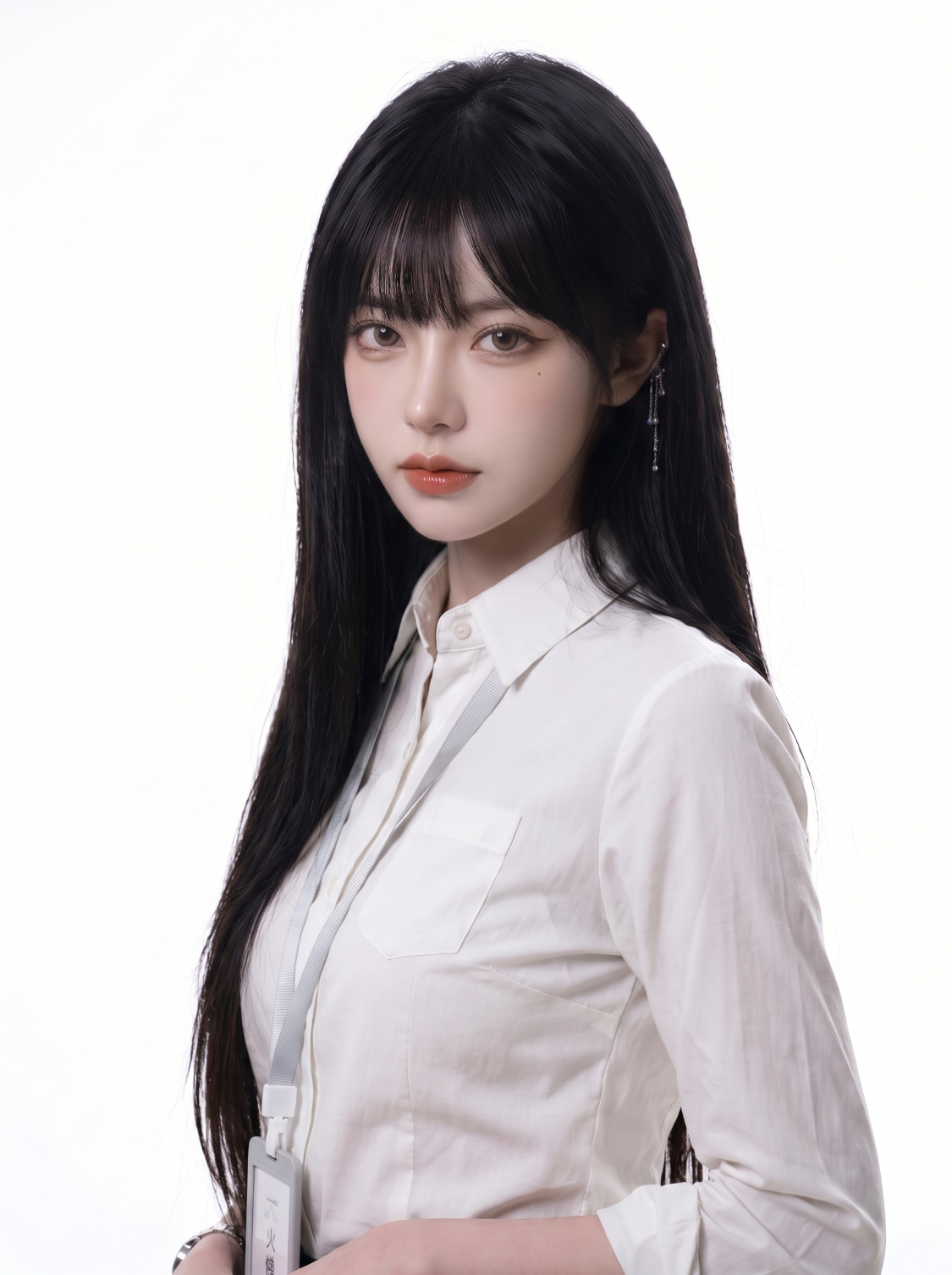
This is my figure
Here's to be careful, the base figure better meet a few conditions。
First, you need to be clear。
Secondly, hair and head contour should be clear。
Thirdly, it's best to have some identification point。
Fourthly, the images should not be too expensive, and as much as possible should be avoided by overheating the atmosphere, excessive lenses and too complex a background。
Because it's not the end of the picture, it's more like a “mother map” of all the assets behind it. The clearer the parent figure, the more stable the assets that are transferred back。
2. convert the figure of the person into a four-view asset with nanobanan pro
when you have a stable personal base map, the next step will be to transform it into a personal asset map using a tool portal that can be consulted at https://www.super-i.cn/info-2796.html。
THE PURPOSE OF THIS STEP IS NOT SIMPLY “TO CHANGE THE LAYOUT”, BUT TO BREAK DOWN A ROLE INTO A STRUCTURE OF INFORMATION MORE SUITABLE FOR AI READING. IN OTHER WORDS, YOU HAVE TO LET AI NOT JUST SEE WHAT “THIS MAN LOOKS GOOD”, BUT WHAT “THIS MAN LOOKS LIKE IN THE FACE, WHAT HE LOOKS LIKE IN THE SIDE, WHAT HE LOOKS LIKE IN THE DRESS STRUCTURE AND WHAT HE LOOKS LIKE IN THE BACK”。
Now you can use two sets of templates directly here. They can be a personal asset, but their use and advantages and disadvantages differ。
Template I: A four-wide view
A big face + three view of the body
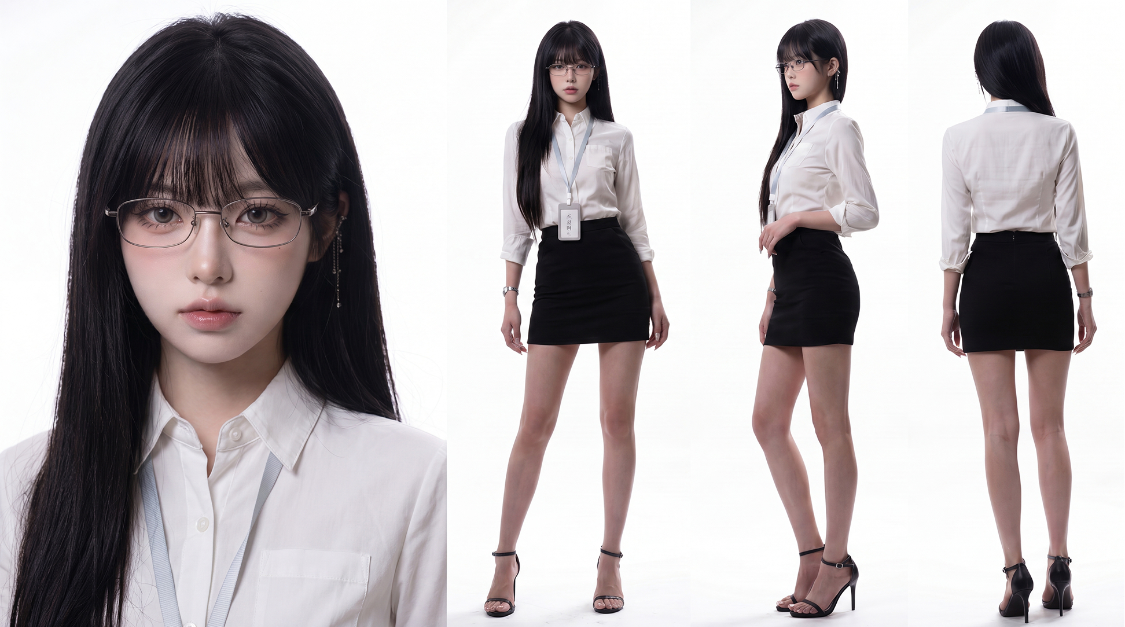
This is a standard set of asset templates for people. Its structure is intuitive: on the left is a fine, face-to-face close-up, on the right is a face, a side, a three-faced body map。
IT IS SUITABLE FOR USE IN THE INITIAL CONSTRUCTION OF A PERSON ' S ASSETS, AS THE INFORMATION IS CLEARLY STRUCTURED AND AI IS EASIER TO UNDERSTAND。
the hint is as follows (to be generated directly using the main map above using nanobanan pro):
"The creation of a four-view image of the person in the picture, the white-ground map, and the left-hand section of the character's fine-titling portrait. Its facial features, skeletal structure, dementia, hairstyle and headdressing must be in strict conformity with the reference map, with natural skin textures, pores and hairline details, high-resolution preservation of hair holes, stripes, feathers, eyebrows, small ups and downs of the hairline and light of the skin, non-branding, non-heavy overtification, non-conforming, non-optimal beauty, photo studio taste, full face, no movement, and real make-up. On the right side, the full-body picture of the role is presented in a standard A-pose position, organized in three precise views: positive view, side view and back map. Supermodel body size, complete clothing design, fabric level, shoes and overall dress style must be strictly followed. All clothing and accessories exhibit a true sense of physical material quality.”
advantage
THE ADVANTAGE OF THIS TEMPLATE IS THAT IT IS STRUCTURED AND RESULTS IN A MORE STABLE LOGIC. THE BIG FACE ON THE LEFT CAN HELP AI TO FIX THE FIVE-OFFICE STRUCTURE, AND THE THREE-VIEW OF THE WHOLE BODY ON THE RIGHT CAN HELP AI TO UNDERSTAND THE SIZE OF THE ROLE, THE PROFILE OF THE COSTUME AND THE SHAPE OF THE BACK. IF YOU'RE JUST TRYING TO CREATE A ROLE-BASED ASSET QUICKLY, THE TEMPLATE IS ENOUGH。
shortcoming
BUT IT ALSO HAS A CLEAR DRAWBACK: IT HAS ONLY ONE BIG FACE AND NO SIDE FACE. AS A RESULT, AFTER THE VIDEO WAS GENERATED, AI SOMETIMES MADE UP ITS OWN STRUCTURES IF THE CAMERA WAS TURNED TO A HALF OR A SIDE FACE, LEADING TO A DECREASE IN HUMAN FACE CONSISTENCY。
In addition, the pure side view on the right, although theoretically part of the three views, is not well used in many of the actual video-generated scenes. Because of the pure-side human position reference, it is not the most common angle of use in the lens, and in many cases it is “existent”, but not necessarily a true high frequency. That was why the entire picture was not used to the greatest extent。
So the template is more like a standard, base person asset. It's a good entry and a good initial role, but it's not the best solution if you're looking at human face consistency。
Template II: Two headers above, and the top back of the dress
Two big heads + magnified clothing master charts
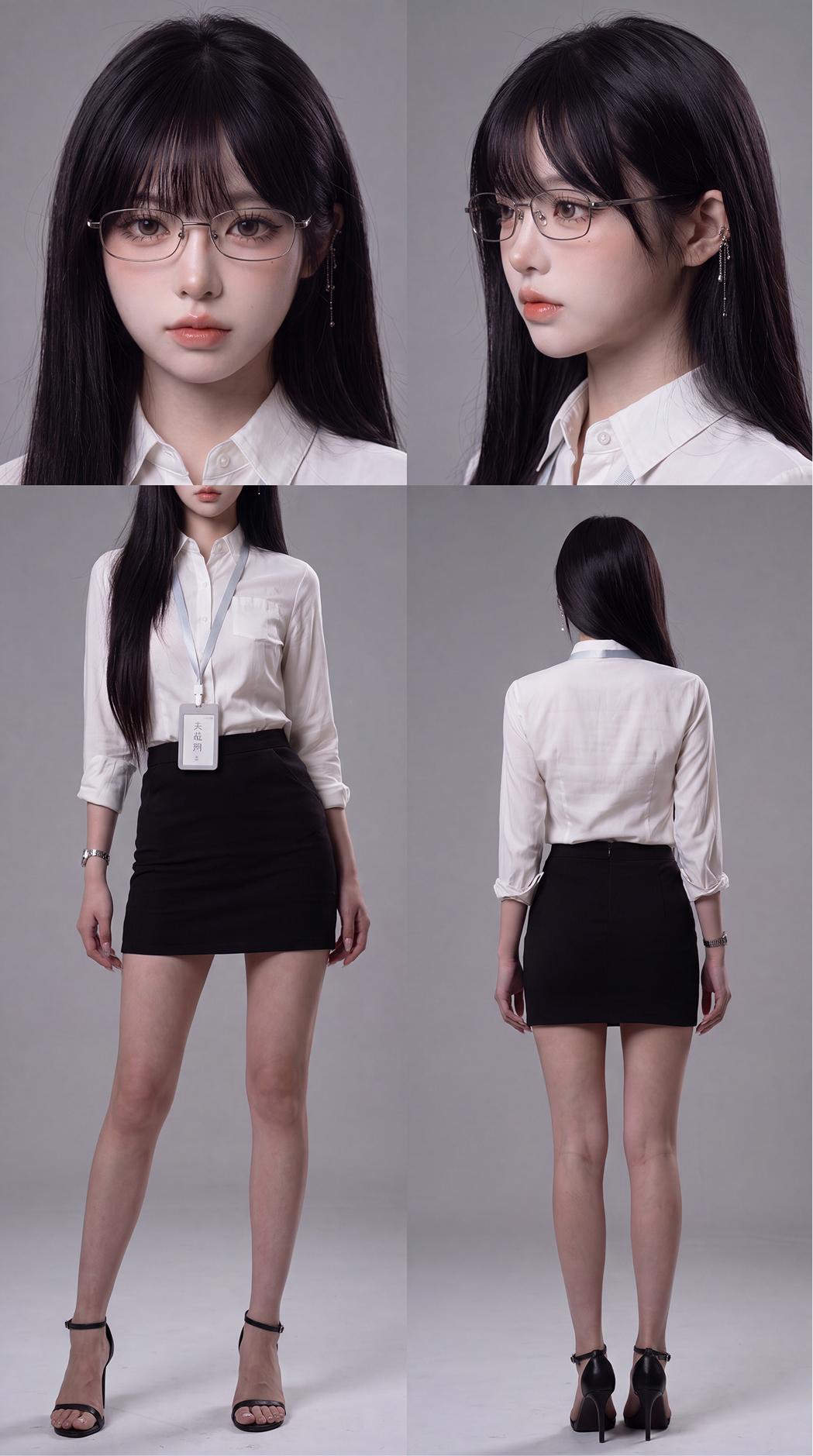
The second set of templates is now the more recommended version. This is because it uses information more efficiently and is more in line with the actual demand for follow-up video generation。
the logic of this template is clear (to be generated directly using the main map above using nanobanan pro):
One third above, with two large heads and a face and a side。
Two-thirds below, using two clothing and body reference diagrams, the left is a magnified top clothing master map, and the right is a complete back body map。
The prompt words are as follows:
The image of the person in the image is set in four views, the grey studio background, the overall make-up board for the professional human role, the layout, the clean, not the poster, not the big magazine, not the drama, not the complex scene。
The overall layout is strictly divided into two parts, top and bottom: the first half accounts for one third of the height of the picture and the second half for two thirds。
The area above displays two fine face features, on the left, on the front, and on the right, on the side. Both features are focused on the head and the neck, and are well organized, with a clear display of the characters ' five officials, bone structure, make-up, hair, hairdressing and decorum. Personal facial features, hairstyles, make-up and head dressing must be strictly consistent with the reference image. The skin sense is real and natural, with porosity, stripes, fuzzy hair, eyebrows, nuanced hair and light on the skin, not grinding skin, not too sharp, not looking like a beauty, and a high-resolved make-up feel。
The area below shows two reference maps of body and clothing, arranged around。
The left-hand picture must be a larger frontal costume display with a standard A-pose position for the person。
The focus of this picture is not on the whole body, but rather on “a significantly larger number of people”, so that the role is more proportional to the picture。
The picture on the left side must be taken in a more proximate light, with the person starting to draw from the lower side of the shoulder neck, until the end of the shoe, and the head being completely cut off from the picture because the image was amplified。
Please note that this is not an ordinary long-range body picture, but rather a positive one that is magnified at close range: the body is significantly larger in the picture, with the upper and lower parts being magnified and the overall visual effect being the main part of the dresser in the time frame。
The person ' s shoulder, arms, hands, torso, waist, legs and shoes must be preserved in their entirety, and the edge of the image allows for only the head to be cut off and the hand, foot or body to be cut off。
This figure on the left must look more "near" than on the back of the right, more "full" and more "expanded" to make the details and body ratio more visible。
It is prohibited to make the left part of the body as a general small scale, to make the person too small in the left side, to keep the head in the picture and to cut off only half the head or leave a chin, mouth, nose, edge of the hair。
The right side of the picture is the entire body of the back, standard A-pose, which presents the whole body from the head to the back of the shoe. The person's back-to-back lens, with complete back, hair, back structure of the clothing, shoes and overall contour, is used to display the role-back shape. The right side of the picture is shown on the general whole back, with a normal figure ratio, which does not need to be magnified as the left。
The two charts below must be the same person, the same dress, the same set of accessories, the same body ratio. The entire body is maintained at a permutation rate, but do not exaggerate. Clothing design, fabric level, shoes, dress style, clothing structure and costume styles must strictly follow the original map. All clothing and fittings are characterized by a sense of true physical material quality, with natural wrinkles, crumblings and thin changes, with real reflections of metals, and with real natural expression of materials such as leather, silk and veils. If the original dress is a long skirt with a fork, the person on the left side can walk half-step by leg in order to show the fork structure and the effect on the leg, but the whole body will still need to remain in a stable position with a make-up and not a show。
The light is only polished using a three-point clean and integrated studio: the main light on the right, the auxiliary light on the right and the contours on the right. Don't mess with the light, don't color the light, don't get the vibe. The background is pure gray and seamless。
Strictly require:
The two faces above account for one third of the picture。
The two bodies below account for two thirds of the picture。
The left bottom figure must be a “magnified frontal costume display”, with a significantly larger figure in the picture and a full head cut out for close proximity。
The right bottom figure must be a full back full body。
It is forbidden to use the lower left-hand map as a small general scale。
Do not allow any head information to appear in the lower left chart。
The right and left clothing is prohibited from inconsistent。
The percentage of characters is prohibited。
IT IS FORBIDDEN FOR AI TO BE GREASY, PLASTIC SKIN, EXCESSIVE BEAUTY, CHEAP CG。
The advantages of this template are clear。
First, it has two big heads, one face, one face。
THIS WILL HELP AI TO FIX THE FACE STRUCTURE MORE THAN A FACE, ESPECIALLY WHEN THE FOLLOW-UP VIDEO FOOTAGE INVOLVES A TURN, A SIDE SHOT, AND A HALF FACE FEATURE。
Second, it makes a "magnified clothing master map" of the frontal body on the lower left。
This step is really crucial. Since the face has been shown again and again on top, if there is another positive picture of the normal scale below, a portion of the entire asset chart will be duplicated. And you now have this template, which cuts the head off of the frontal body and leaves only the parts below the shoulder neck to the shoes, which is the equivalent of making room for the layouts, the size of the body and the details of the material, so that the information can be used more。
Thirdly, it keeps a full back-hull map。
The haircut on the back of the role, the structure of the dress, and the contours of the shoes are still presented in their entirety and no information on the back is lost because of the pursuit of the face。
Therefore, from a practical point of view, the template is more suitable for subsequent video generation than the first set. This is because it places more emphasis on “stable faces” and “screen utilization” than on the mechanical pursuit of a standard three view。
3. What are the options for the two sets of templates
If you're just starting role-building, you want to get a standard version of the personal asset quickly, then the first set can be used directly. It has a simple structure and is more suitable for basic role information pages。
BUT IF YOUR GOAL IS TO FOLLOW UP WITH VIDEO, ESPECIALLY MULTI-SCENARIO, MULTI-SPECTRUM, WITH A PROFILE OF THE PERSON AND A SIDE-FACE, THEN THE SECOND SET IS CLEARLY MORE PRACTICAL. BECAUSE IT CONTAINS HIGHER-VALUE INFORMATION IN THE SAME PICTURE: A FACE-FACE, A SIDE-FACE, A MAGNIFIED CLOTHING MASTER MAP AND A COMPLETE BACK-FACED BODY MAP. THIS WILL MAKE IT EASIER FOR AI TO CAPTURE THE PERSON ' S FACIAL STRUCTURE AND CLOTHING DETAILS IN SUBSEQUENT READING。
You can understand both as asset pages in two different directions。
The first set is more of a “standard set”。
The second set is more "Video-oriented Optimization"。
III. Cosmetic assets: not a set of clothes, but a stylist of the same role
The role of make-up assets is not to wear only one set of clothing for a fixed role, but to create different costumes for the same role。
Because a character is in a complete video, often in different scenarios. Such as daily scenes, sports scenes, work scenes, or special scenes. The role can change, but not. In other words, regardless of the change in clothing, the person ' s face, hair, body size ratio and overall quality must be consistent。
So the core of the make-up asset is not a new role, but an expansion of different costume versions based on the same role。
The creation of this type of asset is not complex and the steps are simple。
The first step is to prepare a full picture of this character。
This whole body chart can be based directly on the role of the person that has been created in Chapter II. The role is first given a clear and stable body map, either white or grey, with as much standards as possible, to facilitate the replacement of the post。
the hint is simple (using your character to generate a body map model nanobanan pro):
Generate this character's entire body. And maintain a supermode body ratio
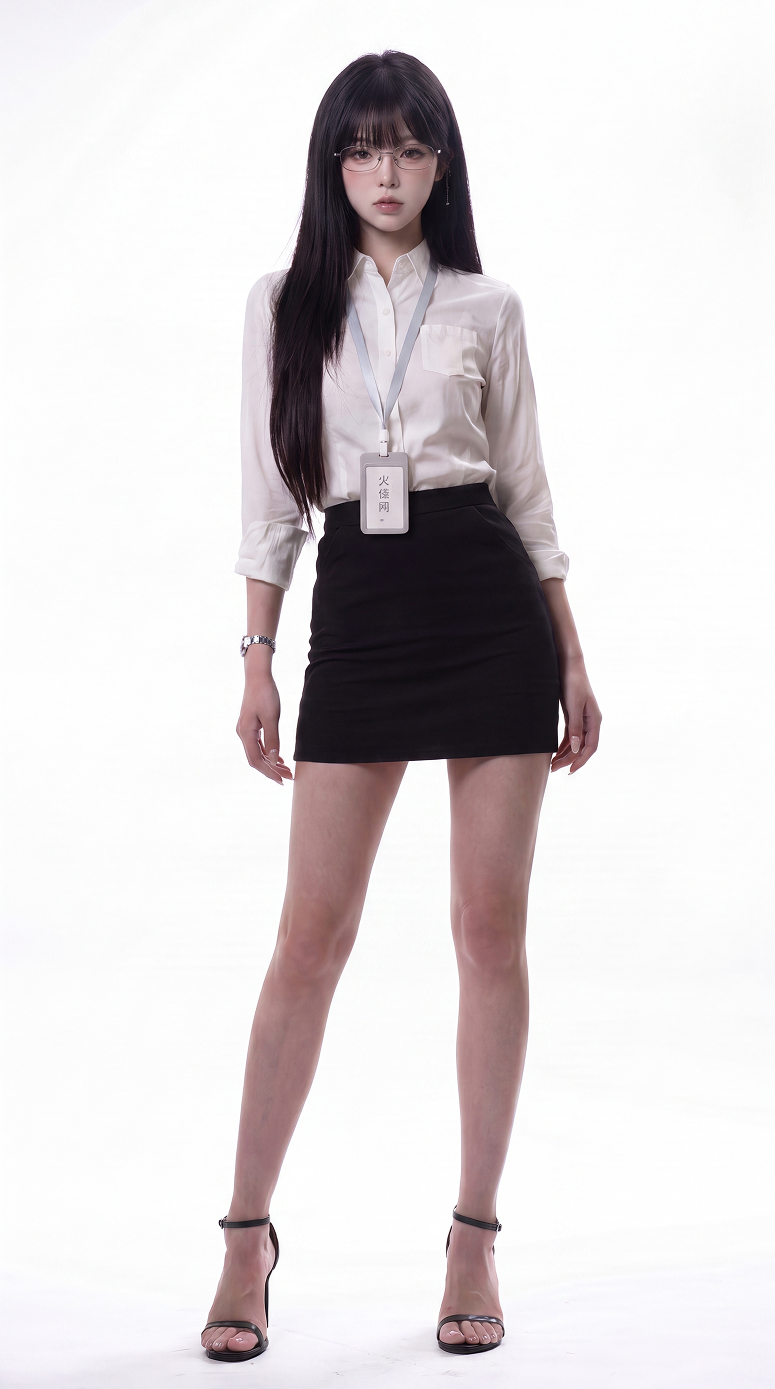
Step two, replace it with the other costumes you need。
For example, if you want this character to have a routine, a sports, a job or a combat, you can replace it with the one you need, based on this whole body map. It is important to note here that only clothes are replaced, not the characters themselves. In other words, the face, the hair, the body ratio and the character look must not change, but only the clothes and the accessories。
the hint is simple (using a body chart and your costume to generate model nanobanan pro):
Replace the make-up in figure 1 with a complete set of make-up in figure 2 to maintain a supermodel body ratio
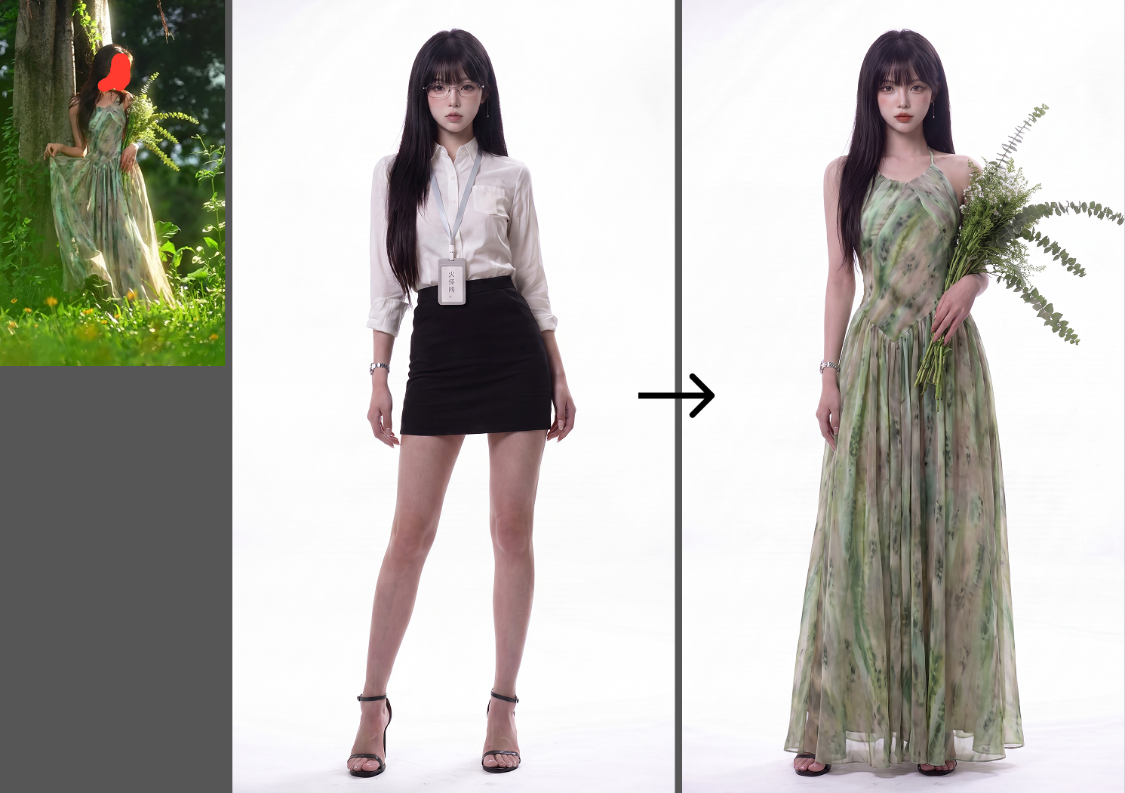
In the third step, the entire body of the dress was changed and four views were generated following the approach of chapter II。
IN OTHER WORDS, EACH SET OF CLOTHING IS RE-CREATED AS A CORRESPONDING FOUR-VIEW ASSET. SO THE BACK OF AI WILL KNOW WHAT THE CHARACTER LOOKS LIKE, WHAT THE SIDE LOOKS LIKE AND WHAT THE BACK LOOKS LIKE WHEN HE WEARS THIS SUIT。
For example, you made three models:
A set of routines
A set of sports clothes
An official set。
THAT'S THREE SETS, ONE VIEW EACH. SO YOU CAN CALL WHATEVER KIND OF MAKEUP ASSET YOU WANT BEHIND YOU, INSTEAD OF TEMPORARILY ASKING AI TO GUESS WHAT THE ROLE IS。
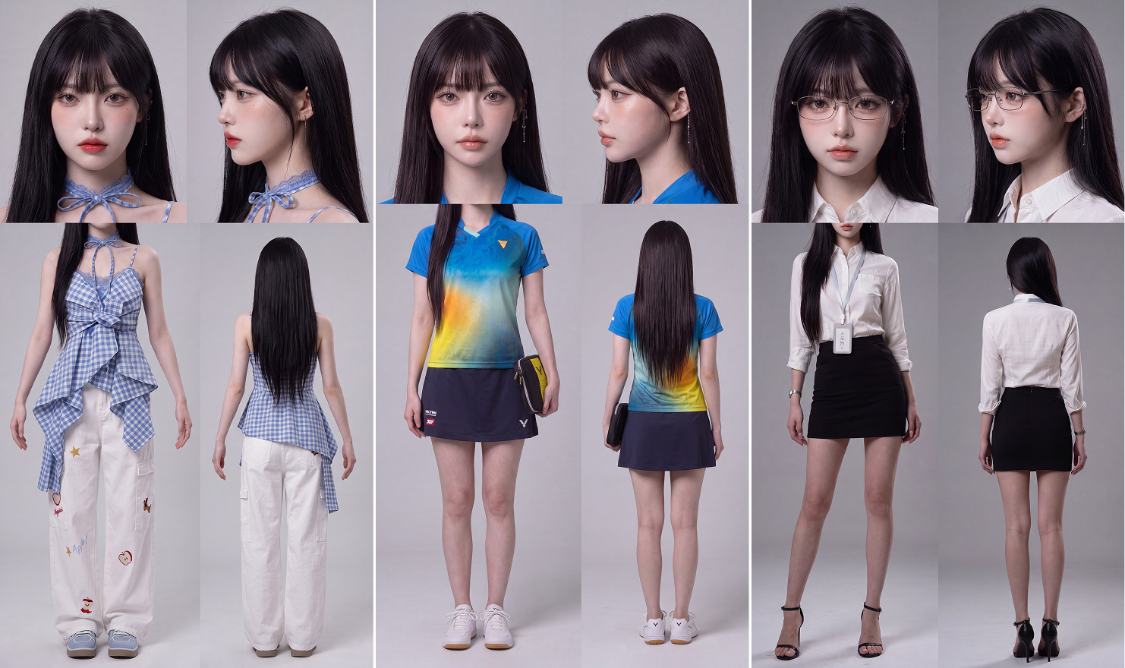
So the logic of makeup assets is direct:
The first is a full picture of the same character
And replace the different costumes
Finally, according to the approach of chapter II, each set of clothing is presented in four views。
IV. Emoticons and movement assets
A lot of people can still do static roles, just as soon as they get to the video。
The reason is that the role has no expression or movement assets。
AI DOES NOT KNOW HOW THIS PERSON SMILES, HOW HIS EYES CHANGE WHEN HE'S ANGRY, HOW HE BEHAVES WHEN HE'S RUNNING, WHETHER HE'S NERVOUS OR CALM WHEN HE FIGHTS. IF YOU DON'T TELL IT, IT'LL APPLY THE MOST COMMON PERFORMANCES IN THE MODEL。
So the third category of people's assets are face and movement assets。
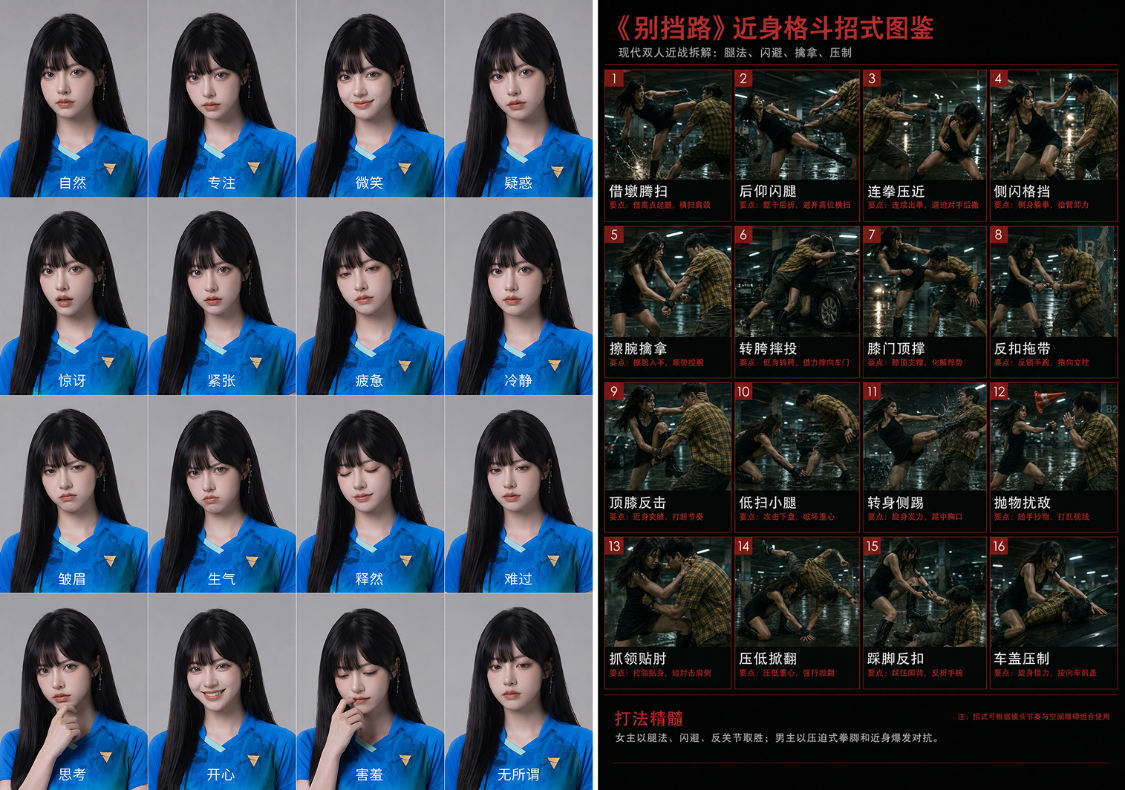
Emoticon assets address the emotional consistency of the role。
The action asset addresses the continuity of the role。
1. Emoticon assets: keeping the role emotional
Emoticon assets are mainly used to fix face changes in different emotions。
A FULL ROLE CAN'T ALWAYS HAVE ONLY ONE FACE. SHE MAY HAVE DIFFERENT STATES OF NATURE, SMILE, FOCUS, SURPRISE, DOUBT, FATIGUE, STRESS, ANGER, INDIFFERENCE, PAIN, RELIEF, ETC. IF YOU DON'T DO THE FACE ASSET IN ADVANCE, THEN WHEN THE VIDEO IS GENERATED, AI WILL DO IT IN THE WAY IT DEFAULTS ON THE FACE。
It's easy to ask the question: there's an expression, but the person is not。
FOR EXAMPLE, YOU WANTED TO MAKE A COOL CHARACTER SMILE, AND THEN AI MADE HER SMILE。
YOU WANT A MATURE ROLE TO GET NERVOUS, AND THEN AI SQUEEZES THE FIVE。
YOU WANT TO MAKE A CHARACTER ANGRY, AND THEN AI MAKES HIS FACE INTO A COMIC-COMB。
These indicate that the expression has not been assetized。
EMOTICONS ARE MADE IN A SIMPLE WAY. YOU CAN GET AI TO MAKE A LOOK AT A NINE OR A SIXTEEN, BASED ON A ROLE MAP ALREADY DONE. THE POINT IS NOT TO EXAGGERATE EVERY EXPRESSION, BUT TO MAKE IT FIT THE CHARACTER ITSELF。
That's what you can say
Based on the same person in the reference, a map of the real role expression assets, a grey studio background, a full set of nine or sixteen palaces was produced. All expressions must maintain the same person ' s facial characteristics, facial ratios, five official structures, hair profiles, makeup and age perceptions. Each cell displays a different state of expression, including nature, focus, a slight smile, doubt, surprise, stress, fatigue, calm, frown, anger, relief, etc. Face change needs to be genuine, not exaggerated, not significantly altered in the five official scales, not changed in the face, not overlooking, not plastic skin. The image is a real studio make-up sense, a clean and integrated light, a concise background, and a focus on the face reactions of the same character in different emotions。
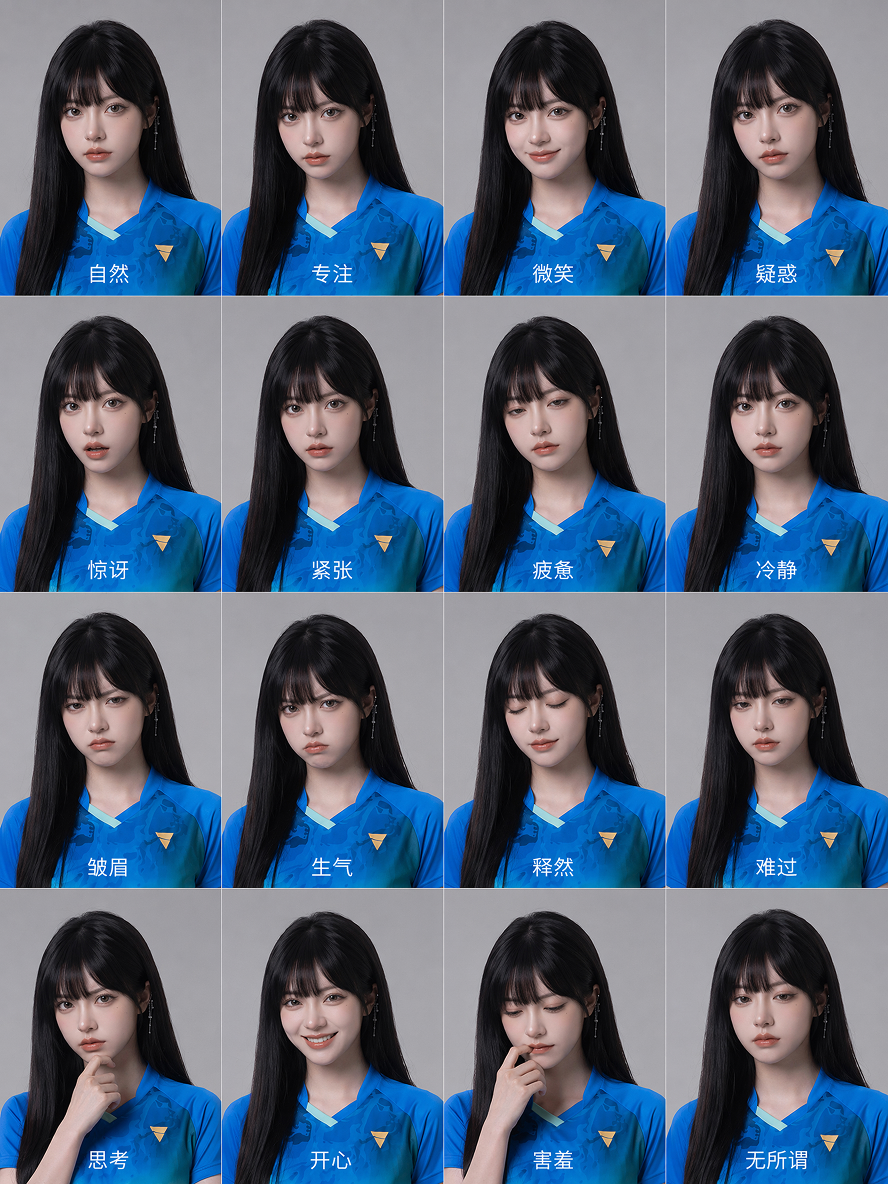
When making face assets, you need to be careful with one key point: don't look as good as you can, but it's about your story。
If you're doing it, you can do more nature, doubt, a little smile, fatigue, loss, relief。
If you do action, you can do more focus, vigilance, stress, stress, anger, calm。
If you do this, you can do more observation, doubt, depression, surprise, fear, meditation。
If you're making love films, you can do more to stop smiling, to avoid looking, to hesitate, to be ungrateful, to be relieved, to be moved。
Emoticon assets are not intended to fill emotions, but rather to prevent the role from suddenly becoming another person when it is necessary to perform。
2. ACTION ASSETS: FIRST LET AI HELP YOU WITH YOUR MOVEMENTS, THEN CREATE A MAP
The action asset solves another problem: whether the action is systematic。
A lot of people do action images by writing "heat fight" and "fast-shield" and "film action." However, the actions thus written are often fragmented, inconsistent and difficult to develop a reusable set of actions。
SO A BETTER WAY TO MAKE THE ACTION ASSET IS NOT TO DO IT ONE BY ONE, BUT TO GIVE THE IDEA OF YOUR PLAY TO AI, SO THAT IT CAN BREAK YOU INTO A 16-GAUGE ACTION MAP。
For example, you can enter an idea first:
The female agent was ambushed by a strong man in the rainy night and underground parking lot, without weapons and with the use of evasive, anti-coastal, knee-buttoning, fall-downs and miscellaneous items on the scene. The whole is like a modern action movie, dark, cold, real, not blood. Please produce for me a reminder of 16-gauge motion。
Then we'll take the following general hint:
You're a movie action specter designer and visual hint engineer. Users will enter a script, clip or simple idea. Your job is to turn it into an image-generation programme for a "acting poster."。
Require:
1 Core conflicts, personality relations, scenes, emotions and movement styles extracted from the script。
2 Splits the actions into 16 continuous spectroscopes, each showing only one clear action for an instant。
3 Each spectroscopy needs to include: numbering, code name, image description, action visual focus, single graph generation of hints。
4 The hint only depicts the film and does not write about the real harm course。
5 Maintain a uniform style of person clothing, scenery, light and lens。
6 When generating a picture, do not require a model to generate Chinese text, which is used for later layout。
7 Final output of a general poster set of alerts, as well as titles, subheadings, each style and a brief description。
Output format:
Poster Theme
Corporate visual settings
Character Set
scene setting
16-bar motion specs
Every single graph hint
Poster settips
Late Text
If the user’s input is not a play, it should also be turned into a spectroscopy of the same structure, such as chase, negotiation, escape, suspicion, love interaction, etc。
Variable formula for different subject matter:
Actions:
ROLES A AND B CLASHED IN CLOSE PROXIMITY IN A PARTICULAR SCENE, BREAKING DOWN INTO 16 DEFENSIVE ACTIONS, BLACK AND RED HARD MAPS。
Suspended:
The detective found clues in a certain scene, dissecting them into 16 observation, reasoning, tracking, confrontation scenes, drawings of black and red cases。
Horror:
The protagonists fled the monster in a certain space, tearing down 16 scenes of terror, flight, hiding, discovering the truth, and black and red survival。
Science fiction film:
The role is to carry out tasks in future facilities, detached into 16 facilities, used, infiltrated, fought, escaped the camera, blue and black technology。
Love film:
The relationship changed between the two in an emotional setting, breaking into 16 eyes, proximity, misunderstandings, and misunderstandings。
AFTER THE INPUT, AI WILL ANALYZE THE CORE CONFLICT, CHARACTER RELATIONS, SCENE ATMOSPHERE AND MOVEMENT STYLE OF THIS SEGMENT, AND THEN BREAK IT DOWN INTO 16 CONTINUOUS MOTION LENSES. EACH CELL PRODUCES A CLEAR ACTION INSTANTANEOUS, AS WELL AS A SINGLE GRAPH TO MATCH。
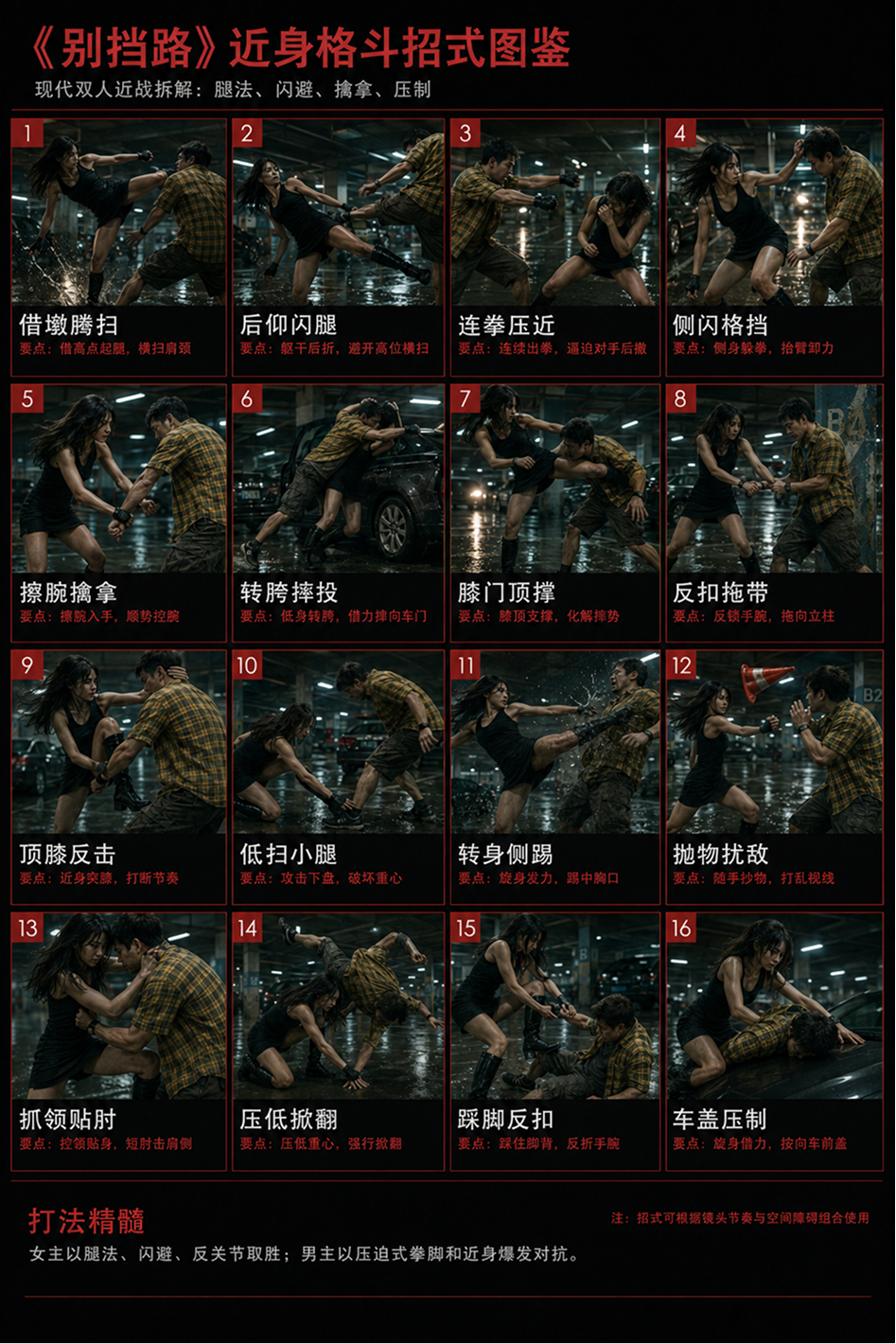
generate using gpt image2.0
Of course, it's not just for fighting。
If what you're talking about is a chase, it can be a chase。
If what you're talking about is a mystery, it can be a clue。
If what you're talking about is a horror scene, it can be a way out。
If your content is a love scene, it can become an interactive map。
So the essence of the mobility asset is not simply a play-off, but to tear a feature into a visual spectroscope asset。
V. SIDE ASSETS: DON'T JUST GIVE A VISIT TO AI
Site assets are often ignored。
A LOT OF PEOPLE THINK IT'S ENOUGH TO PRODUCE A NICE BIG PICTURE. ONE ROOM, ONE STREET, ONE OFFICE, ONE RUIN. THE PROBLEM IS, WHEN YOU START CUTTING THE CAMERA, AI DOESN'T KNOW THE COMPLETE STRUCTURE OF THE SPACE。
The first shot is left, the second shot is probably on the right。
The first shot table against the window, the second shot table could disappear。
The first shot came through the door and the second shot was completely different。
That's the problem with the consistency of the scene。
To solve it, the scene assets need to be more than a single map, but a multi-dimensional one。
A more stable method is to make a Nine Palace scene asset. The first eight were the different angles of the scene, and the last was the flat layout。
The first eight could include: a positive perspective, a negative perspective, a left perspective, a right perspective, an entry perspective, a corner perspective, an overlooking local view, and a critical landscape。
THE LAST FLAT LAYOUT IS USED TO TELL AI SPACE STRUCTURES, SUCH AS WHERE THE DOOR IS, WHERE THE WINDOW IS, WHERE THE TABLE IS AND WHERE THE PERSON CAN GO。
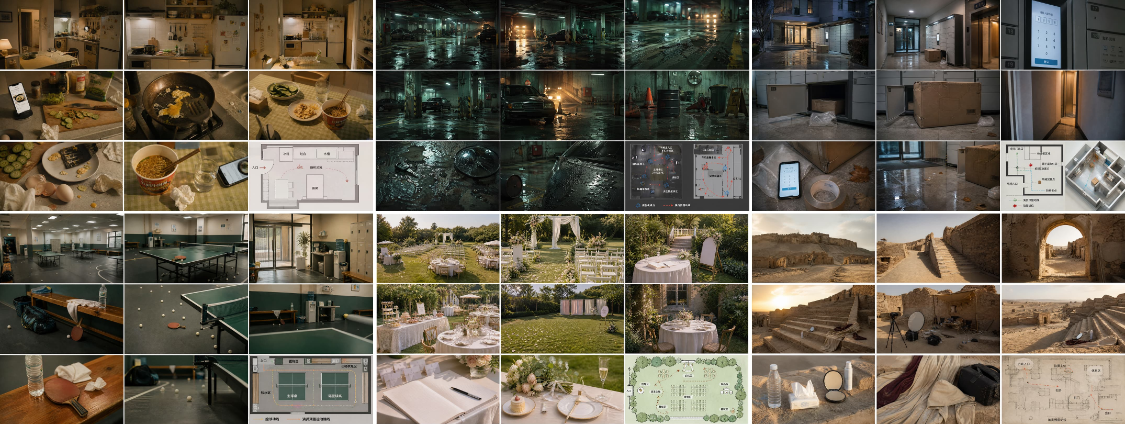
What about scenario assets
First step, make it clear what you want。
FOR EXAMPLE, IF YOU WANT TO MAKE A SKEPTICAL SHORT-SCENARIO SCENE, "THE MASTER IS ALONE LOOKING FOR CLUES IN THE OLD APARTMENT," YOU TELL AI:
I want an empty scene in the old apartment for the suspense clip. The scenes need to be real, quiet, depressed, and not horror movies. The space requires a living room, a door, an old sofa, a tea table, curtains, a half-open door, scattered documents, old photographs, a lamp, a shoe cabinet and some signs of life. The whole feels like someone just left soon。
STEP TWO, HAND OVER YOUR NEEDS TO AI ALONG WITH THE TEMPLATE FOR THE NEXT MESSAGE。
THAT IS, YOU TELL AI WHAT YOU WANT AND THEN YOU SEND IT WITH THIS WHOLE SET. THAT WAY AI WILL HELP YOU TO SORT OUT A WHOLE SET OF SCENE TIPS。
The following is an example of a template that can be used directly:
I'm going to get a set of scene tips along the following templates。
Ping-Pong Hall is open. "Beautiful, but no."
Generates a modern, indoor Ping-Pong-Pong-Tai-Tai-Pong-Tai-Tai-Tai-Tai-Tai-Tai-Tai-Tai-Tai-Tai-Tai-Tai-Tai-Tai-Tai-Tai-Tai-Tai-Tai-Tai-Pong-Tai-Tai-Tai-Tai-Tai-Tai-Tai-Tai-Tai-Tai-Tai-Tai-Tai-Tai-Tai-Tai-Tai-Ki-Ki-Ki-Ki-Ki-Ki-Ki-Ki-Ki-Ki-Ki-Ki-Ki-Ki-Ki-Ki-Ki-Ki-Ki-Ki-Ki-Ki-Ki-Ki-Ki-Ki-Ki-Ki-Ki-Ki-Ki-Ki-Ki-Ki-Ki-Ki-Ki-Ki-K-K No person, no person, no person, no shadow, no shadow, no body, no hand, no face。
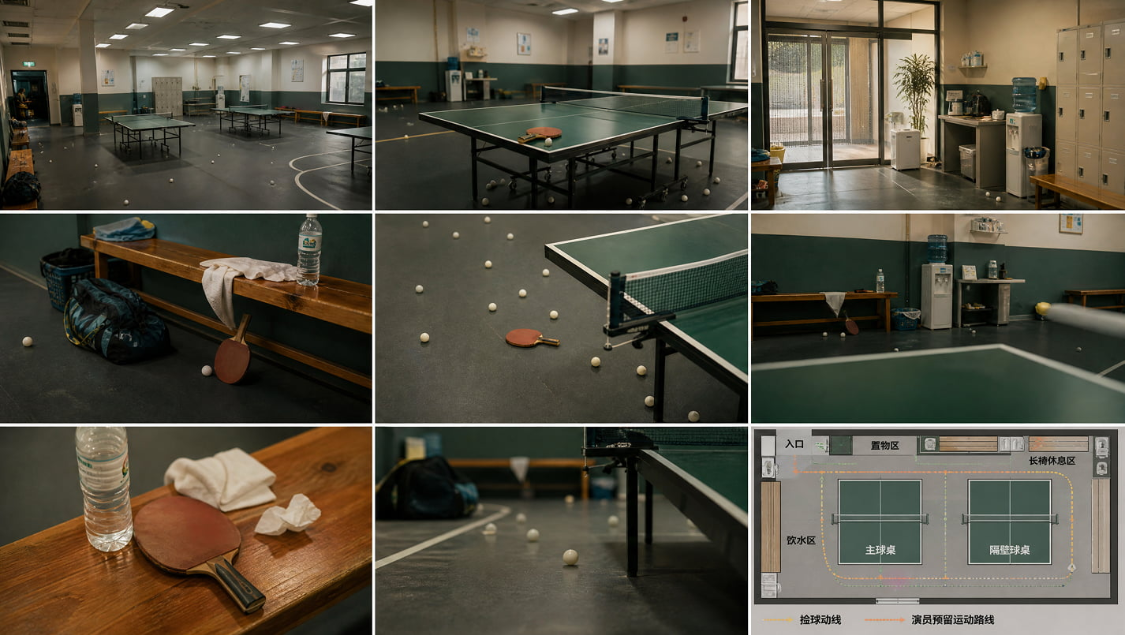
The scene is set for the first time that a woman is playing ping-pong, with the appearance that she wants to get a sense of sports life and that she can't actually catch the light comedy scene at all. The whole body is flat, boring, real-life, with a slight sense of self-tasteful entertainment. With the green ping-pong table and the court bench at the centre of vision, it highlights the following traces of the ball flying around: the ping-pong ball falling on the corner of the table, the ping-pong ball against the wall, half a bottle of water, a sports bag, a sweat towel, a crooked towel and a ball rolling off the ground. The scene is designed for community indoors or general sports centres, with cold white headlights, green table, dark-coloured glue, white edges, wall-side bumper packs, side-of-the-story benches, storage cabinets, drinking water machines, sports wrapping areas. The space consists of entrances, dressing/store areas, main ball table areas, next-door table areas, bench rest areas, drinking water areas, and pick-up lines. The overall space is real and reasonable, and there are no professional stadiums, no auditoriums, and no flaunting of competitive lights. Time is set for the day or evening room, with a cold and white top light, a small amount of natural light on the side of the window, and a low, clean and living body. Lights form soft and high on the surface of the table, the net, the gel and the white ping-pong. The image is of Kodak Portra 400 film colour, slightly green and warm Teal & Warm Amber, light particles, soft focus, real gymnastic air。
Use 3x3 of the Nine Palace grid:
Full wide view of the main indoor ping-pong stadium
Green ping-pong table, net, glucose complete space relationship
The entrance to the court and the restroom
Side bench, sports bag, half a bottle of water, towel rest area
The mid-spect lenses of ping-pong ball and bat by the main ball table
From opposite the table to the bench and the drinking water area
Ping-pong, bat, sweat towel, half a bottle of waterway
Earth-sliding ball, corner table, net, sports bag details
Plane layout of the scene, with signs to the mouth, main table, next-door table, benches, storage area, drinking water area, pick-up line, actor-set sports route
Architectural Vision,
Film Production Design,
Modern Chinese Slice of Life Cody,
Emtty Indor Table Tennis Hall,
Community Reports Center,
I'm sorry,
Reports Hall Scene Bible,
I don't know,
Kodak Portra 400,
Teal Warm Amber,
Global Illumination,
Ultra Detailed,
It's not like you're in trouble,
Scene Bible,
Masterpiece
Negative Promptpeople, people, shadows, shadows, body clippings, hands, faces, athletes, viewers, crowded crowds, competition scenes, professional arenas, cartoons, binary, games scenes, oversights, cheap cinemas, plastic senses, text errors, watermarks, logo, subtitles, saturated neon, sabbunk。
STEP THREE, GET AI TO DIRECTLY OUTPUT A SET OF SCENE TIPS。
YOU DON'T HAVE TO DO THIS YOURSELF. BECAUSE WHEN YOU HAND OVER THE NEEDS AND TEMPLATES TO AI, IT AUTOMATICALLY PRESSES THIS STRUCTURE TO MAKE A COMPLETE SET OF SCENERY TIPS。
Step four, take the AI output hint to image 2.0。
enter this set of hints directly into image2.0, and you can start generating scene asset maps。
VI. PURPOSE ASSETS: IMPORTANT PUTS DON'T LET AI CHECKING
APART FROM CHARACTERS, MAKE-UP AND SCENES, PROPS ARE AN ASSET THAT CAN BE EASILY PROBLEMATIC IN AI VIDEOS。
A lot of people make videos and put their props directly into their tips. For example, “persons holding a green bag” “a bottle of water on the table” “there's a bat on the ground” “a certain product in the hand”. If the props only happen once in a while, the problem may not be so great. But if it is repeated in the video or will be picked up, put down, used, carried, it cannot be created on an ad hoc basis by a single hint。
BECAUSE EACH TIME AI WAS CREATED, IT RE-UNDERSTANDED。
So as long as a props play a clear role in the video, they should be made as assets in advance。
The most common way of producing physical props is through three views。
That is, the front, side, back and, if necessary, a local detail。
The steps for the production of props are also simple。
The first step is to determine whether the props are important。
If it's just a small thing that's passing in the background, it can be done without being done alone。
But if it is in the hands of someone, or if it affects the drama, the movement, the lens, then it needs to be an asset。
Step two, generate three views of this props。
It would be better to use white or light, not complex scenes, not hand-held, and not strong light. The purpose of this map is not to make a film, but to clarify the structure of the props。
The third step is to generate additional local features if the tunnel has key details。
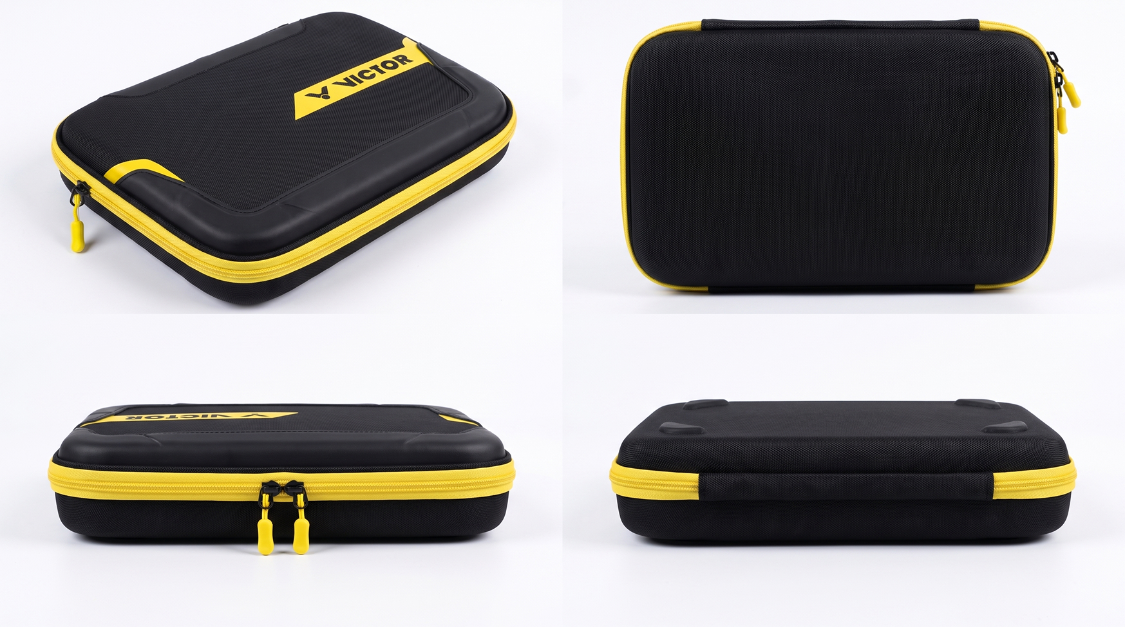
it's very simple, too, to find a picture of your props on the internet, and then use the nanobanan pro to generate:
Generates a three-view physical prop, white or light grey background, displaying the face, side, back of the [insert name of the prop] and adding a local feature. The overall shape, colour, material, ratio and key structures of the props must be unified。
Virtual props
VIRTUAL PROPS ARE NOT REAL THINGS THAT CAN BE PICKED UP BY PEOPLE, BUT ARE SOME OF THE SKILLS, GESTURES, ATTACK TRAJECTORIES, ENERGY EFFECTS, SMOKE, LIGHT, UI INTERFACES OR SPECIAL VISUAL ELEMENTS THAT APPEAR IN THE IMAGES。
For example, the role creates a blade, not just a “light”, but a stage of hand, energy, volatilization, trajectories, hits, dispersion。
For example, a fight, not a stand alone, but a continuum of movement。
So virtual props are better placed in front of the action asset, to be removed using 16-gauge action maps。
In short, physical props are resolved in three-views and virtual props in 16-gauge action maps。
SEEING, TOUCHING, AND BEING PICKED UP BY A CHARACTER, IT BECOMES A THREE-VIEW PHYSICAL PROPS. CONTENT WITH ACTION PROCESSES, SKILLS CHANGES, ATTACK TRAJECTORY AND VISUAL RHYTHM IS PLACED IN THE ACTION ASSET TO BE UNDERSTOOD BY AI IN A CONTINUOUS MAPPING。
VII. PALETTE ASSETS: NOT JUST A FEW PIECES OF COLOR, LET AI KNOW HOW IT WORKS
A lot of people make palettes, just a few nice ones。
FOR EXAMPLE, BLUE, YELLOW, GRAY, WHITE LINED UP, AND THEN TOLD AI, "USE THIS PALETTE." BUT WHEN IT'S ACTUALLY GENERATED, IT'S STILL MESSY. BECAUSE AI DOES NOT KNOW WHO THESE COLORS ARE, WHO THEY ARE, WHO THEY ARE, WHO THEY ARE, WHO THEY ARE, WHO THEY ARE, WHO THEY ARE, WHO THEY ARE, WHO CONTROLS THE DARK, WHO THEY ARE。
So a really useful colorboard asset is not a simple colour collage, but a clear colour usage description。
It contains at least three layers of information。
First floor, is the color itself。
It's a specific color value or color orientation, such as deep blue, warm yellow, gray green, white, dark brown。
The second layer is the visual properties of the color。
For example, the color is the main color, the auxiliary color, the dotted colour, or the shade. It is clean, sunk, bright, reborn, cold, or soft。
The third level is the use of colour。
Deep blue, for example, is used in the background and dark, warm yellow is used in person clothing and visual focus, white is used for skin light and wall reflection, and grey green is used for environmental shadows。
IF THERE IS NO SECOND AND THIRD LAYERS, THE PALETTE IS JUST A COLOUR DISPLAY. AI DOES NOT KNOW THE TITLE OR THE SCOPE OF USE。
Palette assets are produced in approximately two ways。
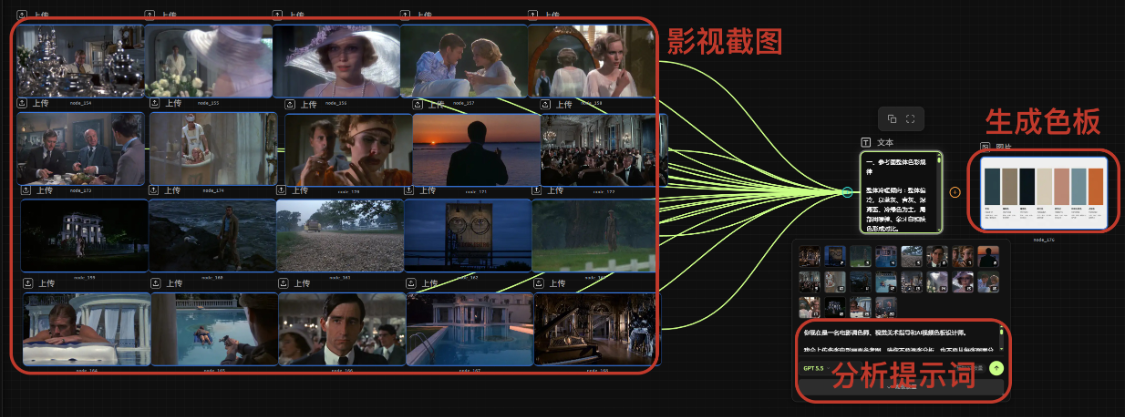
The first is to extract the palette from the film reference。
This is the way you've got a clear vision. For example, you want some kind of chill, retrograde, summer, depression, desolation, or urban life. Instead of looking for only one picture at this point, try to find more pictures of the same style。
Because a single reference map can easily be accidental。
Perhaps this one is a night view, this one has a strong retrograde light and this one has a special prop colour。
If you just extract the palette from a picture, it's easy to see the color as a whole。
IT WOULD BE BETTER TO FIND MORE FILM REFERENCE MAPS OF THE SAME STYLE, AND THEN LET AI SEE WHAT THEY HAVE IN COMMON。
The following are the introductory words of the analysis:
YOU'RE NOW A FILM MONETOGRAPHER, A GUIDE TO VISUAL ART AND AN AI VIDEO BOARD DESIGNER。
I'LL UPLOAD MULTIPLE FILM REFERENCE MAPS. PLEASE DO NOT ANALYSE EACH IMAGE, NOR EXTRACT COLOURS FROM EACH ONE, BUT RATHER DRAW COMMON COLOUR PATTERNS FROM ALL REFERENCE DIAGRAMS, AND HELP ME GENERATE A FILM BOARD ASSET THAT IS SUITABLE FOR THE USE OF VIDEO CREATION IN AI。
Notice:
The number of palettes is contained in seven colours。
EACH COLOUR MUST OUTPUT A STANDARD HEX COLOUR VALUE AND THE FORMAT MUST BE #RGGBB。
Do not output too many colors, do not exceed seven。
Don't just output five colors. Color levels need to be complete enough。
Do not take the occasional small area colours in a single picture as core colours。
Do not extract random colours. Do not extract colour logic from multiple reference maps。
THE PALETTE LABEL ONLY NEEDS TO CONTAIN: COLOUR TYPE, HEX COLOUR VALUE, USE SCENE。
Do not write long lines in the palette label, do not write complex theories and do not write too many words。
Please do the following:
Step 1: Overall colour analysis
Please analyse the common visual features of these reference maps, including:
It's a warmth
Invisibility
Saturation high
The contrast is weak
Dark colour
Highlight colour
Color expression
Background master colour
Light
Image Emotion
Step 2: Extract 7 core palettes
Please extract seven core colours:
The main colour is used in the background, environment or overall tone of the maximum size of the image。
2. Auxiliary colour。
3. Dark colour for shadows, image edges, space depths and dark areas。
4. High light for light sources, reflections, light receiving, skin brightness or areas where the image is brightened。
5. Colored zones are used for the face, hand, body-exposed areas, so as to preserve the human skin。
6. Environmental reflection colour for wall reflection, surface reflection, air sense, environmental colour and integration。
7. Decoration for small area visual focus such as props, lights, clothing locales, clues or image memory points。
Each colour only contains:
COLOUR TYPE: HEX COLOUR VALUE: USE SCENE:
Step 3: Generate colour usage rules
PLEASE TELL ME HOW THIS PALETTE SHOULD BE USED IN THE AI VIDEO
The main colour should be used in what large areas, where the auxiliary color is suitable, how the dark color controls the image level, how the high light controls the real light, how the color area preserves the physical reality of the person, how the environment reflects the image, how the colours are integrated, how the colours can avoid overdose, what colours can be used in large areas, which colours can only be used in small areas, which colours need to be avoided
STEP 4: GENERATE AN AI PALETTE ASSET GRAPH REMINDER
on the basis of the above analysis, write me a complete hint that can be used directly to generate the film board asset map for the image 2.0。
This board asset chart contains only seven core blocks:
Main color, auxiliary color, dark color, high light color, skin colour area, environmental reflection color, color color
Only three types of information are indicated next to each color block:
COLOUR TYPE HEX COLOUR VALUE USE SCENE
DO NOT MAKE A LONG NOTE. DON'T COME UP WITH COMPLEX DESIGN THEORY. DO NOT SHOW TOO MANY WORDS. NO CHARACTERS, SCENES, POSTERS. THE WHOLE PICTURE IS LIKE A REFERENCE BOARD FOR A PROFESSIONAL FILM, CLEAN, ORGANIZED, PRACTICAL AND SUITABLE FOR USE IN THE VIDEO CREATION OF AI。
Step 5: Output format
Please output as follows:
I. Overall colour pattern of reference maps
Two, seven colour core palettes
1. MAIN HEX COLOUR: USE SCENE:
AUXILIARY HEX COLOUR: USE SCENE:
3. DARK HEX: USE SCENE:
4. HIGH LIGHT HEX COLOUR: USE SCENE:
5. COLOUR AREA HEX COLOUR VALUE: USE OF SCENERY:
6. ENVIRONMENTAL REFLECTION/HEX COLOUR: USE SCENE:
7. DECORATION HEX COLOUR: USE SCENE:
III. The colour usage rule
iv. indices for palette assets suitable for image 2.0
V. Negative Prompt
AND THE SECOND THING IS, IF YOU ALREADY HAVE A SCRIPT, LET A.A. DIRECTLY GENERATE A COLORBOARD。
THAT'S A GOOD WAY FOR YOU NOT TO HAVE A CLEAR REFERENCE TO A MOVIE, BUT YOU ALREADY KNOW THE STORY, THE RELATIONSHIP, THE ATMOSPHERE AND THE EMOTIONAL DIRECTION. FOR EXAMPLE, YOU'VE WRITTEN A SHORT FILM THAT KNOWS IT'S SUSPENSE, LIGHT COMEDY, LOVE, ACTION, SCIENCE FICTION, OR LIFE SHORTS. AT THIS POINT, IT'LL BE POSSIBLE TO GET AI TO CREATE A PALETTE FOR YOU BASED ON THE SCRIPT。
YOU CAN TALK TO AI LIKE THIS:
YOU'RE NOW A CINEMATOGRAPHER, A FILM COLORER AND AN AI VIDEO BOARD DESIGNER。
I'LL PROVIDE A SCRIPT, SHORT FILM SET, STORYLINE OR SCENE IDEA. PLEASE HELP ME GENERATE A FILM BOARD ASSET THAT IS SUITABLE FOR THE USE OF AI VIDEO。
Notice:
The number of palettes is contained in seven colours。
EACH COLOUR MUST OUTPUT A STANDARD HEX COLOUR VALUE AND THE FORMAT MUST BE #RGGBB。
Do not output too many colors, do not exceed seven。
Don't just output five colors. Color levels need to be complete enough。
Do not give random colours, but generate color logic based on the mood, scene, character and narrative needs of the script。
THE PALETTE LABEL ONLY NEEDS TO CONTAIN: COLOUR TYPE, HEX COLOUR VALUE, USE SCENE。
Do not write long lines in the palette label, do not write complex theories and do not write too many words。
THE BOARD SERVES THE ENTIRE AI VIDEO, NOT A SINGLE POSTER。
Please do the following:
Step 1: Visual analysis of the script
Please analyse the following:
The type of story, the core emotions, the person relationship, the main scene, the time climate, the image, the image, the appropriate color direction, the overall warmth, the light, the dark, the saturation, the contrast, the light style
Step 2: Generate 7 core palettes
Please generate seven core colours:
1. Main colour
The background, environment or overall tone for the maximum size of the image。
Supplementary colour
Used in person clothing, furniture, space material or medium area of image。
3. Dark colour
For shadows, image edges, space depths and dark areas。
4. High light
For light sources, reflections, light receiving, skin brightness or image brightening areas。
5. Colored areas
It is used for the face of a person, his hand, his body's luminous area, so as to preserve his skin。
6. Environmental reflection colour
For wall reflection, ground reflection, air sense, environmental colour and integration。
7. Decoration
For small-area visual focus, such as props, lights, clothing parts, clues or image memory points。
Each colour only contains:
Colour type:
HEX COLOUR:
Use scenarios:
Step 3: Generate colour usage rules
PLEASE TELL ME HOW THIS PALETTE SHOULD BE USED IN THE AI VIDEO
Which large areas should be used for the main color
Where does the auxiliary color fit
How dark color controls the image level
How do you control the light
How does a colored area keep a person real
How environmental reflections converge
How do you avoid overdose with a dot
Which colours can be used extensively
Which colours can only be used in small areas
Which colors to avoid
Step 4: Generate recommendations for use by lens type
Please describe how this panel is used in the following shots:
Personalized
Central Nearview Dialogue
Indoor scenes
Outside scene
Action Camera
Emotional camera
Empty Mirror
The prop
End shot
STEP 5: GENERATE AI PALETTE ASSET GRAPH TIPS
on the basis of the above analysis, write me a complete hint that can be used directly to generate the film board asset map for the image 2.0。
This board asset chart contains only seven core blocks:
Main colour
Assistive Colours
Dark color
High Light
Color area
Environmental Reflection Colour
Light
Only three types of information are indicated next to each color block:
Colour Type
HEX COLOUR VALUE
Usage scenarios
DO NOT MAKE A LONG NOTE. DON'T COME UP WITH COMPLEX DESIGN THEORY. DO NOT SHOW TOO MANY WORDS. NO CHARACTERS, SCENES, POSTERS. THE WHOLE PICTURE IS LIKE A REFERENCE BOARD FOR A PROFESSIONAL FILM, CLEAN, ORGANIZED, PRACTICAL AND SUITABLE FOR USE IN THE VIDEO CREATION OF AI。
Step 6: Output Negative Prompt
Please output a Negative Prompt to avoid high-saturation neon, low-cost cinema sense, plastic tastes, over-dreaming, messy colours, wrong text, watermarks, logo, subtitles, etc。
The output format is as follows:
I. Visual analysis of the script
Two, seven colour core palettes
1. Main colour
HEX COLOUR:
Use scenarios:
Supplementary colour
HEX COLOUR:
Use scenarios:
3. Dark colour
HEX COLOUR:
Use scenarios:
4. High light
HEX COLOUR:
Use scenarios:
5. Colored areas
HEX COLOUR:
Use scenarios:
6. Environmental reflection colour
HEX COLOUR:
Use scenarios:
7. Decoration
HEX COLOUR:
Use scenarios:
III. The colour usage rule
IV. Proposal for colour use in different shots
v. image 2.0-applied graphic asset tips
VI. Negative Prompt
If you want to be more stable, you can combine both approaches。
Use multiple film references to extract colour orientations to determine the overall style。
AND TELL AI ABOUT YOUR SCRIPTS, CHARACTERS, SCENES AND EMOTIONS, AND LET AI GENERATE A MORE APPROPRIATE COLORBOARD HINT IN THIS DIRECTION。
finally, an image of the assets of the board is generated with an image 2.0。
VIII. FINAL STEP: QUIPMENT OF ASSETS FOR USE OF VIDEO MARKET
We have already finished with the way people's assets, make-up assets, face-action assets, scene assets, props assets and palette assets are made。
But when the assets are done, it's over if all the pictures are not left to the video model。
THE REAL KEY STEP IS TO LET AI KNOW WHAT EACH ASSET MAP DOES。
The assets are uploaded and the identity of each asset is clearly indicated in the text。
FOR EXAMPLE, YOU UPLOADED A FOUR-PERSON VIEW, INSTEAD OF JUST SAYING, "REFER TO THIS." YOU HAVE TO TELL AI:
This map is a personal identity asset of the female owner and is used to keep her face, hair, body size and overall integrity。
If you upload makeup assets, note:
This is the master's sports assets, which are used to keep the costumes, shoes, accessories and overall clothing in the play。
If you upload emoticon assets, mark:
This image is the face asset of the hostess, and this shot needs to refer to the expression of “unusual but well-dressed” expression, which should be restrained and not exaggerated。
If you upload action 16, mark:
This is an action asset. It's an action reference for character fighting
If you're uploading the scene, it's marked:
This is the scene asset, the visual anchor of the ping-pong scene。
If you upload a three-view physical prop:
The chart is a propriet to keep the shape, colour, material, zipping position and shoulderband structure of the green sports pack. The sports bag in this shot is next to the bench and does not need a handheld。
If you upload a palette asset, mark:
This is a whole video board asset that unites the image. The main color is used for the environmental background, the dark colour is used for the outer edge of space, the high light colour is used for light and reflection, the light colour is used only for small area proptiles, and no high saturated neon color is generated。
In a nutshell:
Assets are stable, labelled as callable and hints are lensed。
wind up
TO DATE, AI HAS DEVELOPED, AND HINTS ARE NO LONGER A SEPARATE ABILITY。
A truly stable picture often comes from a combination of “assets” and “indicators”。
THE HINT DETERMINES WHAT YOU WANT TO GENERATE, AND THE ASSET DETERMINES WHAT AI IS GENERATED FROM。
The hint determines the direction, the asset determines the boundary。
The hint is for creative expression and the asset is for controlling the outcome。
If you just want to create a picture, you can use inspiration and description。
But if you want to make a full video, a series of characters, a brand vision, assets are the basis of the circle。
So, starting with this section, do not leave any more questions behind。