



I'm sure you're all familiar with those "one static picture changes into a blockbuster painting in a second"AI VideoThe screen has been swiped. Under the itch to try personally, but it turns out that the generated video is distorted and chaotic, like an abstractionist experimental work - the characters are deformed, the scene is disorganized, and it's not at all the silky smooth effect that was imagined.
Don't be in a hurry to doubt your creativity! Often the problem isn't your ideas, but not mastering the "communication language" of AI video tools.
Today, I'm going to break downvideo of the first and last framesThe real-world core skills of theopening and closing framesVideo success rates will skyrocket.
Core cognition: AI is not a director, it is a top "visual gradient engineer". It calculates how the pixels will transition based strictly on the first and last frames you provide. The clearer the instructions, the more stunning the result.
Tip #1: Anchor Point Locking - Give the AI an Unchanging Reference
AI relies on spatial reference points to calculate motion trajectories. The lack of stabilizing anchor points can lead to an overall drifting and distortion of the picture. ThereforeAt least one key element that is completely unchanged or in a highly consistent position must be retained in the first and last frames.
Real-world case:
- Want to make a character change from middle age to old age? Make sure the position and size of the eyes in both images almost overlap. This is the most stable anchor point for the face.

- Misbehavior: Characters are on the left in the first frame and on the right in the last frame. the AI will try to "pan" the character, usually resulting in blurry drag or broken limbs.
Tip two:"Extreme Zoom" Throughout - Let the AI Brainstorm!
Through the extremely fast zoom and motion blur, the two scenes are forcibly connected. This method has the most "one shot to the end" feeling, the highest technical requirements, and requires AI tools to have better support for the "lens zoom" command.
Real-world case:

Want to realize the effect of crossing two buildings? Use the "fast zoom-blur-sharp" command.
First and last frame cue words:The video starts with a static wide-angle shot of building A (the Forbidden City) and suddenly zooms forward with explosive speed, everything in the center of the frame is dramatically stretched and produces a strong radiating motion blur, and the surrounding landscape is transformed into flying lines and blocks of color, mimicking the "bullet time" or "warp speed flight. "The blurring reaches an extreme. After the blur reaches its peak, it decelerates rapidly and becomes clear again, eventually stabilizing seamlessly on the aerial view of Building B (the Bird's Nest). The whole process must be extremely fast, powerful and visually striking.
Instead of relying on the similarity of the first and last frames, this method is dominated by a powerful "text command", which the AI tries to execute in a "fast zoom-blur-sharp" manner, creating a "dragon The AI will try to execute this "fast zoom-blur-sharp" command to create a "dragon's tail" type of fast transition effect.
Tip 3: Compositional consistency - reducing the AI's "burden of understanding"
AI performs pixel-level gradient interpolation, where the subject's position changes drastically, and the AI thinks that old pixels are going to disappear and new pixels are going to appear, and the process is bound to be raw. ThereforeThe subject position, size, and picture structure of the first and last frames should be as consistent as possible.
Real-world case:
- Want to realize the beautiful change of cherry trees from spring to winter?The core is locked in trunk position.
The first frame (spring flowers) and the last frame (winter snow) must have the exact same tree trunk coordinates, which the AI will use as a "spatial axis" to naturally render the branches and leaves as they grow and die.
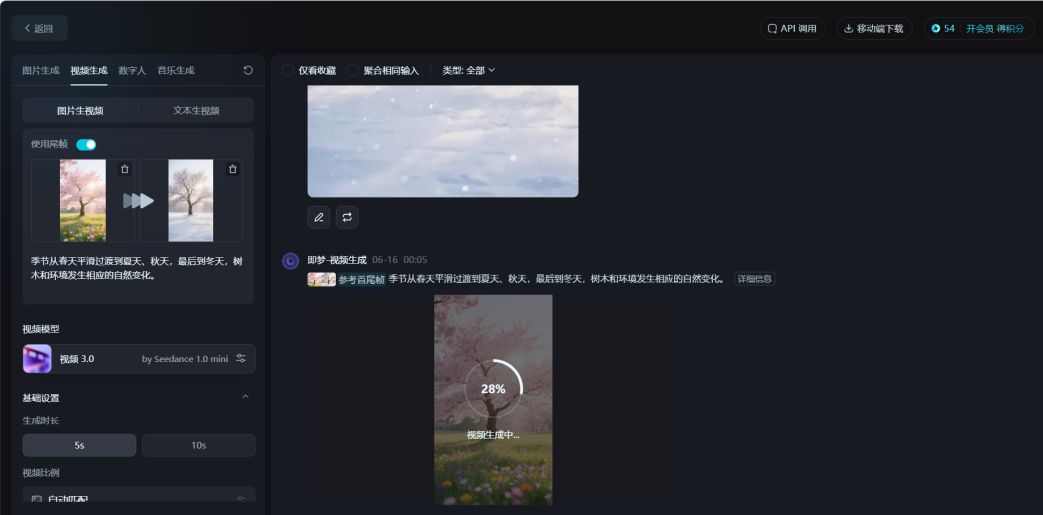
- First and last frame prompt words: the seasons smoothly transition from spring to summer, fall, and finally winter, with corresponding natural changes in the trees and environment.
- Wrong operation: If the tree is on the left side of the screen in the first frame and the tree is on the right side in the last frame, the AI will force the tree to generate a "panning" animation, and the result will definitely be a distortion and drag.
Tip 4: Step-by-step dismantling - complex changes need to be "foolproof"
AI's interpolation algorithms fail under short, wide-span variations, resulting in hard "flashes" or distortions. Thus transitions that span very large distances (e.g., apes → astronauts) must be broken down into multiple small steps to accomplish them.
Real-world case:
- In the case of "A Woman's Life", for example, going directly from a little girl to a grandmother would cause the AI logic to break down.

- Scientific disassembly: little girl → college girl → middle-aged woman → grandmother
- Each stage generates a separate video post-editing for a more natural transition in age sense.

Tip 5: Precise Cue Words - Give the AI a clear "blueprint for completion".
Vague cue words give the AI too much free rein, and the results are highly likely to deviate from expectations. Detailed descriptions can effectively constrain the direction of generation. The description of the end frame (Prompt) must be specific, detailed and unambiguous, telling the AI the final picture you want.
Real-world case:
- Fuzzy cue word: "Inside the leaf". the AI may just give you a translucent leaf.
- Precise cue word: "Cross-section of a plant cell in microscope view, clearly showing green chloroplasts, cell wall texture and flowing cytosol, 3D scientific rendering style, cool lighting".AI is what generates professional-grade microscopic worlds.
- Professional Advice: Terms such as "cinematic lighting", "macro-photographic texture", "cyberpunk tones", "8K detail", etc. are often used to define style and precision. Terms such as "cinematic lighting," "macro photography texture," "cyberpunk tones," "8K detail," etc. are used to define style and precision.
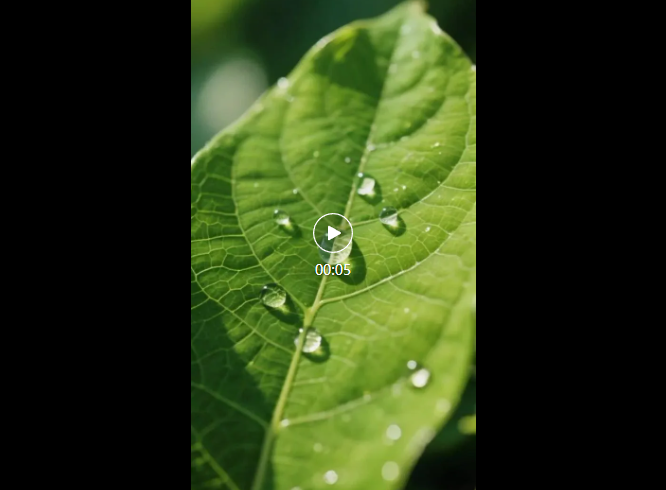
First and last frame cue word: The camera drills quickly and smoothly downward from the surface of the leaf, through the epidermis, and into a microscopic universe of cells.
Tip 6: Manual transitions - act as an AI "navigator" when necessary
Artificially providing a transition reference point dramatically reduces the difficulty of AI interpolation and ensures that changes are logically coherent. ThereforeWhen the difference between the first and last frames is so large that it is difficult for the AI to understand, an "intermediate" image is manually generated as a transition frame.
Real-world case:
- Want to turn a "real beauty" into a "beast of the sea"?
- Use the Tupelo tool to use a real life photo as a reference.
- Enter the cue word: "Antlered beauty, retaining human features on her face but with antlers growing from her head, half deer, half human form".
- Generate transition maps, one is not enough, generate more.
- Generate video with three frames: first frame (real person), transition frame (half-human beast), and last frame (white deer), the effect is natural and shocking.
The number of video limitations, will not put out examples here, before doing the Shanhaijing teaching video, did not watch the treasure can point portal:
Stunning arrival! Instant Dream AI 3.0 video first and last frames are finally here! (real test + commercial application)
Tip 7: Motion curve fine-tuning - simulating real physics
Show the AI the "Variable Speed Running Instructional Video": first jogging to warm up (slow acceleration), then sprinting (high speed), and finally slow stop (slow deceleration). It's more realistic than running at a constant speed.
Real-world case:
- Fighter planes crossing the canyon ofthree-stage acceleration:
- retard retardation(0-3 seconds): engine blue light intensifies, dust spreads in a cone shape
- rush through(3-6 seconds): sonic boom cloud generation, rock wall texture blurring
- retardation(6-8 seconds): nose up against inertia

Finally: from "control" to "collaborative" creative philosophies
With these seven tips, you can already significantly improve the quality of your AI first and last frame video output. But I want to share a deeper realization:The most efficient AI video creation is not about absolute control of the tool, but about establishing a subtle "collaborative relationship".
Your role is tostrategistandquality controller: By carefully designing the first and last frames, providing precise instructions, and setting reasonable boundaries, a clear path of creation is mapped out for the AI. Within this framework, please allow the AI to retain a certain amount of "free play" - for example, the direction of the cracks when the glass breaks, the arc of the leaves that fall and rotate, the randomness of the flow of light and shadow particles.
These algorithmically generated, slightly uncertain details are often the most dynamic and "life-like" parts of the video. They go beyond the deliberate design of human beings and bring unexpected surprises.
Therefore, a true AI video master knows how to find a balance between "precise guidance" and "unleashing potential". When you stop trying to control every pixel and learn to trust the creativity of your tools within the rules, your work will really stand out and show the unique charm of human-computer collaboration.
The above is the content of today's sharing, is not very practical, you learned?