



If you want to talk about one of the most frequently used AI software on a daily basis, it's none other than Instant Dream.
Basically every day to use the rhythm, the reason, one is good, two is free, really suggest that all ai beginners are dead that dream, open every day to practice, growth will be very fast.
That dream recently updated again, the page layout have changed, more simple and more dreamy, very exquisite look. Even the function, is also more and more spiritual.
The Dream Image 3.0 model is also very impressive. Especially the "matting" is excellent.
Today to share with you, that is, the Dream 3.0 mat map play, whether it is to do business list poster, portrait photos or picture transfer painting, etc., with it everyone can be a P picture master.
What's a "pad map"?
Matting, in simple terms, is the process of uploading an existing image as a reference so that the AI can refer to certain features of that image when generating a new image, such as composition, color, style, and subject form.
With Padmap, we can more accurately control the effect of the generated image, realize image style conversion, detail modification, creative P picture and other operations.
Dream AIHow to "pad the map"
I.e. Dream AI: https://www.1ai.net/10005.html
Open that dream AI, the default is the picture generation, click the dialog box in the middle of the "+" sign, upload the reference picture.
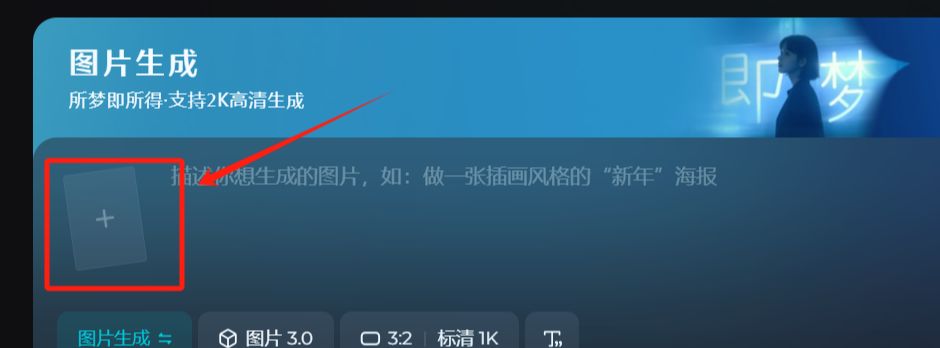
Reference map of this, there will be a lot of dimensions to choose from, generally use the [smart reference], you can also adjust the [reference intensity], of course, according to the specific content to be done, select other dimensions, the effect varies.
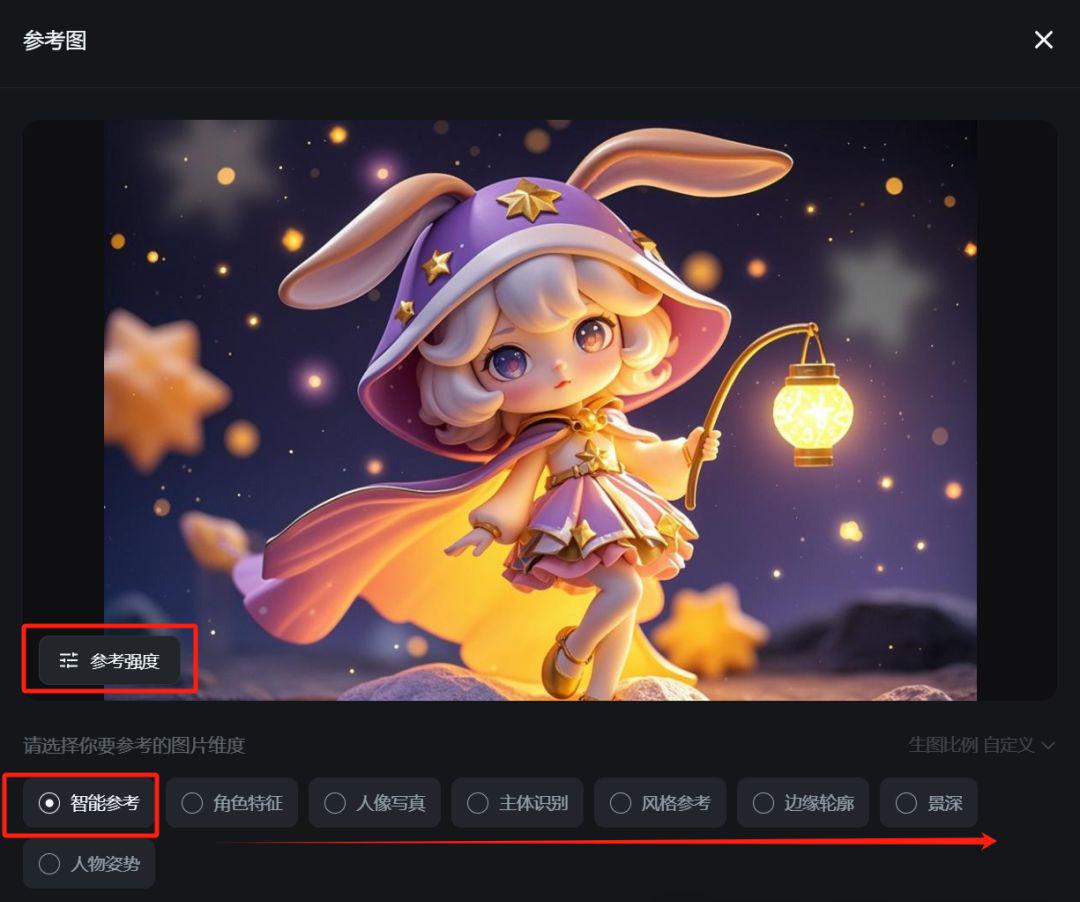
Select a good reference map, normal input prompt word, out of the map is OK. About this procedure, the following to give you a specific talk about that dream 3.0 mat map effect cases.
Some examples of classic matting
Case 1: Fixed products for e-commerce posters
ai continues to evolve, we often say that designers are going to lose their jobs, a person without any design experience, in fact, can be through a white background product picture, make a texture advanced advertising campaign.
For example, I uploaded this picture of Estee Lauder foundation white base

Select "Smart Reference", reference strength 100, ratio 3:4", cue word:
Help me generate a picture: this is a brand of 618 carnival promotional ads, show 618 carnival logo, the background is red and white color scheme, beveled background 45 degrees into the simulation of floating cloth effect, add a sense of dynamics. The picture shows a product, a bottle of Estee Lauder bottle foundation, the product for the subjective lens shooting, the main display of the product, zoom in, close-up lens to the product, the product shooting angle for the upward angle of 45 degrees, holographic projection, 3d three-dimensional effect, minimalism. The upper text layout for 'instant order buy 30ml get 30ml free', and mark the activity time 'June 18, 20:00 open for grabs' text optimization layout. The overall style highlights the promotional information, attracts purchases with vivid colors and clear product displays, and creates a warm promotional atmosphere." Promotional information is highlighted, which not only strengthens the professional attributes of the brand, but also fully accentuates the warm atmosphere of the mid-year promotion, which is very attractive and transformative.
Out of the picture effect is as follows, the atmosphere of the big promotion pull full there is no:
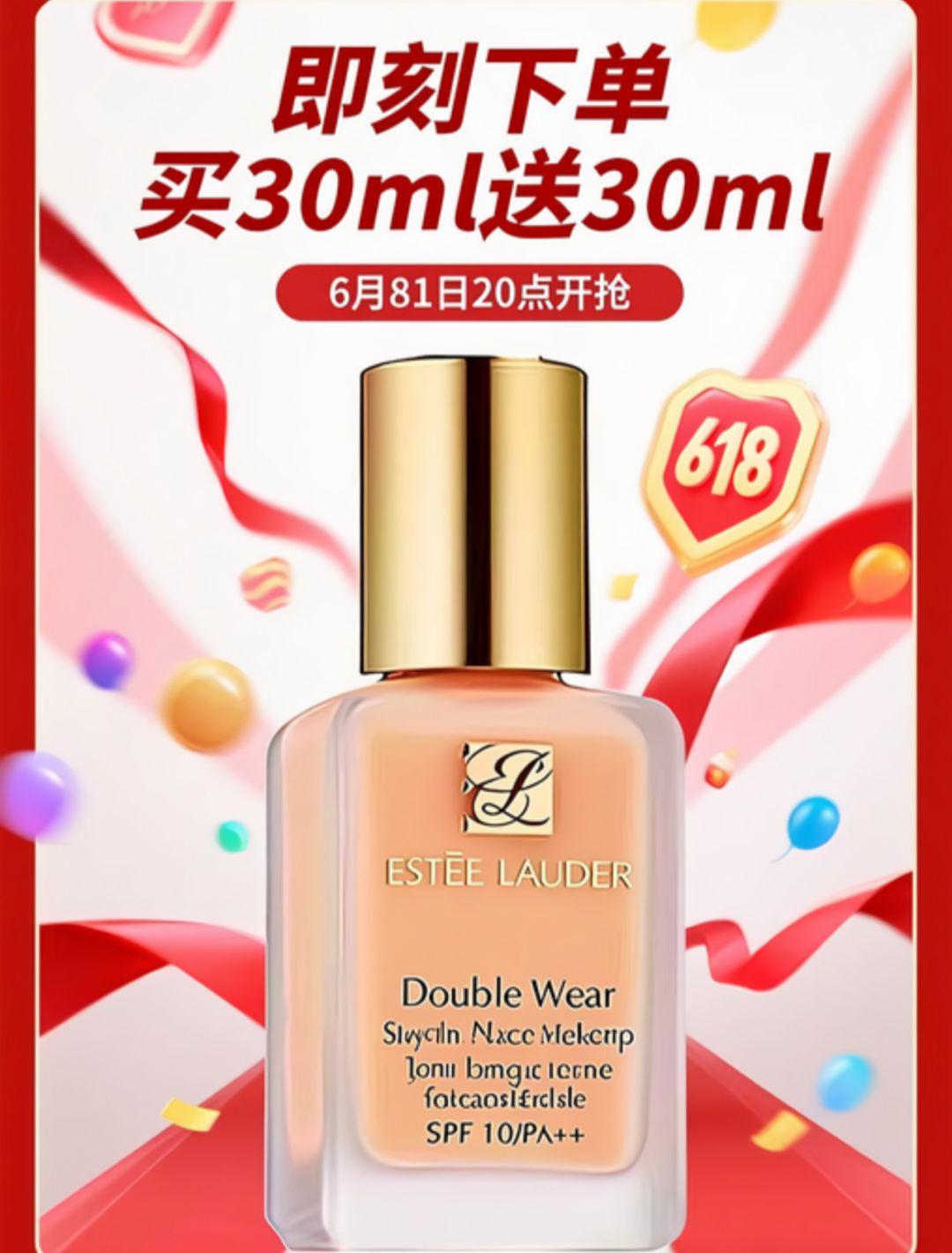
Case 2: Generate images with Instant Dreams
Many students want to try to turn real people into cartoon style, hand-drawn illustration style, etc., in the past to go to find a lot of other software, in fact, that is, the dream can be done.
For example, I uploaded this photo of a beautiful woman as a reference image
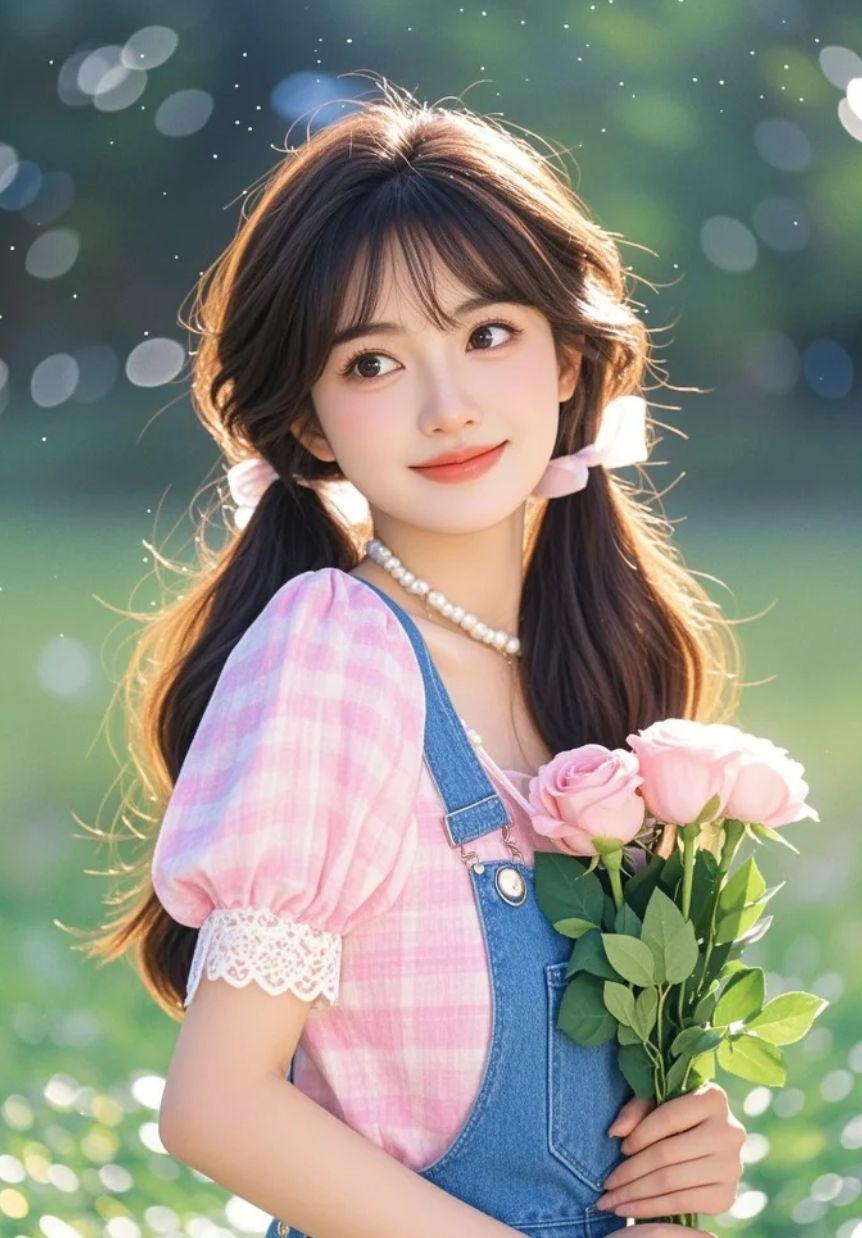
Select "Smart Reference", Ratio 3:4", Cue 1:
Transfer this image to a simple and fresh modern illustration style, composed at a flat angle, using a three-quarter composition. The main subject is a girl with a double ponytail, wearing a pink plaid top and blue back pants, holding a pink rose. The background is an outdoor green meadow. Requirements are clear lines, fine drawing, high color saturation, obvious contrast and brightness.

Select "Smart Reference", Ratio 3:4", Cue 2:
Convert this image to a drawing that requires rough strokes, large brushstrokes, oil paintings, headshots, squeegee drawings, simple brushstrokes, Monet style, strong light and shadow effects, and the subject is a girl with double ponytails, wearing a pink plaid top, blue back pants, and holding pink roses in her hands. Thick crayon drawing, graffiti style, bright colors, simple and clean image, creating a healing atmosphere.

It can also be made in 3D Pixar cartoon style, ink rendering style, pixel style, etc., so go ahead and try it out yourself!
Case 3: One-click Pic to modify the picture
In the future, you really do not even need to learn PS, directly use ai software to move your mouth and get it done. Whether it is to add to the picture, delete content, or adjust the light, can do.
The left reference picture, the right side of the picture after adjusting the light, the prompt word: the picture p out of the sunshine on the couple's body feeling, the character's skin whiter

Reference picture on the left, the picture on the right after adding some accessories, hint word: add a bow hair band to the character in the picture, and hang a cute pom pom bag on the left hand

Reference picture on the left, change the color of the clothes on the right, hint word: change the clothes of the character in the picture to a green silk shirt

Case 4: Replacing the Character Product Scene
When you have a product, you want to give him a more lofty scene, in order to enhance the product texture; or, you took a picture at home, you want to change the background of a tourist attraction, with the namely dream are OK.
The left reference picture, the right picture changed the background, the prompt word: to the couple photo for a different background, blue sky, white clouds, beach seaside, the two sitting on a leisure bench

Reference image on the left, scene changed on the right, prompt words: keep the appearance of the artifact the same, give it a different scene, home environment, coffee table placement

Case 5: Creating emoticons
There is no want to do WeChat emoticon packet cash treasure, that dream to do so easy! Find an anime character or their own cute pets or friends and relatives of the picture as a reference picture, to create a set of exclusive emoticon packet, but also interesting ~!
For example, I've uploaded this picture of Ne Zha as a reference image

Then write the prompts like this: Take Nezha in the reference picture as the prototype to create a set of WeChat emoticons, requiring nine-panel output, 3D cartoon style. The text of the nine emoticons are "don't want to go to work"; "off work"; "lie down"; "struggle"; "hahaha"; "you are great"; "thinking about life"; "angry"; "Sad"; overall white background, the expression should be related to the text content.
Look at a couple of sets of outtakes, it's really nice, take it and cut it up into a single image, to the extent that you can use it straight away:

Final Thoughts
Today is a simple test of these la, in fact, ai with a good far more powerful than you think, the most important thing is to command its people to use. You still have any whims, can be thrown into the dream try oh, maybe there are surprises!