



Previous articleSharedBean curdP chart instructions, and the feedback has been very enthusiastic!
Beanbag a sentence P map instructions, zero-basic AI retouching allows you to become a PS master in seconds
I'm striking while the iron is hot, the last installment shared focused on P portraits, and a lot of po-po's were asking about the work ofProduct DiagramDemand, will beanbags work?
As a cowhorse who has spent time in both A and B, I know all too well! How torturous it is to create a set of product drawings:
- High cost:Photographers, models, venues, props, post retouching ...... a set of pictures down, the budget miso rising. Small teams or individual businesses simply can not afford.
- Long cycle time: from communicating the needs, booking the shooting to getting the finished movie, ten days and half a month is common. If you miss the window of new product release, the food will be cold.
- Uncontrollable results: bad weather, poor modeling, or a photographer who doesn't get your point, can all lead to a less-than-ideal picture, and rework is even more out of reach.
You call yourself a national AI for nothing? Doesn't Dou Bao know that our mainland is rich in cattle and horses? Dou Bao has already figured out the needs of our laborers to a T. Dou Bao can do it!
Today's post is to teach you, hand in hand, how to use beanbags to generate high-quality product images at low cost and high efficiency. From basic background changing to advanced modeling compositing, you'll learn it all in one go!
Four key points for writing good instructions
Before we start the real world, let's remember this core mnemonic, which determines whether the AI can accurately understand your needs: [Subject + Style + Composition + Constraints
- Point out what the subject is : TellAI ImageWhat is the main character in the movie. For example, "a white ceramic mug", "a glass bottle of orange soda". If the item is not common, you can add more descriptions to help the AI understand.
- Describe the style/feel What tone do you want your images to have? This is the key to determining the "high class feel" of the image. For example: high-level commercial texture, atmosphere, cream style, Korean low saturation, American retro, cyberpunk style, natural light, studio light, and so on.
- Define composition/proportions : Tell AI the image ratio you need, such as 1:1 (square, suitable for Taobao main image), 3:4 (suitable for Little Red Book), 16:9 (suitable for public cover). If you don't say, the default will be consistent with the ratio of the image you uploaded.
- Presentation of constraints/other information: This is the key to ensuring that "the product is not deformed". Be sure to add commands such as "keep the body of the product unchanged" and "keep the appearance/color/angle of the product unchanged". You can also tell the AI what elements you want to add or exclude, such as "greenery in the background" or "no text in the image".
Memorize this formula, and you have mastered the magic of communicating with beanbags! Let's move on to the practical part.
Scenario 1: White background image with background
This is the most common and basic need.
Help me put this mug into a background with a sense of atmosphere. The resulting figure 3:4, the background can have some real ambient elements added to it, keeping the angle and appearance of the main body of the product unchanged.
Command Parsing:
- [Subject: This cup]
- [Style: ambient]
- [Composition: 3:4]
- [Constraints: add elements with a sense of atmosphere, keep the angle and appearance of the main body of the product unchanged.]
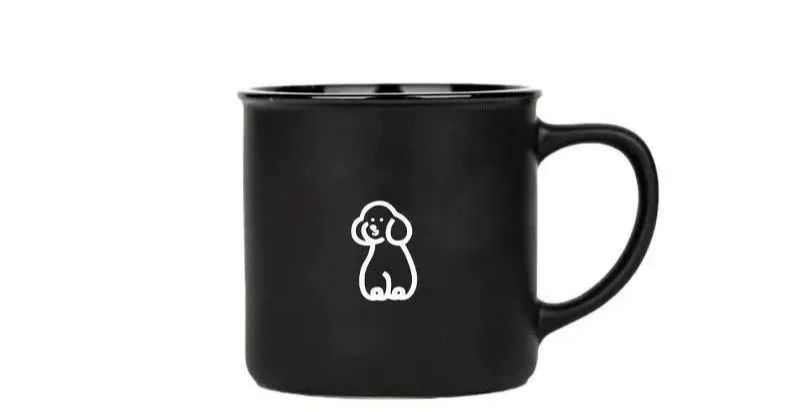

When you don't know what elements to add to a scene, but have a clear need, you can try to describe a feeling. For example, "summer thirst-quenching feeling", "warm citrus in winter", "vintage feeling" and so on.
Place this bottle of orange soda into a scene to create a very thirst-quenching feeling for summer. Keep the appearance and proportions of the drink the same. The resulting image has a ratio of 3:4.
Command Parsing:
- [Subject: Orange Soda]
- [Style: Very thirst-quenching in summer]
- [Composition: 3:4]
- [Constraints: Keep the appearance of the drink unchanged]


Scenario 2: Replacing the background with a product image
The input image should preferably be a white background image, or at least a clean image. If not, you can ask the beanbag to do a background deduction first.
(Oh yes, for the design dog or operation 🐶, keying is also a high-frequency demand, before the use of PS or other paid software, now there is no need at all, directly with the beanbag on the line, and then complex scenes can give you keyed out!!!)
If you don't have a white background image, you can also just tell the beanbag to replace the background. One step!
Replacing a scenario for a handheld fan requires that the product itself remains unchanged


Of course, you could be more descriptive.
Replacing a desk scene with a handheld fan requires that the product itself remains the same and the elements in the scene remain realistic

(The original picture is a random buyer's show on Taobao, so the generated effect is average. So when you shoot the white background picture, also try to shoot better. (The better the background picture, the better the AI generated results will be, you compare the above mug and Arctic Ocean soda generated by the effect will have a perception of it ~)
Scenario 3: Specify a reference map for background
This is a more advanced way to play, when you have a very favorite scene style, want to put their own products "P" in, this method has a very high success rate. The instructions are also very simple.
Take the floor fan of Fig. 1 and place it in Fig. 2 for display, requiring the fan to remain the same as in Fig. 1


When you need the scene to be more reproducible, you can say this
Put the floor fan in Figure 2 into the scene in Figure 1 to display, the fan appearance is required to remain unchanged, restore the scene in Figure 1 in the elements, color and texture of light and shadow, the resulting image size 3:4


Scenario 4: Product image with model
This is definitely the ultimate money saver! Not only can we swap things, we can swap people!
For the model and action in Figure 1 and the product in Figure 2, keep the angle in Figure 2 so that the object held in the left hand of the model in Figure 1 is like the handheld small fan in Figure 2. Keep the color and appearance of the small fan the same


As long as the modeling picture looks good, the success rate will be very high! Doesn't it feel better than you guys find your own models to shoot ahahahaha
To be honest, after so many tests, the AI-generated product images are not 100% perfect. Especially in fine product details, such as logos and complex textures, there are occasionally some slight deformations or color deviations.
But! Despite its minor flaws, its advantages are still disruptive to our work:
- Creativity increases infinitely: it becomes possible to test 100 scene styles in one day, something unimaginable with traditional shooting.
- Costs plummeted: modeling and movement were exceptionally well controlled, and, crucially, modeling, photography, and venue fees, the biggest overhead, were saved in real terms!
- Efficiency takes off: for some minor product flaws, we can totally fix them simply with PS or Meitu Xiu Xiu, which is so much easier than organizing a shoot from 0 to 1!
The point is, it greatly reduces inefficient and even ineffective communication with people, and AI communication mammary glands are much more fluid!
Be sure to emphasize one thing to everyone here: try more! Try more! Try more!
Even if you copy my tips, it can only greatly increase the success rate of the "one-click map", but there is no guarantee that 100% will satisfy you at once. I have repeatedly adjusted and polished the effect diagrams shown in my article. (I'll show you my intermediate process---)

So don't be quick to dismiss the AI just because the first drawing it gives you isn't good enough. Think about it, even if you paid a human designer, wouldn't you have to communicate repeatedly and have him change several drafts?The same goes for AI, which is trying to learn your intentions.
Give the AI more patience and try a few more ways of describing it, and it will definitely reward you beyond expectations! It's definitely worth it!
All in all, the Beanbag Make Picture feature is definitely a super money-saving tool for our content creators, e-commerce operations and designers at the moment. It may not be able to completely replace the top commercial blockbusters, but it can definitely cover our daily 80% product diagram needs.
Have you learned it yet? Go ahead and upload your product images and try these instructions!