



- AlibabaLaunchedTongyi Wanxiang2.1 (Wan2.1) is currently leadingOpen SourceVincent video modelBased on its strong capacity to generate, it has become an important tool for AI video creation. This paper will teach you how to quickly install and use the Wan2.1 model to make text-generated videos easy。

One.environmental preparation
Before starting, ensure that your equipment meets the following requirements:
System support: Windows, MacOS
HARDWARE REQUIREMENTS: IT IS RECOMMENDED TO USE EQUIPMENT WITH NVIDIA GRAPHIC CARDS TO DISPLAY 16GB AND TO RECOMMEND RTX 3060 AND ABOVE TO ENSURE THAT THE MODEL IS RUNNING SMOOTHLY。
Two.Installation step of General Mansion 2.1
1. Download and install ComfyUI
ComfyUI is a powerful AI image and video generation framework that supports many models to load and workstream operations。
Get ComfyUI One Installerhttps://www.comfy.org/
Installation Steps:
- Download the corresponding installation package according to the system (Windows/macOS)。
- Depress and install, and start CommyUI after completion。

DOWNLOAD TEXT ENCODER AND VAE
Wan2.1 relies on specific text encoders (Text Encoder) and VAEs (Distorted Encoders) to parse hints and generate higher quality content。
Text Encoder Download & Placement
- Downloadhttps://huggingface.co/Commy-Org/Wan_2.1_CommyUI_repackaged/tree/main/split_files/text_encoders
- Store Path: depress the downloaded file to the following directory: ComfyUI/models/text_encoders/
VAE DOWNLOAD AND PLACE
- Downloadhttps://huggingface.co/Commy-Org/Wan_2.1_CommyUI_repackaged/blob/main/split_files/vae/wan_2.1_vae.safetensors
- Store Path: Put the file in the following directory: CommyUI/models/vae/
3. Download video generation model
Video Generation Model is the core of Wan2.1 and is recommended for use fp16 version to obtain a better generation effect。
- Downloaded address: https://huggingface.co/Commy-Org/Wan_2.1_CommyUI_repackaged/tree/main/split_files/diffusion_models
- Precautions:
- Recommended version:fp16 (highest quality of generation)
- Compatibility selection: fp8 version (quick but slightly lower quality) can be used if there is insufficient visibility。
- Sort Mass:fp16 > bf16 > fp8_scaled > fp8_e4m3fn
- Store Path: drop down to the following directory: CommyUI/models/diffusion_models/
4. Importing text-to-video workflows
Workstream files could simplify the process and facilitate the rapid generation of video。
- Download: https://comfyanonymous.github.io/CommyUI_examples/wan/text_to_video_wan.json
- Import Method:
- DOWNLOADS A JSON FILE。
- Starts the ComfyUI, click the Load button to import the workflow。
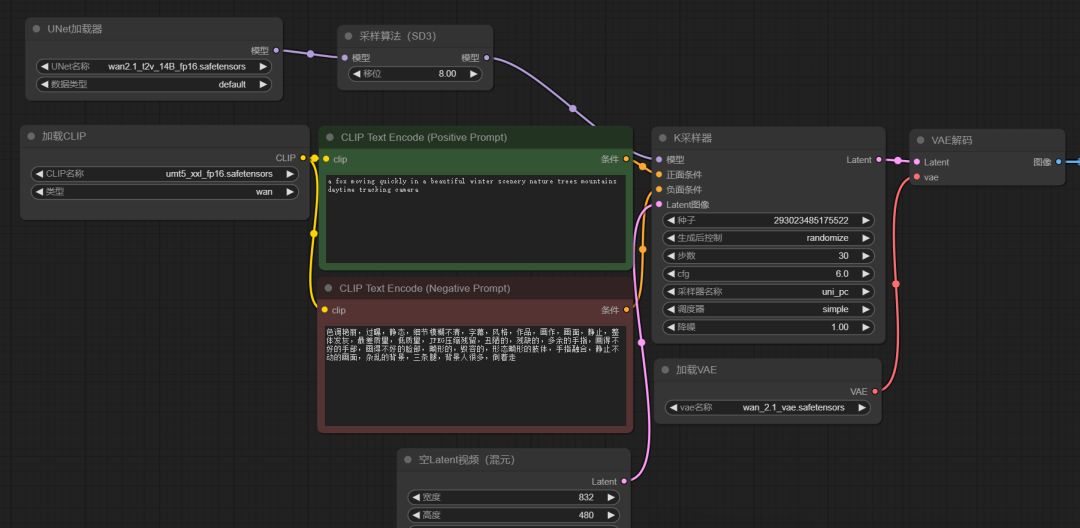
Three.Run a generic Mansion 2.1 to generate video
- Start CommyUI:
- Double click (Windows) or (macOS)。
- i'm sorry, run
- i don't know, run
- Load Model:
- ENSURES THAT MODELS, TEXT ENCODERS, VAES ARE CORRECTLY PLACED。
- Enter the prompt:
- Enter the video description you want to generate in the interface, such as "A kitten runs on the grass."。
- start generating:
- Click the Generate button to wait for the model to be generated。

Four.Common problems and solutions
1. What if we don't have enough
Try using fp8 Documentation with less RAM and less visible equipment。
2. Generating poor quality
Ensure use fp16 Version model and check if the hint is clear and accurate。
3. Models can't load
Ensures that all files are routed correctly and that the download is intact。