



A lot of people don't know the details:The resolution doubles and the presence doubles。
A lot of friends have been asking me latelyComfyUIWith regard to computer configuration, this article is being read today。
Honestly, I've been asked that question dozens of times. Those who asked 3060 if they could run Flux, those who wanted to spend 20,000 with 4090 for SDXL, and those who struggled for half a day with AMD or NVIDIA。
I spent most of the month running the nine models that are currently in the mainstream over the ComfyUI, documenting each model's visible occupancy, velocity, quantitative performance。
Let me be clear today。
No bullshit, straight to the conclusion。
1. Remember one sentence: Visibility capacity is more important than card performance
A lot of people buy cards first looking at model performance, which is the biggest error。
AL PAINTS ARE DIFFERENT FROM PLAYING GAMES。
IT'S A GPU GAMEHow big a model can it be.
Models can't fit, they can't count -- they just crash。
Here's a real example:
RTX 4060 IS BETTER THAN THE 3060 GENERATION, WITH MORE CORE PERFORMANCE AND FASTER PRODUCTION。
BUT IF THERE ARE 8GB IN 4060, THERE ARE 12GB IN 3060. AND THE RESULT IS..3060 can run more than 4060。
So the cards first show up, second see speed。
Two-and-a-half top-ups. What's your number
I put together a table
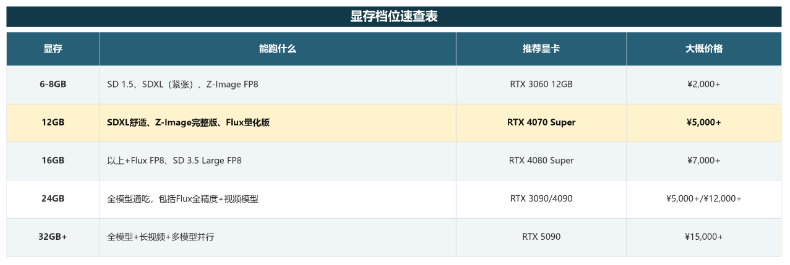
IF THE BUDGET IS LIMITED, THE 12GB IS A DESSERT SLOT THAT RUNS A 901 TP3T MODEL.
This is my most recommended start-up configuration。
How much is there in each of the 3.9 models
That's my actual data. It took a lot of time to get out one by one:
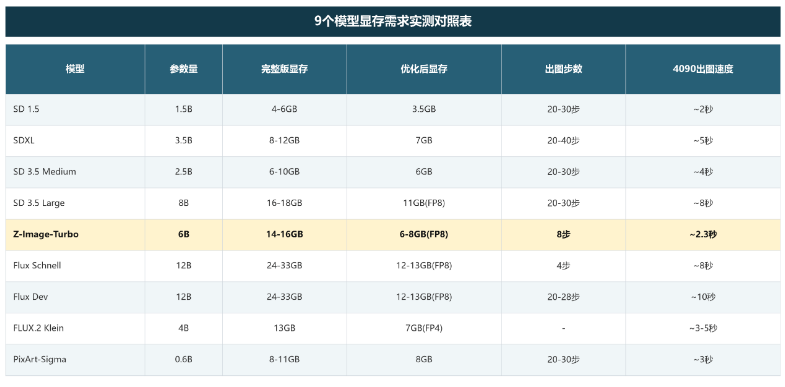
SDXL HAS ONLY 5GB AT 512 X 512 AND 16GB AT 2048 X 2048. SO DON'T PULL THE RESOLUTION AT ONCELet's see how small it works.
4. Secondhand 3090: The hidden king in my heart
If I could just recommend one card to someone with a limited budget, I would say:SECONDHAND RTX 3090.
Make yourself at home
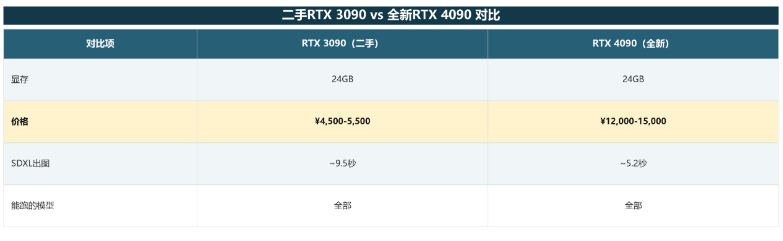
THE RATE WAS 451 TP3T, BUT ONLY ONE THIRD。
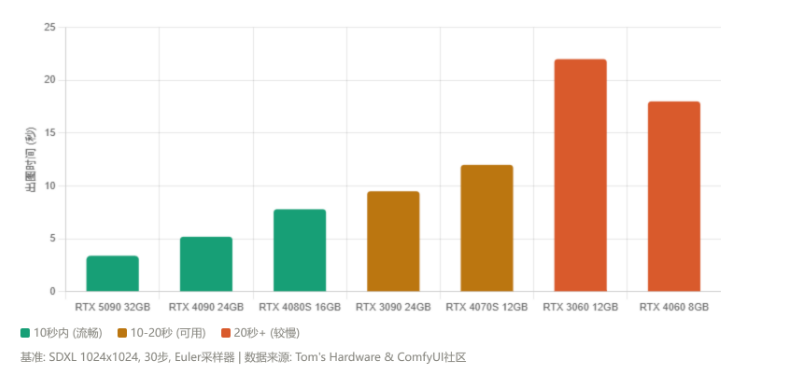
It's as big as it looks, and the model can run。For individual creators, 9.5 seconds of a graph and 5.2 seconds of a graph are really not so different。
The second-hand purchase of 3090 points: check GPU-Z for non-mining cards, run FurMark for temperature, check for visible particle types and purchase of vouchers。
5. Four sets of programmes directly budgeted for you
Introduction (hs. 3,000-5,000)
- VISIBLE CARD: RTX 3060 12GB (NO 8GB VERSION)
- CPU: i5-12400F / R5 5600
- MEMORY: 16GB
- Hard drive: 512GB NVME SSD
- POWER: 550W
DSD 1.5 flow, SDXL barely, Z-Image FP8 run. Flux can't run。
Personal strength (sw. 6,000-9,000)
- Card: RTX 4060Ti 16GB
- CPU: i5-13400F / R5 7500F
- MEMORY: 32GB DDR5
- Hard drive: 1 TB NVMe SSD
- POWER: 650W
This is my current configuration slot. SDXL in 9 seconds, Z-Image-Turbo in 8 paces and 10 seconds, the daily figure is fully adequate. Flux barely runs F1 Dev FP8。
Advanced (¥12,000-18,000)
- Card: RTX 4080 Super 16GB
- CPU: i7-1370K / R7 7700X
- MEMORY: 32GB DDR5
- Hard drive: 2TB NVME SSD
- POWER: 850 W
Flux FP8 is running and SD 3.5 Large FP8 can run. Suits people who need commercial figures。
¥20,000+)
- VISIBLE CARDS: RTX 4090 24GB OR 5090 32GB
- CPU: i9-1490K / R9 7950X
- MEMORY: 64GB DDR5
- HARD DISK: 2TB SSD + 4TB HDD
- POWER: 1000 W
All models, including video models. No change for the next 3-5 years。
6. Insufficient visibility? Don't change your cards yet
Many people's first reaction was to change the card if there's not enough to show it, but there is a way to save money。
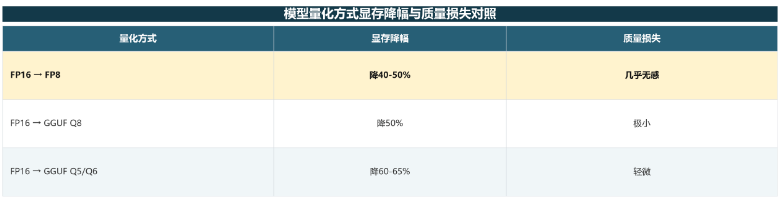
First move: Quantified precision (most effective)
The full version of Flux Dev requires 24 GGB, but the GGF Q4 can run 12 GGB with minimal quality loss. Z-Image-Turbo BF16 takes 16GB, so FP8 version 6GB can run。
ComfyUI original support, with a quantitative version selected at the Load Checkpoint node。
Second move: ComfyUI in optimisation
- VAE Decode enabled Tiled VAE to drop VAE phase 50%+
- start parameter plus –lowvram, automatically unmount non-used models
- Five-one-one-one-one-two, and Hires-six-- half of direct
THIRD MOVE: CLOUDY GPU
You don't want to pay for an upgrade? The cloud ends are paid on an hourly basis:
- AutoDL: RTX 4090 24GB, ¥2-3/h, pre-filled ComfyUI mirror
- RECTANGULAR CLOUD: RTX 4090 24GB, ¥2-4/H, 1 KEY DEPLOYMENT
Accounting: 50 hours per month x $3 = $150 per month. It cost 12,000 to buy 4090 for 80 months of the current cycle。
It's more cost-effective if it's not a daily run. Of course, dreams, bean buns, and so forth are more fragrant
7. Z-Image-Turbo exclusive reminder
I'm familiar with the Z-Image-Turbo model that I'm usingVery friendly:
Full version of the BF16: 14-16GB display (RTX 4060 Ti above)
FP8 EDITION: 6-8GB DISPLAY (RTX 3060)
EIGHT STEPS, RTX 4090, APPROXIMATELY 2.3 SECONDS PER SHEET
DOCUMENTS TOTALLING APPROXIMATELY 19GB (MODEL 12GB+ TEXT ENCODER 7GB+VAE 335MB)
My sincere advice
IF YOU'RE JUST STARTING TO LEARN TO DRAWLeave the hardware alone.
Tens of dollars to rent a cloud, 4090 for a month, first to identify their needs。
You know what you need -- maybe you find out you don't need to run locally, or you think the clouds are too expensive to match。
It's more useful than my strategy. It's how you actually run for a month。
Of course, if you've made sure to match the machine, just follow the four options。