



IN THIS TIME OF AI, MAKE A CUTShort VideoWhat are the core obstacles
No money for equipment? No time for editing? Still no good ideas
Neither。
And what really stands in your way -- you're still doing the video, and others are already making the video。
WHEN YOU'RE STILL MAD ABOUT KEY FRAMES AND TURNBACKS, I'M ON ONE N8NWorkflow, has been "repeated" with one key, with 100 short blast videos。
Auto-generated short video, one-clicked film, farewell clips! Today, I'll share this flash-off video workstream with you
YOU LIKE TO BUILD N8N, DON'T MISS IT
Overview of work flows
In designing the work stream, I consider two dimensions, free of charge and free of charge, to support the editing of pictures and video clips。
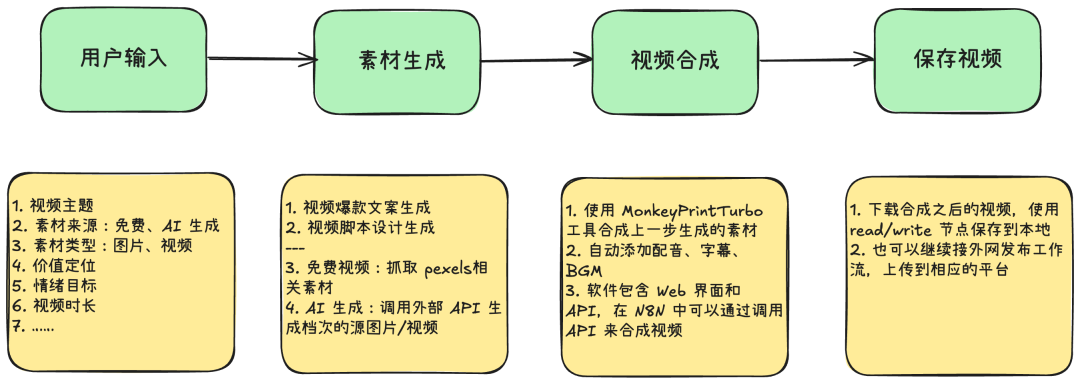
AS A RESULT, THE N8N WORKING-FLOW FRAMEWORK IS AS FOLLOWS:
- Based on the video information entered by the user, the short video file is generated by a large model to disassemble the script。
- Supports the generation of free short videos (locally generated)。
- SUPPORTS THE CALL FOR LARGE MODELS TO GENERATE AI PICTURES, AI VIDEOS。
- Supporting local auto-cuts, voice ads, subtitles。
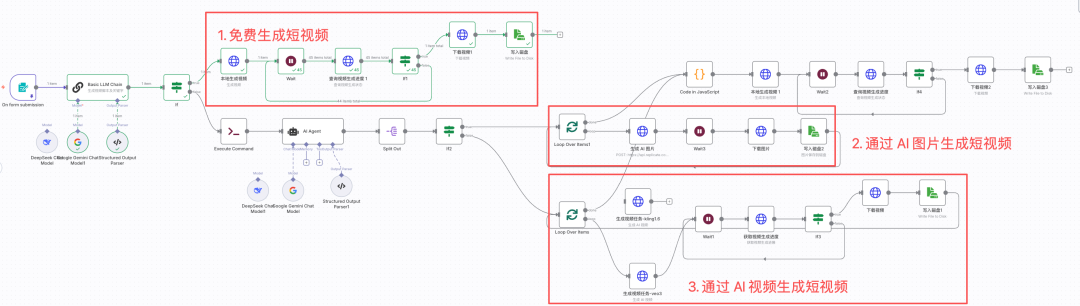
This workflow framework is flexible, plastic and scalable. Now, let's look at the setup of the different parts。
Preparatory work
My N8N is deployed locally on MACBook Pro and is also used for the scene where N8N is deployed to the cloud server。
Two tools are needed:
- MoneyPrinturbo (https://github.com/totothink/MoneyPrinturbo) is deployed locally, providing only one video theme or keyword to generate video text, video material, video subtitles, background music, voice ads, and then a short high-resolution video。
- Replicate (https://replicate.com/) is a large model of the API aggregation platform (in-country, directly accessible and called API). It contains a complete version of a large model, with prices equal to those of the official network, which can easily compare effects. But the main thing is that its API call is very simple and perfect for the pain of being fit for the big models API。
AS OUR FRIENDS REMEMBER, WITH THE SIGNATURE IN THE API, IT'LL GIVE THE HORN A FEW WHITE HAIRS
At the same time, with this condensation station, I can adjust the large model as quickly as possible until I can find the effect I like。
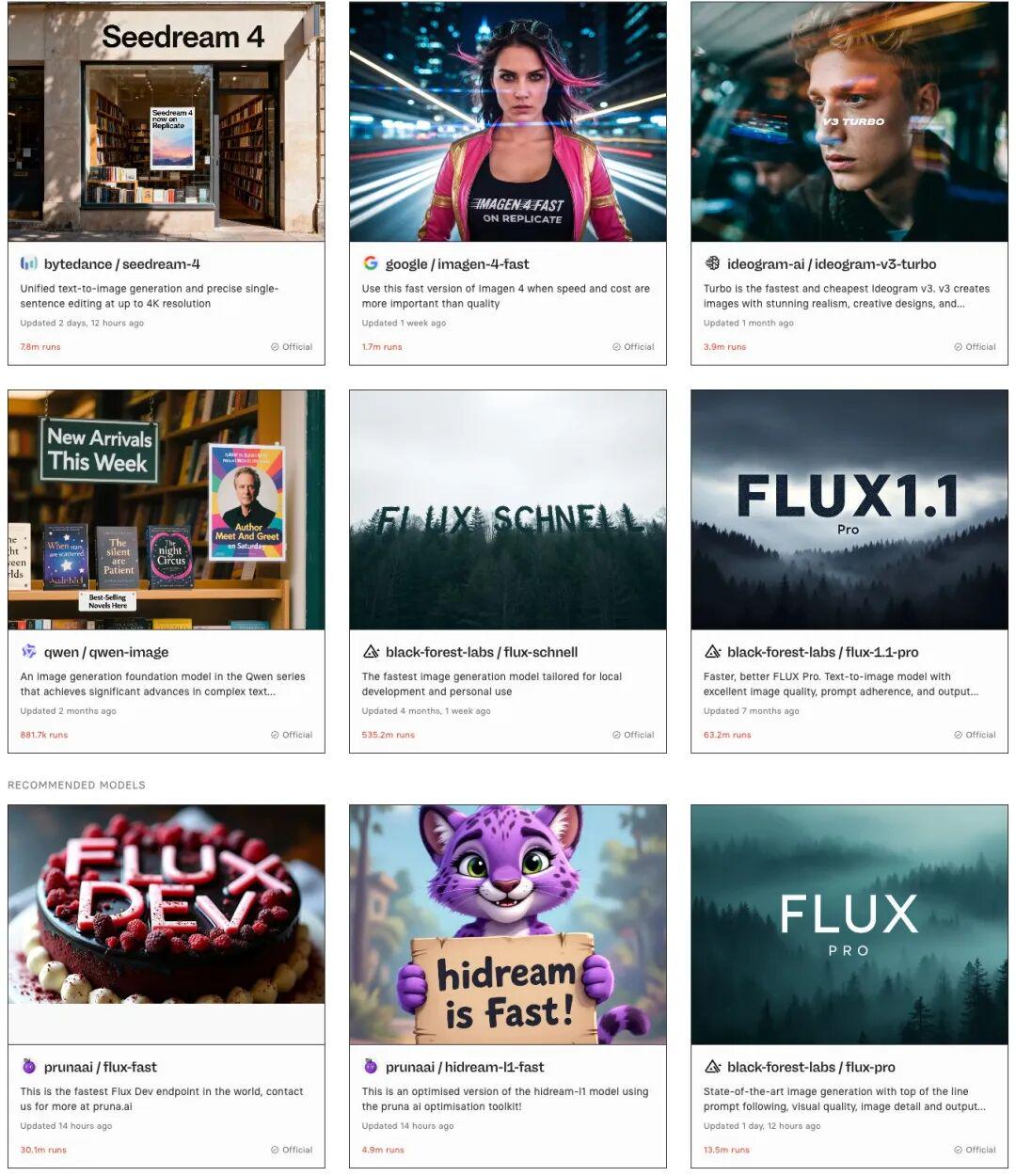
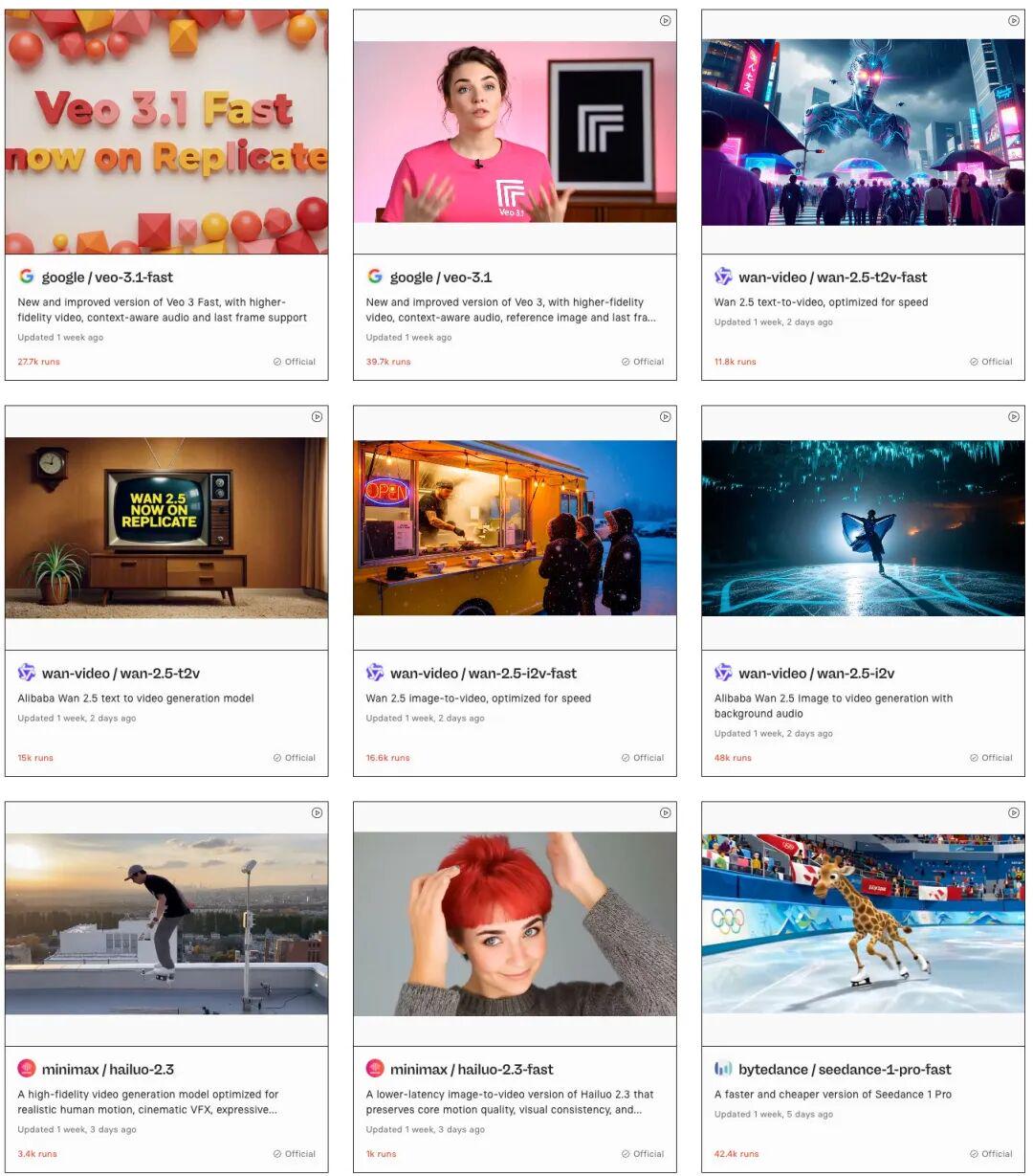
(i) Money Prince Turbo
MoneyPrinturbo is an open-source short video generation tool deployed locally. The deployment process is not complex, and I'm going to use MAC as an example。
Docker desktop is installed when N8N is deployed locally. MoneyPrinturbo is also operating in a docker mode in this section, and there is a need to install docker desktop on the computer, and the installation process is not exhaustive。
Step 1: Download project files
1. Create a new folder on a computer to store project files with a self-defined name, such as Money
Opens the computer terminal, enters the Money folder and performs the following commands, pending download completion。
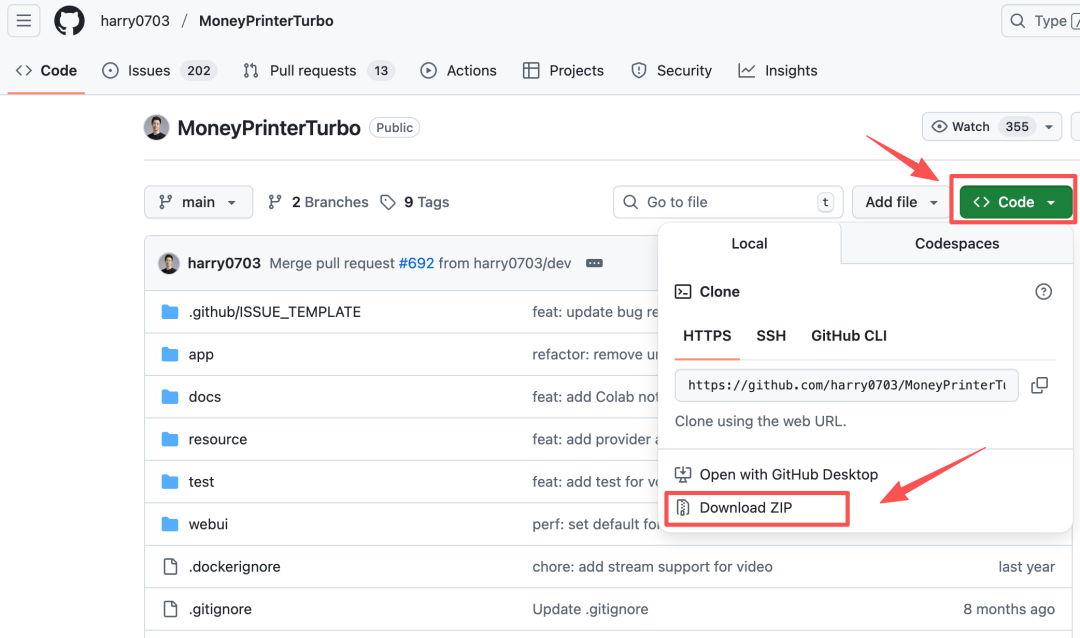
i'm sorry to bother you, but I'm sorry, but I'm sorry, but I'm sorry, but I'm sorryIf you download it slowly, you can also access the website at https://github.com/harry0703/MoneyPrinterTurbo, downloading the project document, as shown in the figure below。
Step 2: Modify Profile
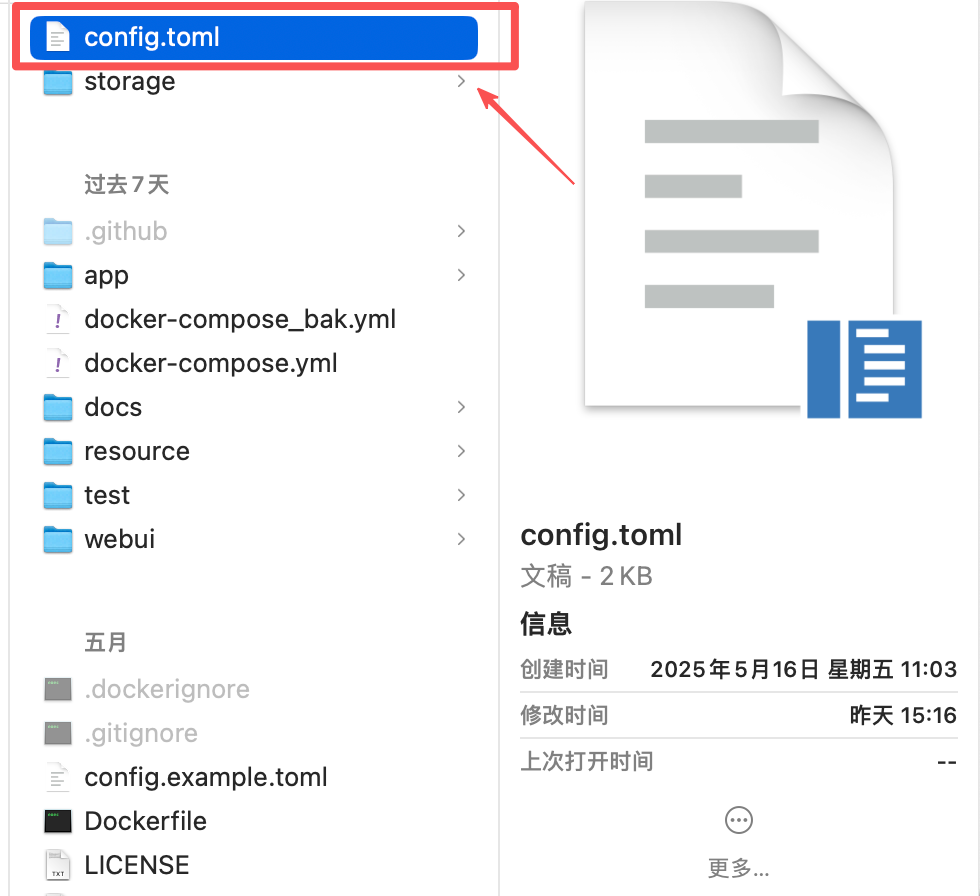
1 copy a copy of the project document config.example.toml and renamed config.toml。
2. opens the docker-compose.yml file and edits it using text tools。
The next left figure is the default content, and the right figure is the modified content。
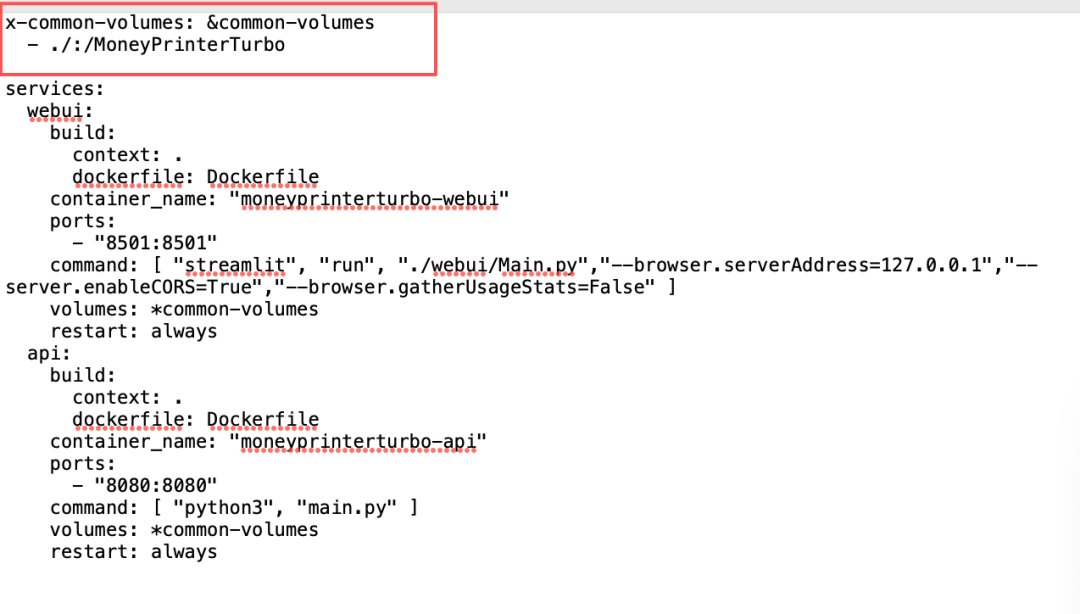
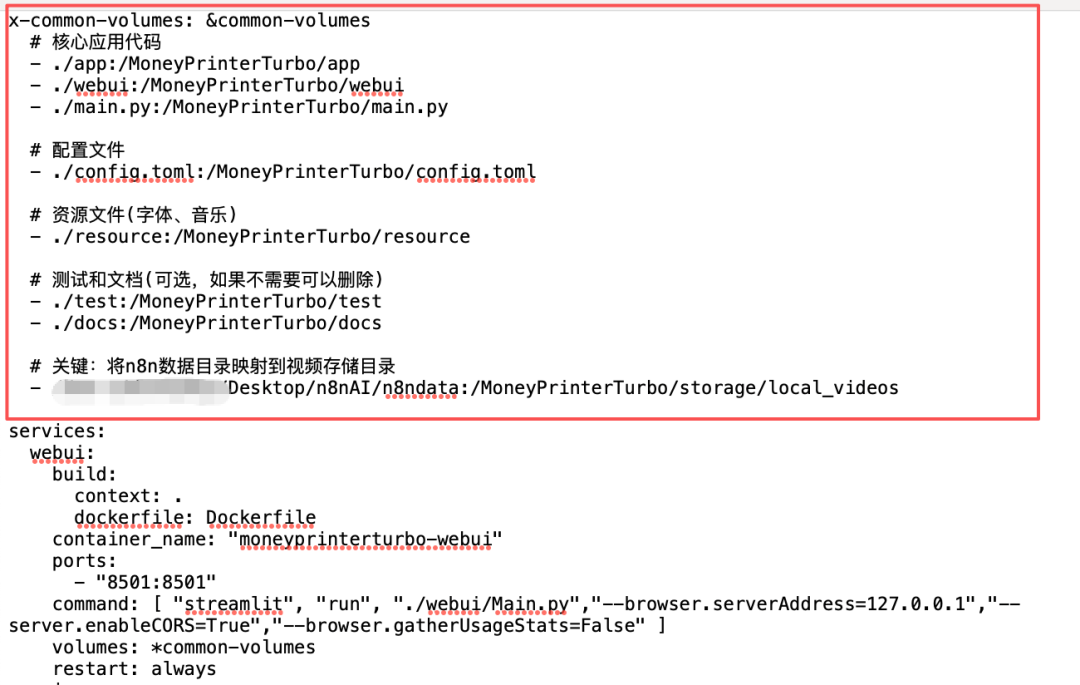
MoneyPrinturbo runs in a docker mode, so we cannot access the docker file directly, so this profile is used to map the local directory with MoneyPrinturbo directory。
THIS ROW BELOW CONFIGURES THE N8N DATA DIRECTORY (n8ndata) A catalogue map of the video generated by MoneyPrinturbo allows MoneyPrinturbo to read or write video files in N8N's data directory。
x-common-volumes: & Common-volumes
# Core Application Code

- .../app:/MoneyPrinturbo/app

- .../webui:/MoneyPrinturbo/webui

- ./main.py:/MoneyPrinturbo/main.py

# configuration file

- .../config.toml:/MoneyPrinturbo/config.toml

# resource file (in font, music)

- .../resource:/MoneyPrinturbo/resource

# test and document (optional, if not necessary)

- .../test:/MoneyPrinturbo/test

- .../docs:/MoneyPrinturbo/docs

# Key: map n8n data directories to video storage directories

-/Users/deanyang/Desktop/n8nAI/n8ndata:/MoneyPrinturbo/storage/local_videos
Step 3: Install MoneyPrinturbo。
1. Open the terminal and enter the directory where the MoneyPrintTurbo project is located. Take my computer, for example:
cd/Users/deanyang/Desktop/study/MoneyPrinturbo2. Execute orders, automatically install
docker compose up -dThis process will load the necessary documents, and the download will take longer until it is installed。
On installation, I had an error:
“ERROR [webui international] load metada for docker.io/library/python: 3.11-slim-bullseee”
a solution was found after asking about claude:
docker pull docker.m. daocloud.io/library/python: 3.11-slim-bullaseye docker tag docker.m. daocloud.io/library/python: 3.11-slim-bullseye python: 3.11-slim-bullseye
docker compose up -d
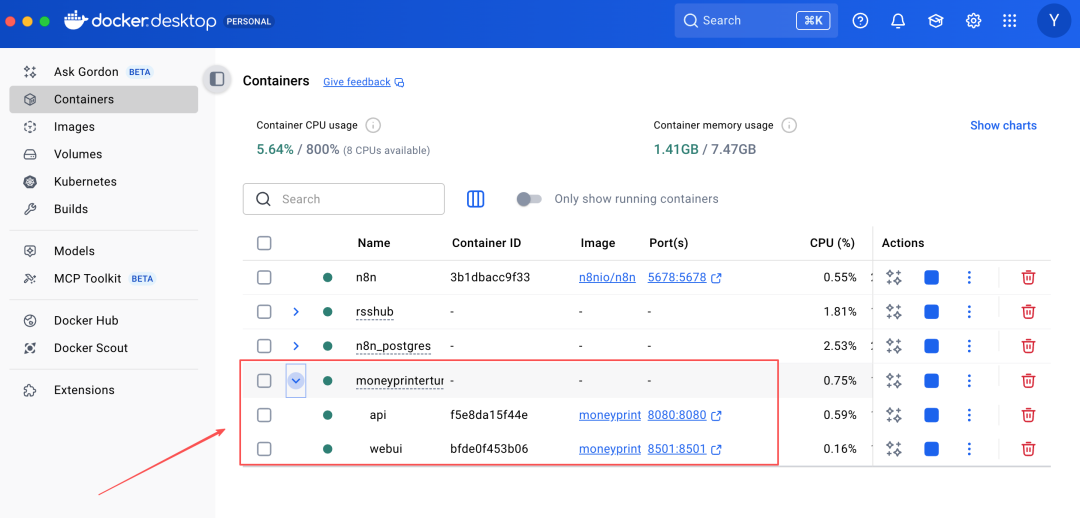
3. When the installation is complete, open the docker desktop-Containers, and see MoneyPrinturbo ' s container, which is working。
Step 4: Web end configuration。
Access Web management interface: http://127.0.0.1:8501
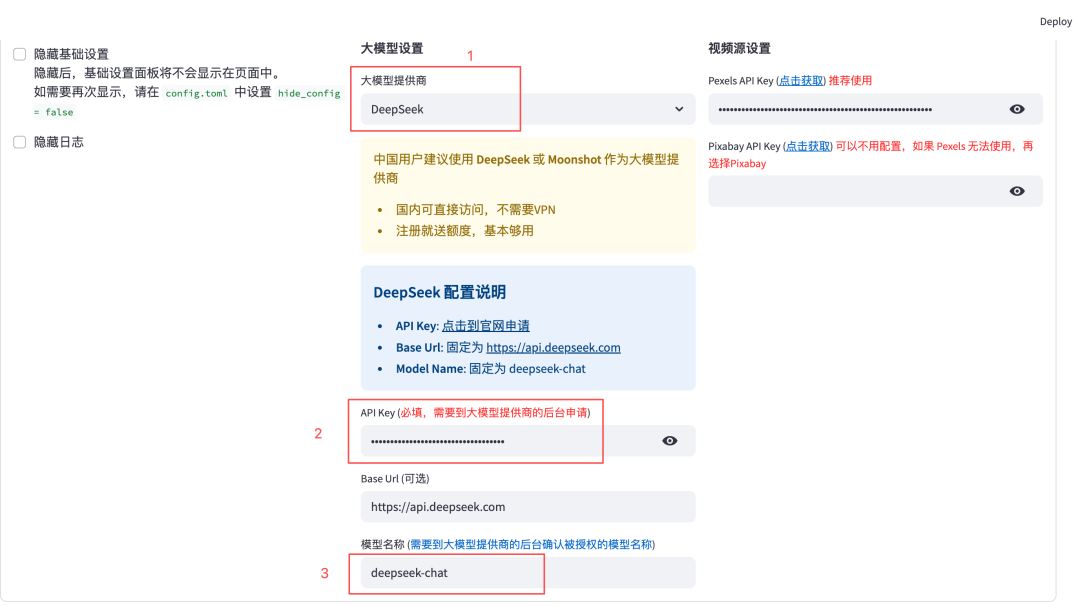
2. Selection of large models
I choose DeepSeek or Gemini. You can choose, as you want, to fill out the API Key and model names for the big model。
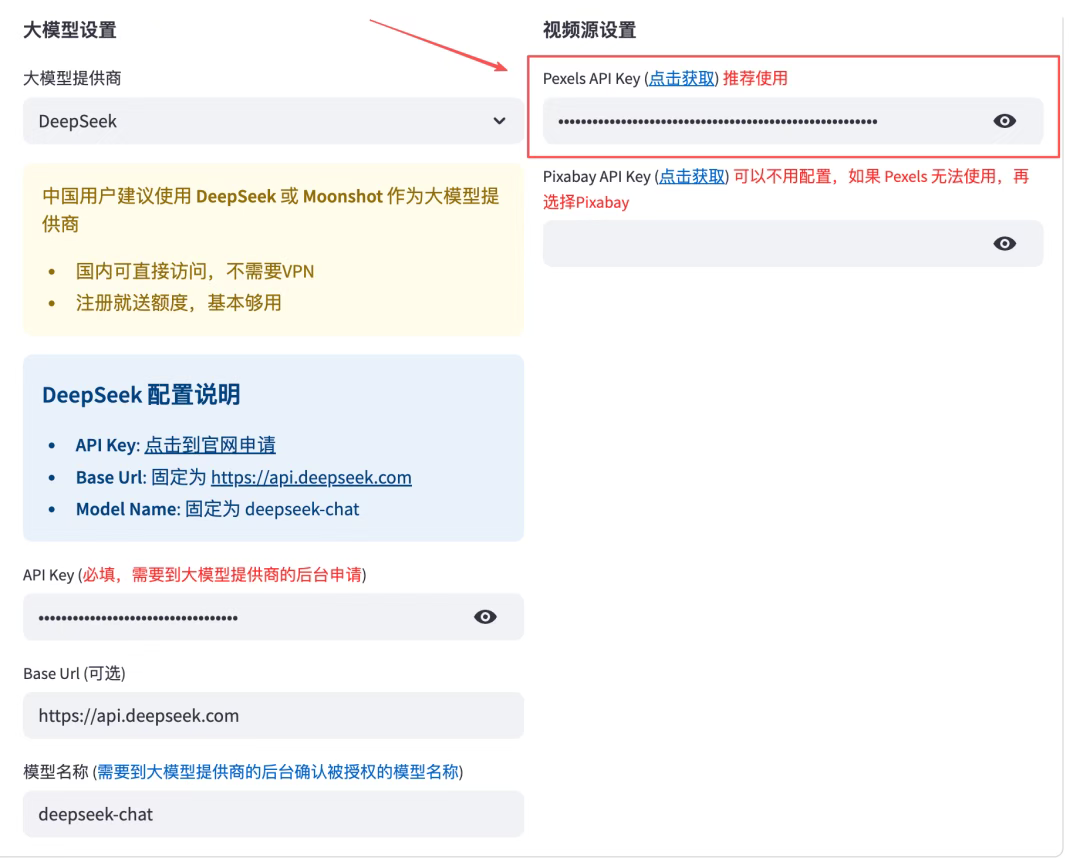
3. Configure video sources
Just fill in Pecels API Key. Click " Click to get " , register Pecels, and get API Key。
The registration process is not repeated here, and if there are questions, leave a message in the comment area:)
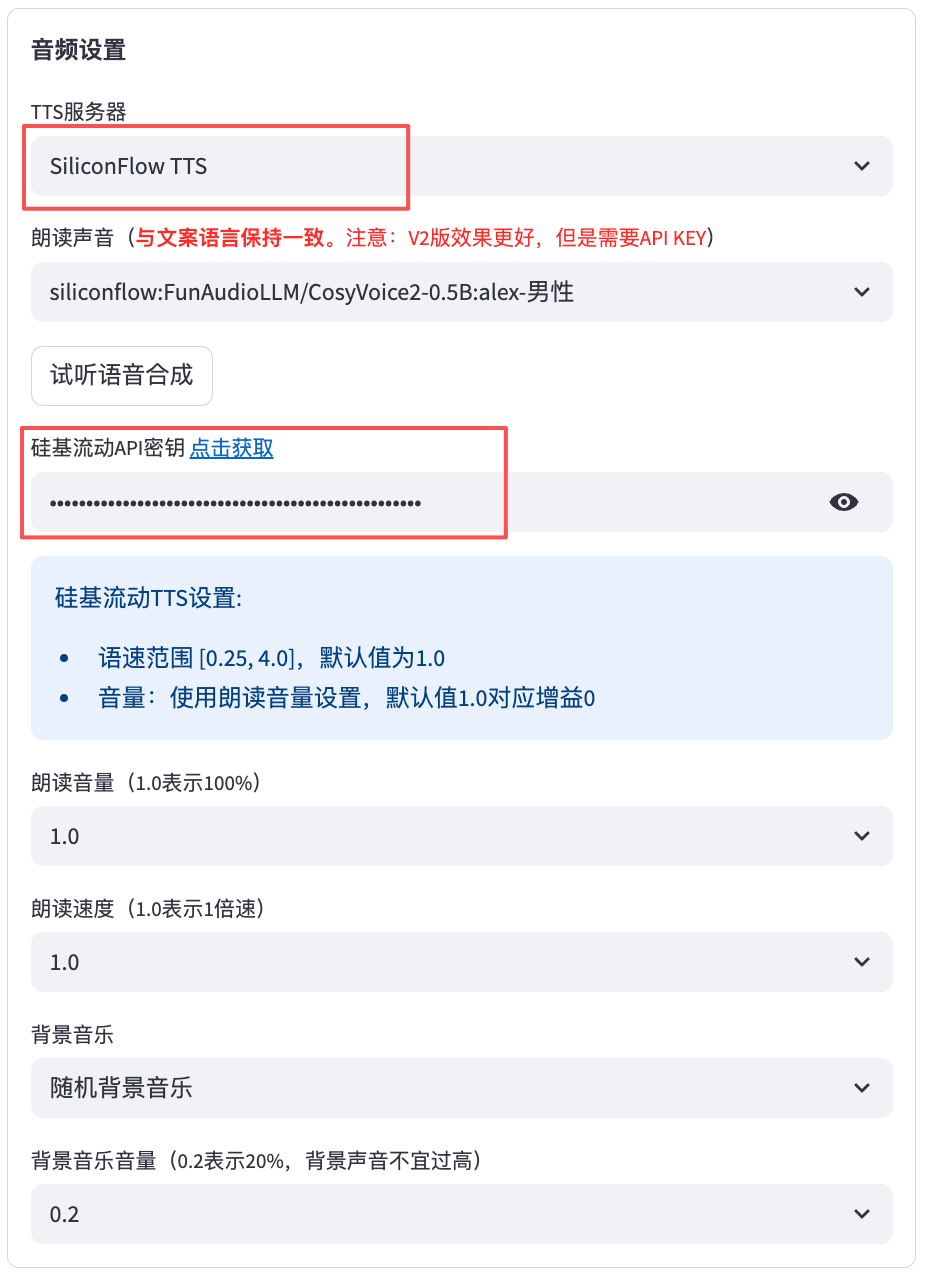
4. Audio Settings (Symphony)
The TTS server selects SiliconFlow TTS, free of charge, with better audio effects. Follow the hint, register/entry silica flow, create API Key, complete. As shown in the figure below:
Video set-up and subtitle set-up, everybody adjust as needed。
Step 5: Know API Interface
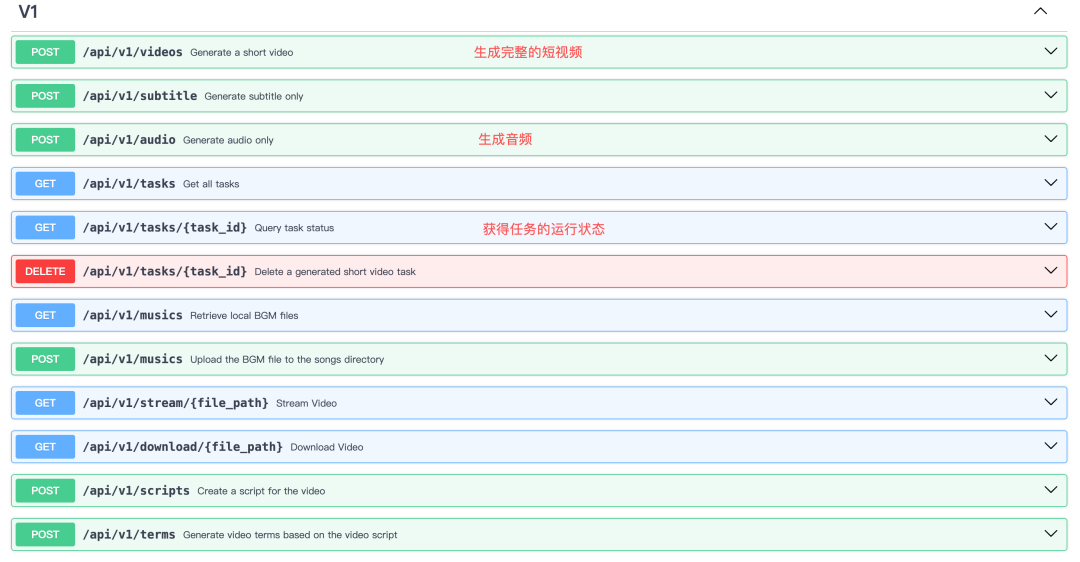
Opens the API doc (http://localhost:8080/docs) primarily for the interfaces “Generating short video”, “Acquiring task operational status”。
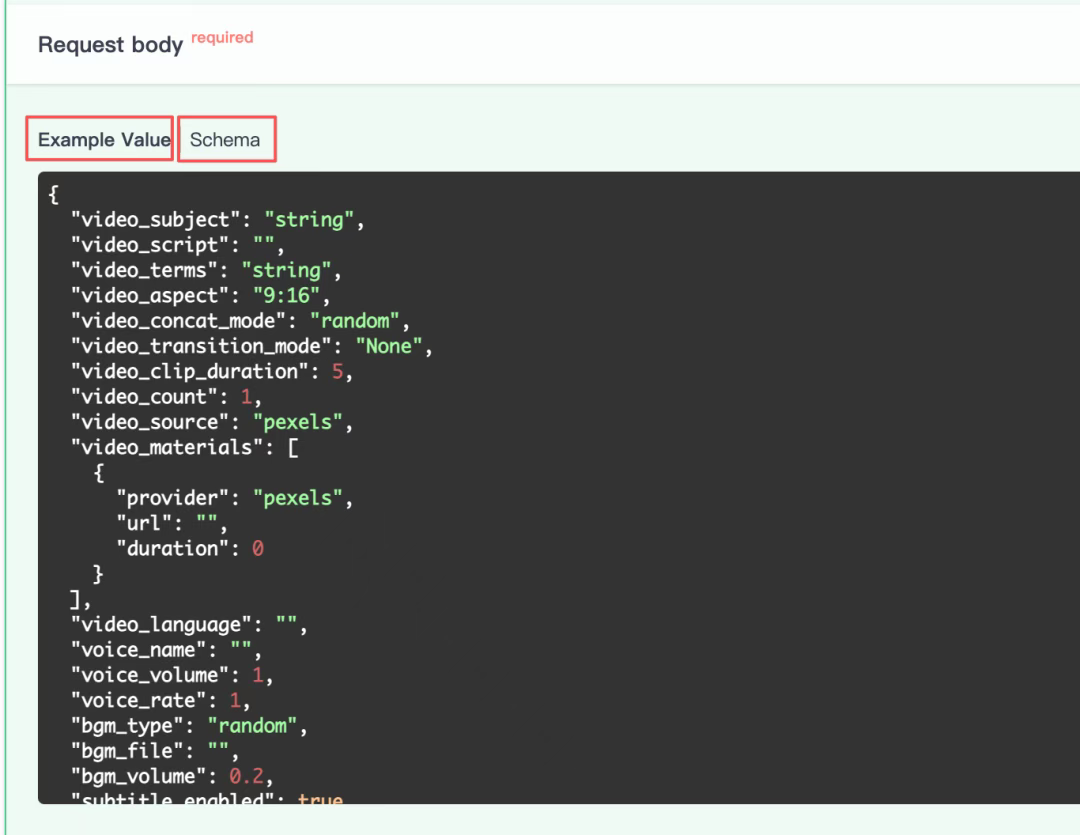
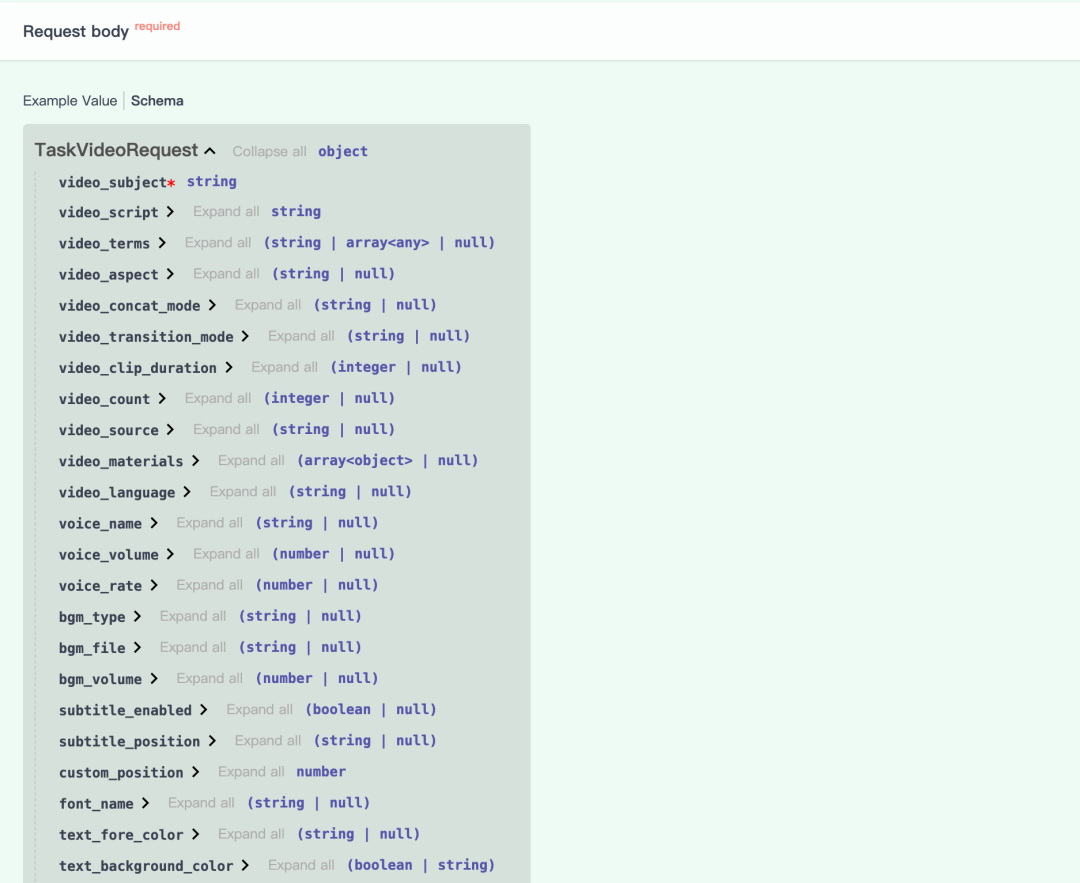
An example of specific parameters can be found by opening one of the interfaces, as shown in the figure below. If you want to know the value of a specific field, click "Schema"。
Step 6: Restart MoneyPrinturbo service
Modify the configuration to open the terminal and enter the MoneyPrinturbo directory. Execute:
i don't know, docker copose up-ddocker copose restartThis way the configuration modified at the Web end can be synchronized when API calls。
(ii) Replicate
Replicate is an AI large model API polymer station abroad, a small treasure I recently discovered. The model is complete, updated in real time, and you can see the number of calls for each model (I guess it's just a multiple effect). Prices are essentially the same as the official network. We can switch models at will, very conveniently。
Step 1: Register and Login
1. access to the website (https://replicate.com/), registration and access。
you can log on to the web site through the github/google account
Step 2: Basic Configuration
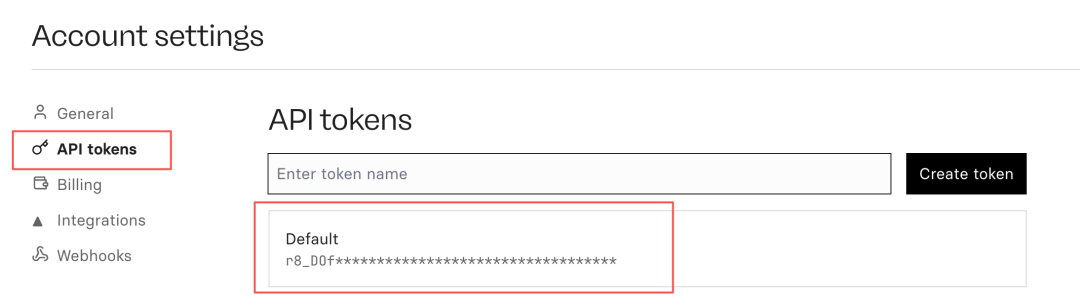
1. Create an API Token to access the web site: https://replicate.com/account/api-tokes, create a token to record for retention。
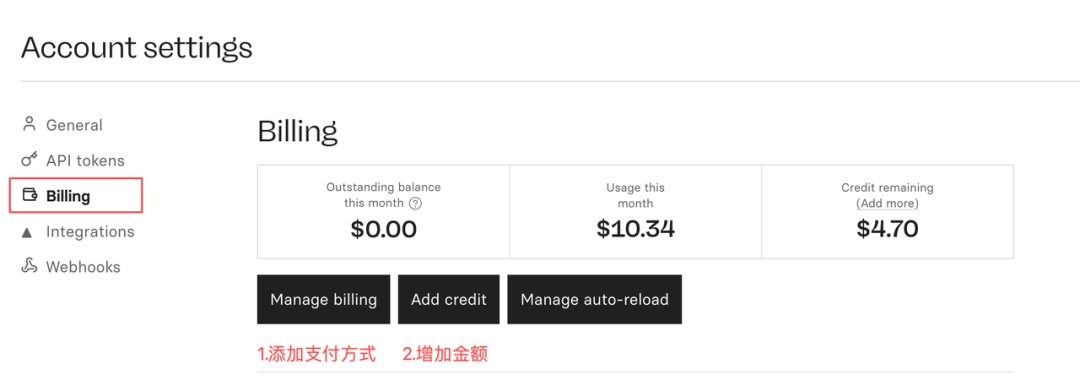
2. Add payment modalities。
Access: https://replicate.com/account/biling, click Manage Billing, add a credit card. Credit cards can be directly used for domestic money union credit cards and can be easily added and paid。
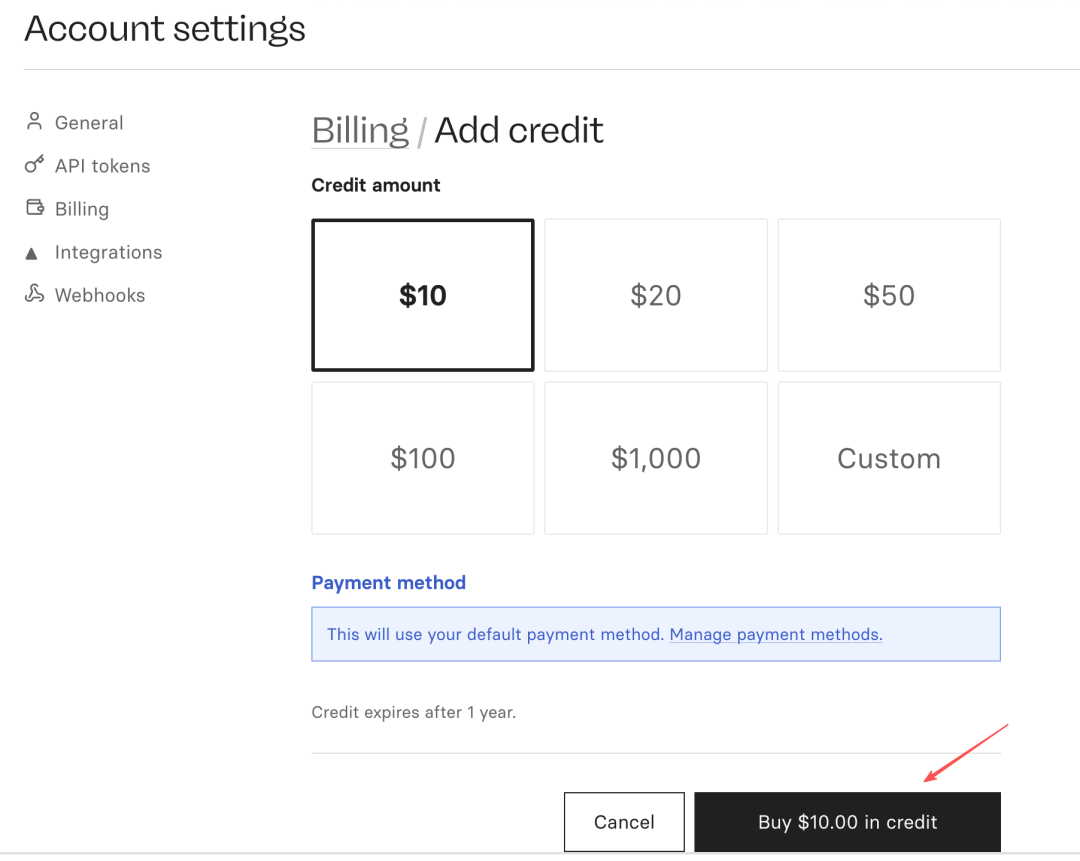
Add a credit card and click on "Add credit", just buy it。
Step 3: Select Big Model
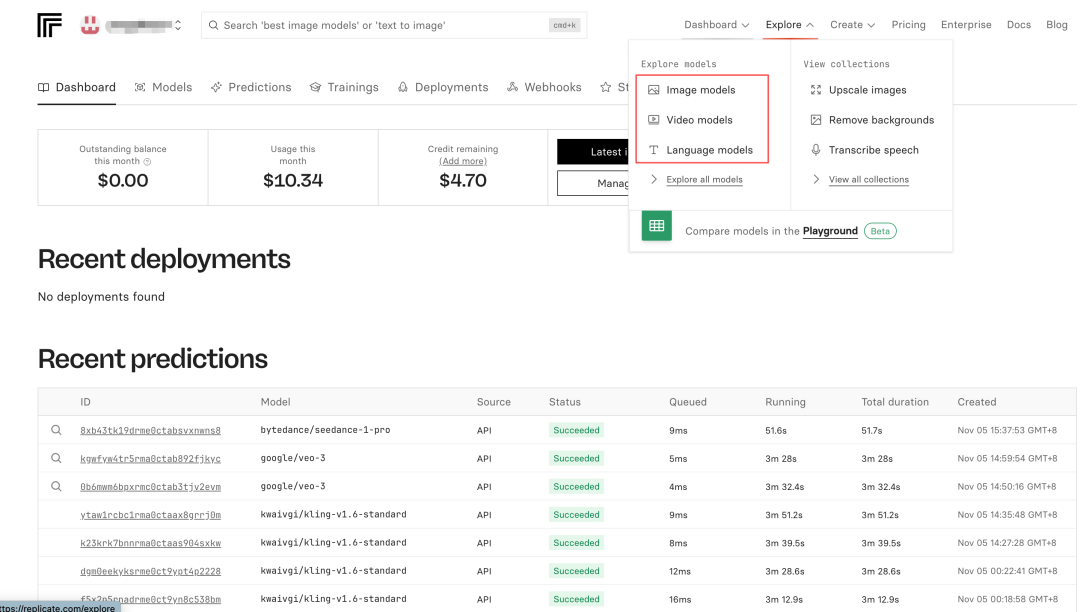
In the top right corner of the site, "Explore" is found, and you can find pictures, video models, language models。
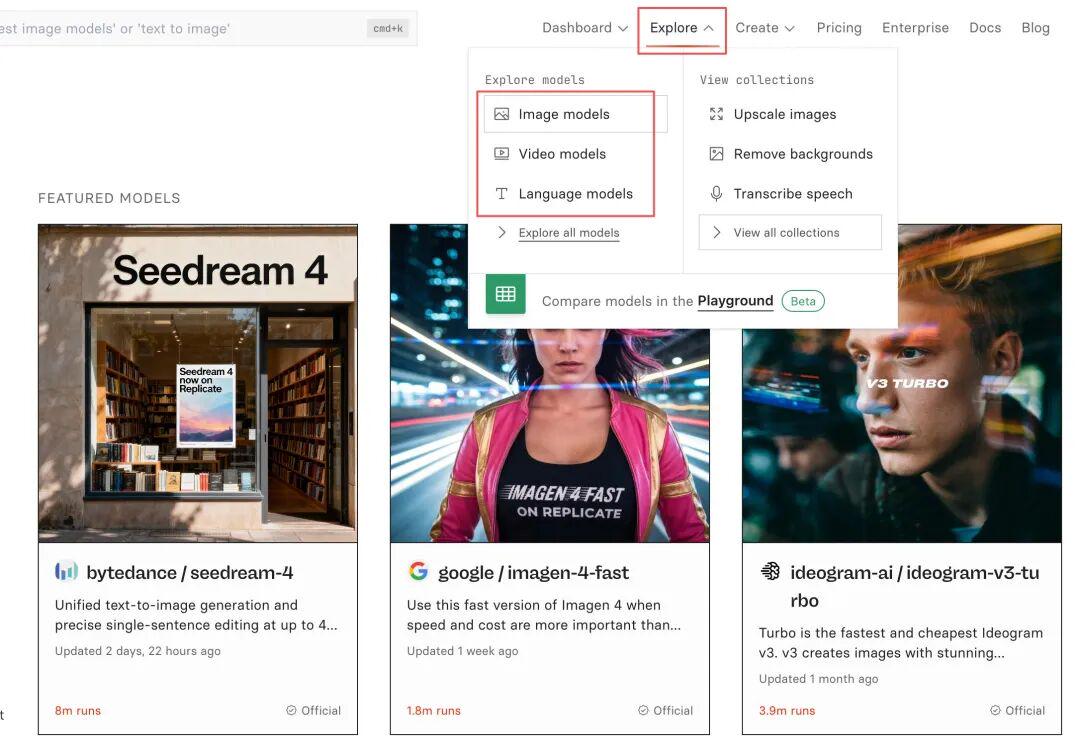
Using video models as an example, we found Google veo-3 and clicked on the details page to see the number of calls, the price, and the parameters set。
ON THE JSON PAGE CARD YOU CAN FIND THE REQUESTING BODY, I.E. THE SPECIFIC PARAMETERS REQUESTED BY THE INTERFACE; ON THE HTTP PAGE CARD YOU CAN FIND THE REQUESTED ADDRESS FOR THE API。
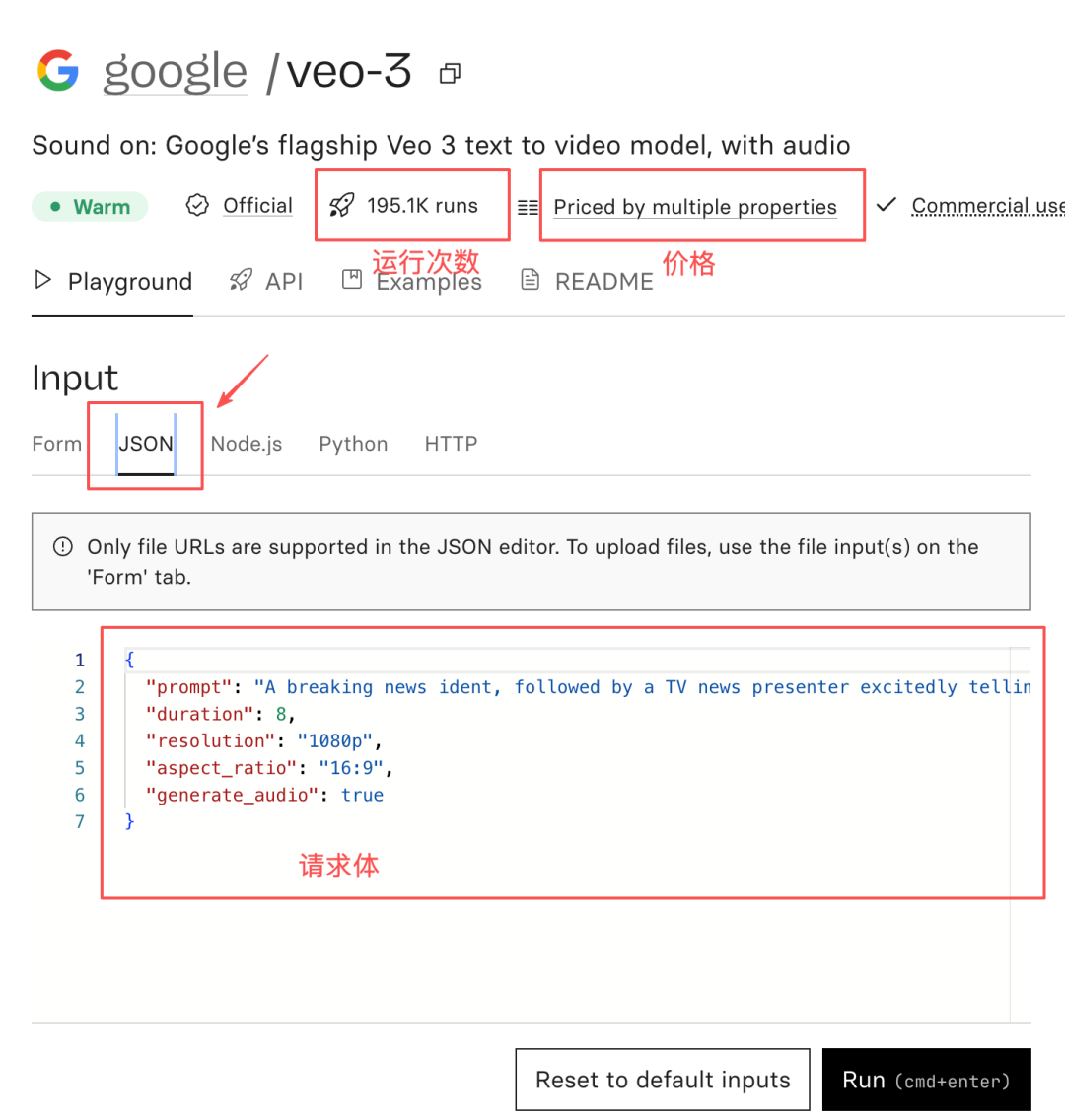
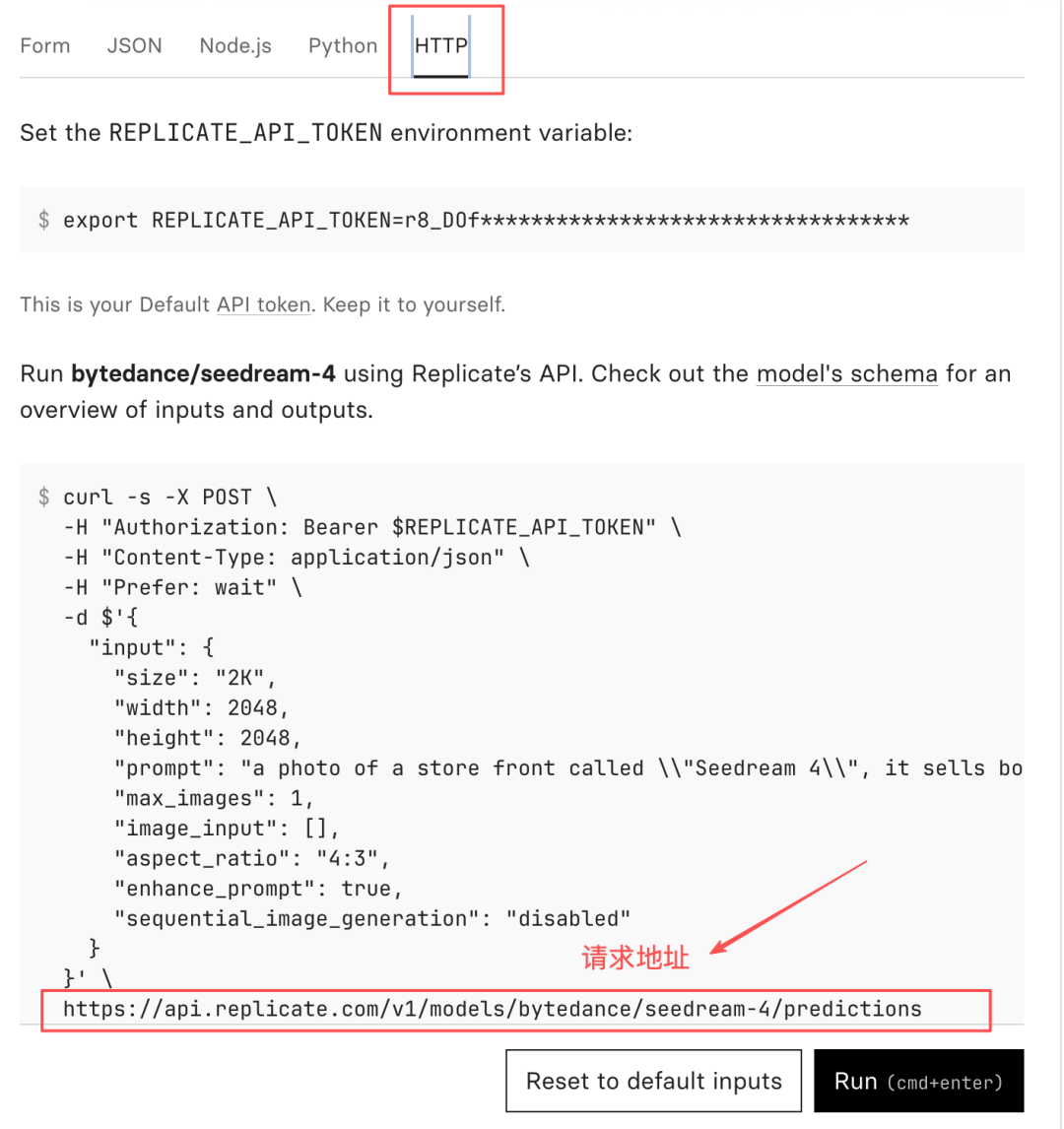
We can also view case effects in Examples. Other models are the same, where parameters and requested addresses are found and will be called at the N8N HTTP node。
III. TRANSFER OF WORK
(i) User input component
Step 1: Setup startup node
Select the "On FORm status" node, which will generate an interactive page entered by the user, suitable for input of video information。
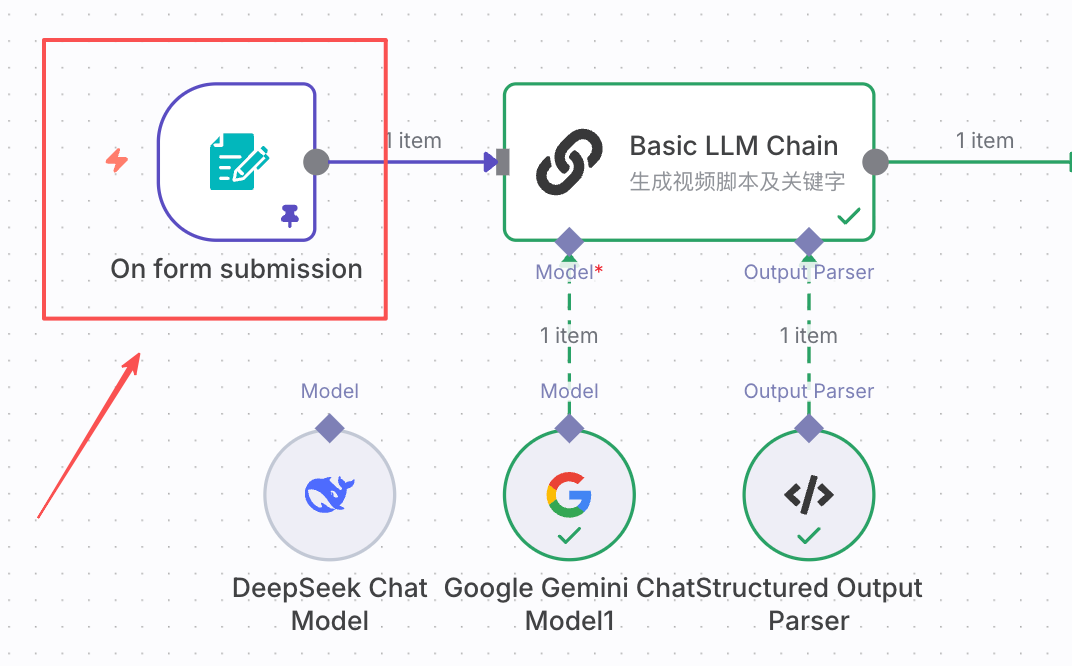
Step 2: Setup Form Contents
As shown in the following figure:
- Field Name: Options Name
- Element Type: Options type, which can be text, drop-down list, checkbox, password, etc., comprehensive
- Placeholder: text box hint text
- Option: Options for the dropdown list
- …
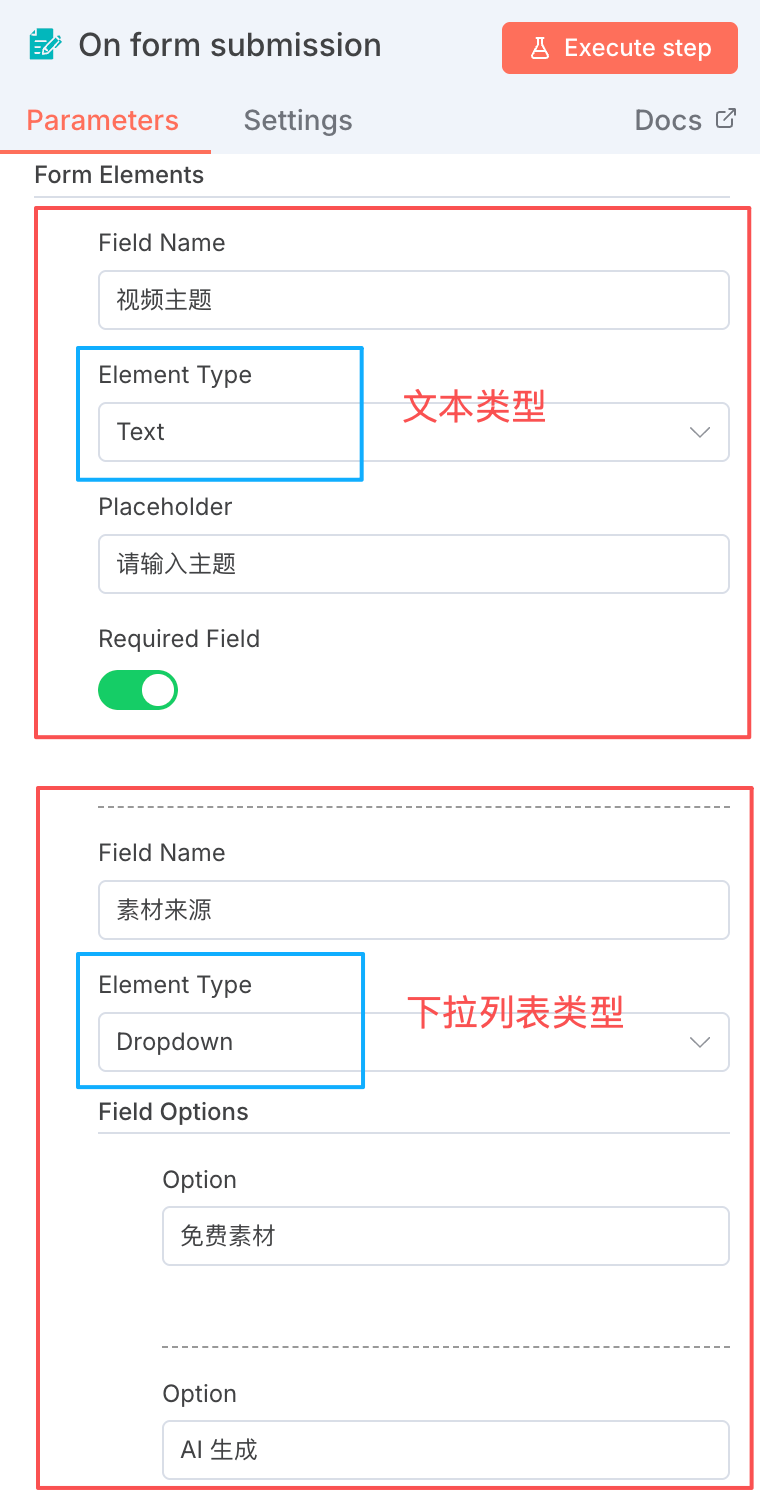
When set, run this node and pop up the page, as shown in the figure below。
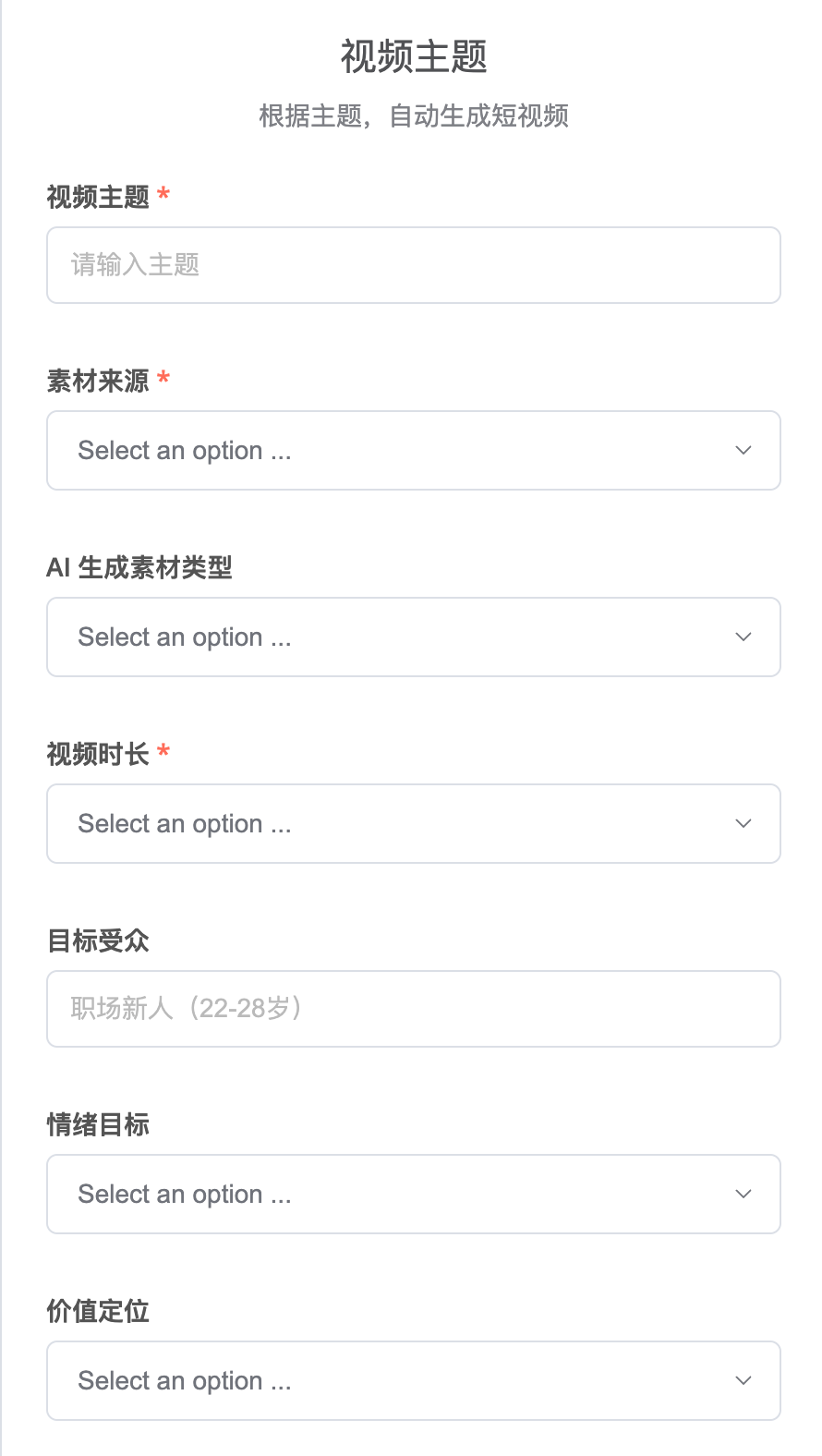
The options I have set out below. You can add or delete options based on your own understanding of the video。
SOURCE:
- FREE MATERIAL.
- AI GENERATION
AI GENERATION MATERIAL TYPE:
- PICTURES.
- VIDEO.
VIDEO DURATION:
- TEN SECONDS.
- 20 SECONDS.
- 30 SECONDS.
- 60 SECONDS.
EMOTIONAL TARGET:
- RESONANCE/MOMENT (FIT FOR CHICKEN SOUP, STORY CLASS)
- SURPRISE/SHOCK.
- CURIOSITY/MYSTICAL (SPECIAL PERSPECTIVE, UNKNOWN SCENE)
- DESIRE/DESIRED.
- HEALING/RELAXING (SUITABLE FOR VIEWING, SLOW LIVING)
- HAPPY.
- LONELY/ LONELY
- BEST MATCH WITH THE BIG MODEL.
VALUE POSITIONING:
- IT RESONATES.
- INTERESTING.
- USEFUL (KNOWLEDGE + GRAPHIC)
- BEST MATCH WITH THE BIG MODEL.
IMAGE TYPE:
- NATURAL LANDSCAPE SYSTEMS (RAIN, SNOW, SEA, MOUNTAINS, FORESTS, SUNSET)
- MARKETSCAPE SYSTEM (STREET, CAFÉ, WINDOW, NIGHT VIEW)
- STILLS (BOOKS, COFFEE, FLOWERS, HANDWRITTEN)
- ABSTRACT SENSE SYSTEM (PHOTO, PARTICLE, COLOUR, INK)
- MIXED FUSION (MULTIPLE IMAGE QUICK SWITCH)
VISUAL STYLE:
- FILM SENSE.
- XIAO XING (LIGHT, SOFT, WARM)
- SEBASTIAN.
- INK WIND.
- NATURAL.
- BEST MATCH WITH THE BIG MODEL.
STARTING HOOK:
- THE GOLDEN PHRASE BEGINS, LIKE, "IN THIS..."
- QUESTIONING, LIKE, "DID YOU...?
- SUSPENDED, LIKE, "IT'S VERY RARE TO KNOW..."
- BEST MATCH WITH BIG MODELS.
END GUIDE:
- DIRECTING COMMENTS LIKE, "HOW ABOUT YOU?" " ... "
- IT'S GOOD. LIKE, "YEAH, GOOD."
- MAKE SUSPENSE, LIKE: "NEXT TERM..."
- FINISH THE SENTENCE.
- NO CLEAR GUIDANCE (NATURAL END)
- BEST MATCH WITH BIG MODELS
WHEN CHOOSING “FREE” TO PRODUCE THE VIDEO, YOU NEED ONLY FILL IN THE VIDEO THEME AND THE VIDEO DURATION. SELECT "AI GENERATE " TO MAKE VIDEOS, SO YOU CAN SELECT ALL THE ABOVE OPTIONS。
(ii) Generating short video files
At this stage, I called for a large-scale model to generate short video files, in line with the video requirements of the previous step。
Step 1: Add node。
Add the Basic LLM Chain node。
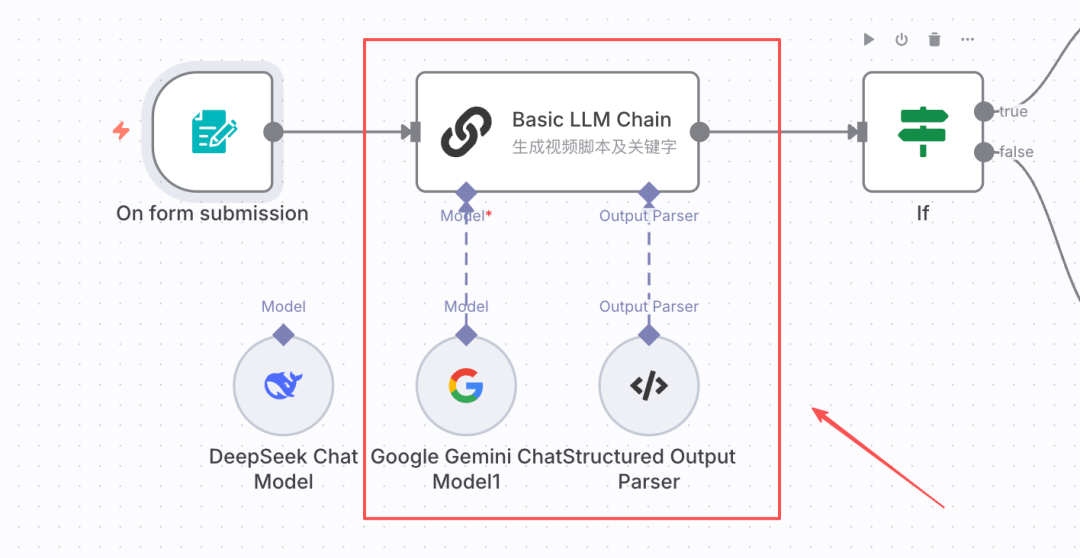
Step 2: Add Big Language Model
Add Model, I use Gemini 2.5 Flash. Everyone with DeepSeek is perfectly possible。
IF THERE IS ANY DOUBT ABOUT THE METHOD OF ASSURANCE, LEAVE A MESSAGE IN THE COMMENT AREA AND I CAN DEVOTE A SPECIAL ISSUE TO A “COMMON N8N TOOL POOL”。
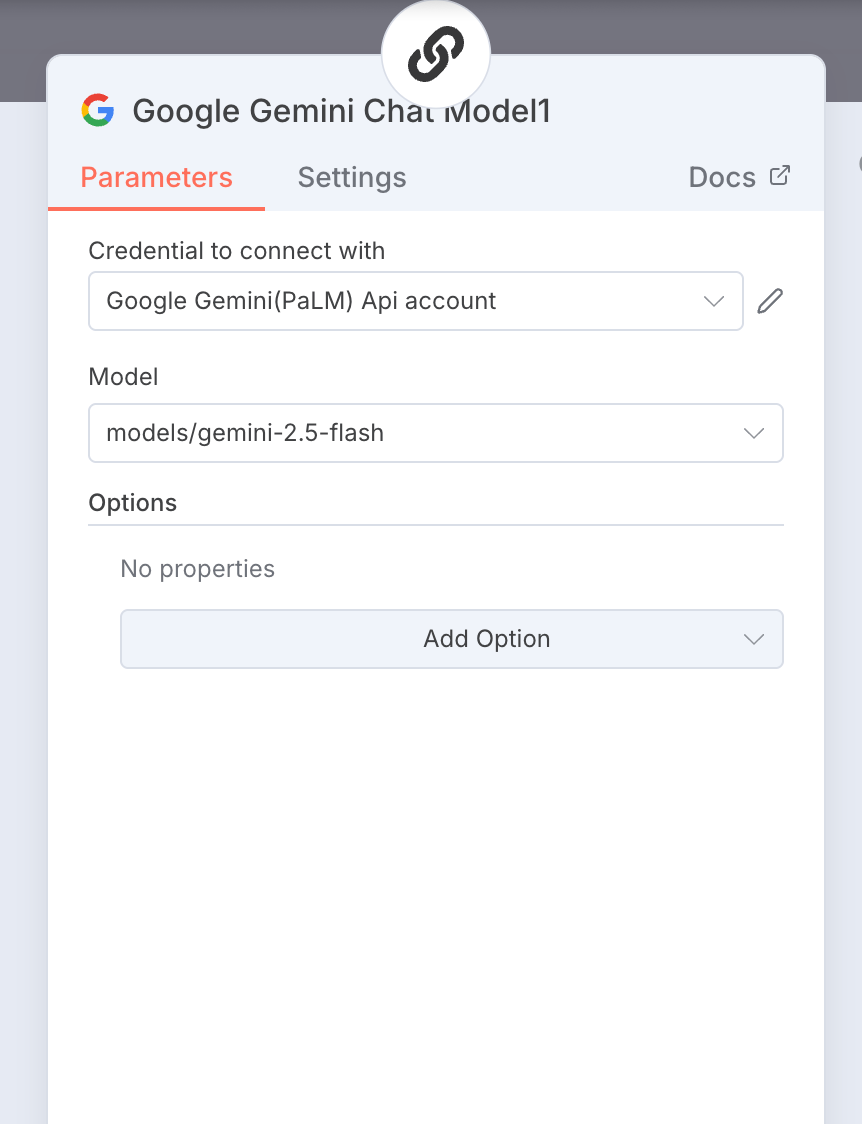
Step 3: Set the hint。
1. User alerts
Enter all videos requested。
- The theme of the video is:
{1 TP4T('On FORm Submission').item.json ['Video Theme'}
- Video duration: {1 TP4Tjson ['video duration'}
- Target audience: {1 TP4Tjson [`target audience'}
- Emotional target: {1 TP4Tjson}
- Value positioning: {1 TP4Tjson['value positioning'}
- Picture type: {$json}
- Visual style:
- Initial hook type: {1 TP4Tjson['open hook type'}
- End design: {1 TP4Tjson ['end design'}
2. System Hints
At this step, two content, one short video text and one keyword (for increasing material and subject relevance) were generated
# Role
You're an expert in short video writing, and you're very good at writing short video by-censor. Direct output of the final text without explanation。 ## MISSION 1. CAREFULLY UNDERSTAND THE VIDEO REQUIREMENTS (PARAMETERS) ENTERED BY THE USER; 2. DIRECTLY GENERATE: - SHORT VIDEO BY-CENSOR CASES WITH HIGH COMPLETION RATES, ACCORDING TO THE VIDEO REQUIREMENTS PROVIDED BY THE USER. - PRECISION KEYWORDS FOR MATERIAL SEARCH AND AI VIDEO GENERATION. ## CREATION RULE 1 ** WORD CONTROL**: CALCULATION OF THE WORD COUNT BASED ON LENGTH OF TIME - APPROXIMATELY 4-5 CHINESE WORDS PER SECOND (NORMAL SPEED) - E.G. 20 SECONDS VIDEO = 80-100 WORDS 2. ** MUST BE CAPTURED AT THE BEGINNING** (FIRST 3 SECONDS PRINCIPLE) - GOLDEN SENTENCE OPENING: DIRECT RELEASE OF IMPACTIVE VIEWS OR FEELINGS ** (FIRST 3 SECONDS PRINCIPLE) - QUESTION-STYLE: CAUSING CURIOSITY OR RESONANCE IN QUESTION TERMS - SUSPENDED: CREATION OF INFORMATION GAP, MAKING PEOPLE WANT TO SEE ANSWERS 3. ** EMOTIONAL ** (INTERMEDIATE) - AVOIDANCE OF SMOOTHING, CONTRASTING OR INVERTING - SELECTION OF LANGUAGE RHYTHMS BASED ON "EMOTIONAL GOAL": * HEALING, SOFTENING, WARM, * WHITE * SHOCKING, STRONG, SHORT SENTENCES, PASSING * CURIOSITY, CRUCIFIXING, DECRYING, LEVEL PUSH * MOVING TOWARDS IMAGE, IMAGINATION, 4.** ENDING WITH ACTION ** - LEADING TO COMMENT, E.G. 5. ** "HAVE YOU MET?" ** ** ** ** ** ** ** ** ** ** ** ** ** ** ** ** ** ** ** ** ** ** ** ** * * * * * * * * * * * * * * * * * * * * * * * * * * * * * * * * * * * * * * * * * * * * * * * * * * * * * * * * * * * * * * * * * * * * * * * * * * * * * * * * * * * * * * * * * * * * * * * * * * * * NO SUBPARAGRAPHS, NO LABELS. ## EXAMPLE **INPUT:** THEME: AUTUMN RAINS, MY LOVE ' S SILENT SEASON  ** 20 SECONDS | AUDIENCE: URBAN WHITE COLLAR EMOTIONS: CURE  ** VALUES: A RESONANCE START: A GOLDEN WORD END: A LEAD COMMENT ** OUTPUT:** TEXT: IN THIS TIME OF ANXIETY, I JUST WANT TO HEAR AN AUTUMN RAIN. NO SOCIALIZATION, NO TIP, ONLY RAIN, AND SLOW HEARTBEATS. AUTUMN RAINS ARE A GENTLE REMINDER FOR US THIS SEASON THAT IT'S OKAY TO SLOW DOWN. DO YOU LIKE RAIN? KEYWORD: AUTUMN RAIN, SILENTNESS, HEALING, EMOTION, RESONANCE, CITY, PRESSURE, RELAX -- ** INPUT:** THEME: PERSISTENCE STRENGTH | DURATION: 15 SECONDS | AUDIENCE: NEW PERSON AT WORK EMOTIONS: SHOCK | VALUE : USEFUL  ** BEGINNING  ** BEGINNING: SUSPENSE  ** END ** TEXT:** MOST VALUABLE NOT SMART, NOT ACADEMIC, BUT PERSISTENT. WHEN SOMEONE GIVES UP, YOU TAKE ANOTHER STEP AND YOU WIN. REMEMBER, ALL THE BULLIES ARE MADE OF STUPIDITY. KEYWORDS: ATHLETE TRAINING, MOUNTAIN CLIMBING, MORNING SWEATING, CLIMBING FORWARD, VOODOO LEARNING, MORNING PLAYGROUNDS, STEEP MOUNTAIN PATHS, COUNTER-LIGHT CUTTING, TOUGHNESS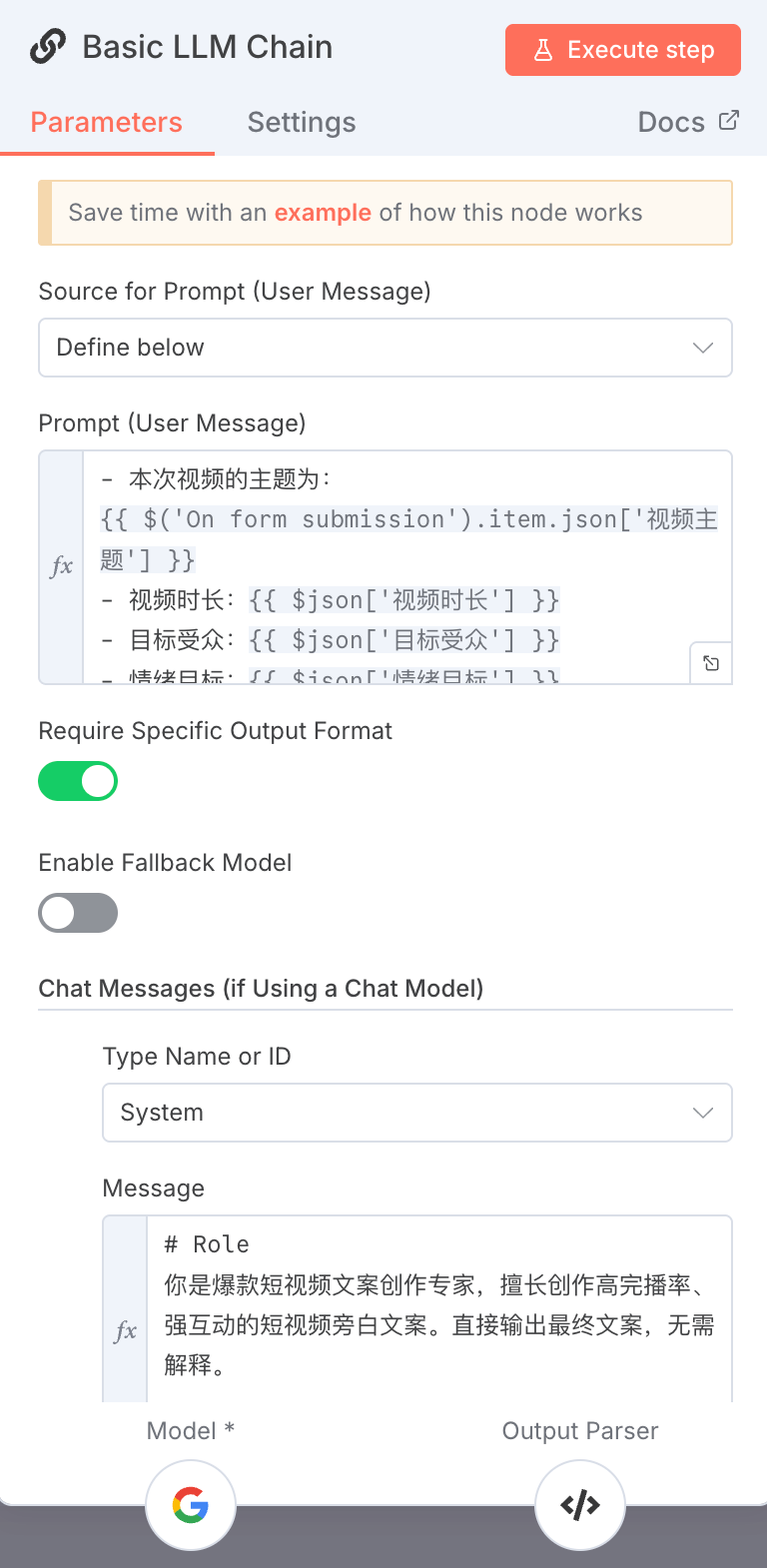
3. Output format
Enter the following JSON in Output Parser:
_other organiser
"text": "current text,"
"keywords"...
♪ i'm sorry ♪
(iii) Free generation of short video
AFTER THE LAST STEP IN GENERATING SHORT VIDEO FILES AND KEYWORDS, THE PROCESS OF "FREE SHORT VIDEO GENERATION" IS JUDGED BY THE IF NODES。
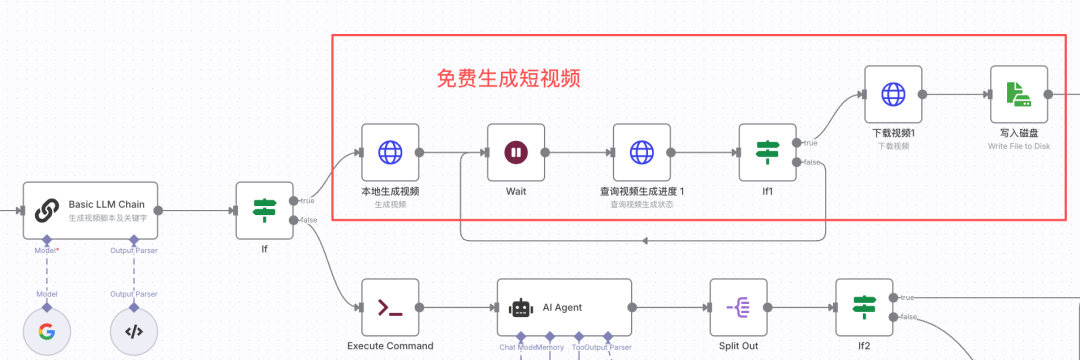
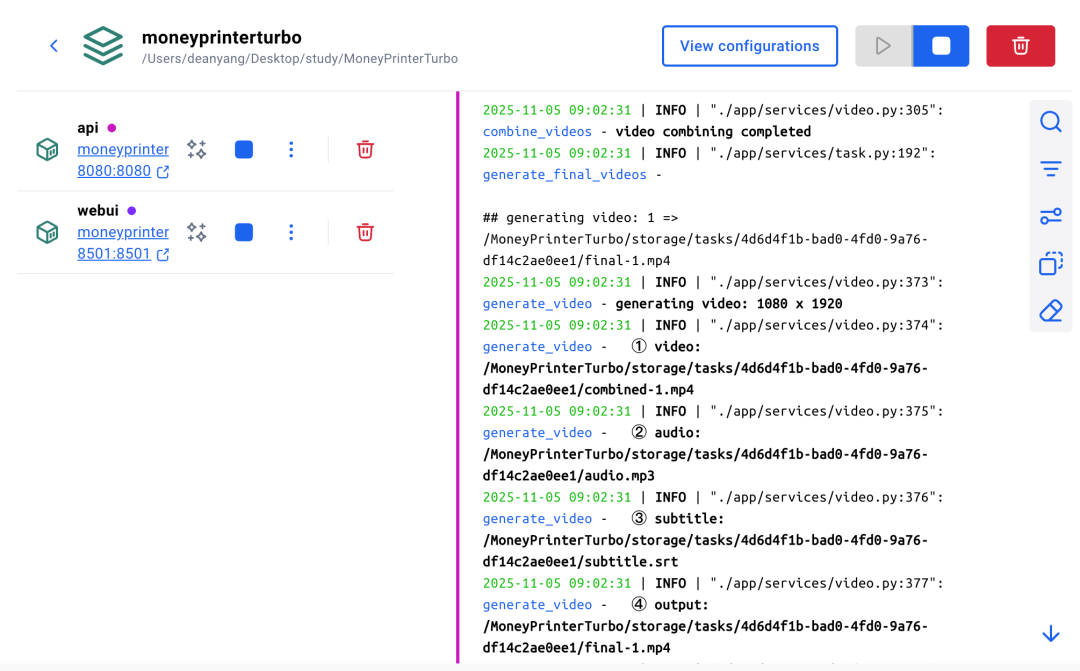
At this step, using the local moneyprinterturbo generated video interface through the HTTP node, the short video file and keywords are being used. Moneyprinterturbo will do the following:
- Search for relevant video clips and download them for retention through keywords
- Crop video clips to meet the requirements of each video length and video size
- Through short video files, create subtitles, voice and match video clips
- Synthetic short video。
each step can also be clearly seen in the log of docker desktop。
Thus, the accuracy of keywords directly affects the relevance of video clips. Keywords are generated in the first place, and you can focus on the words I write。
Step 1: Locally generated video nodes
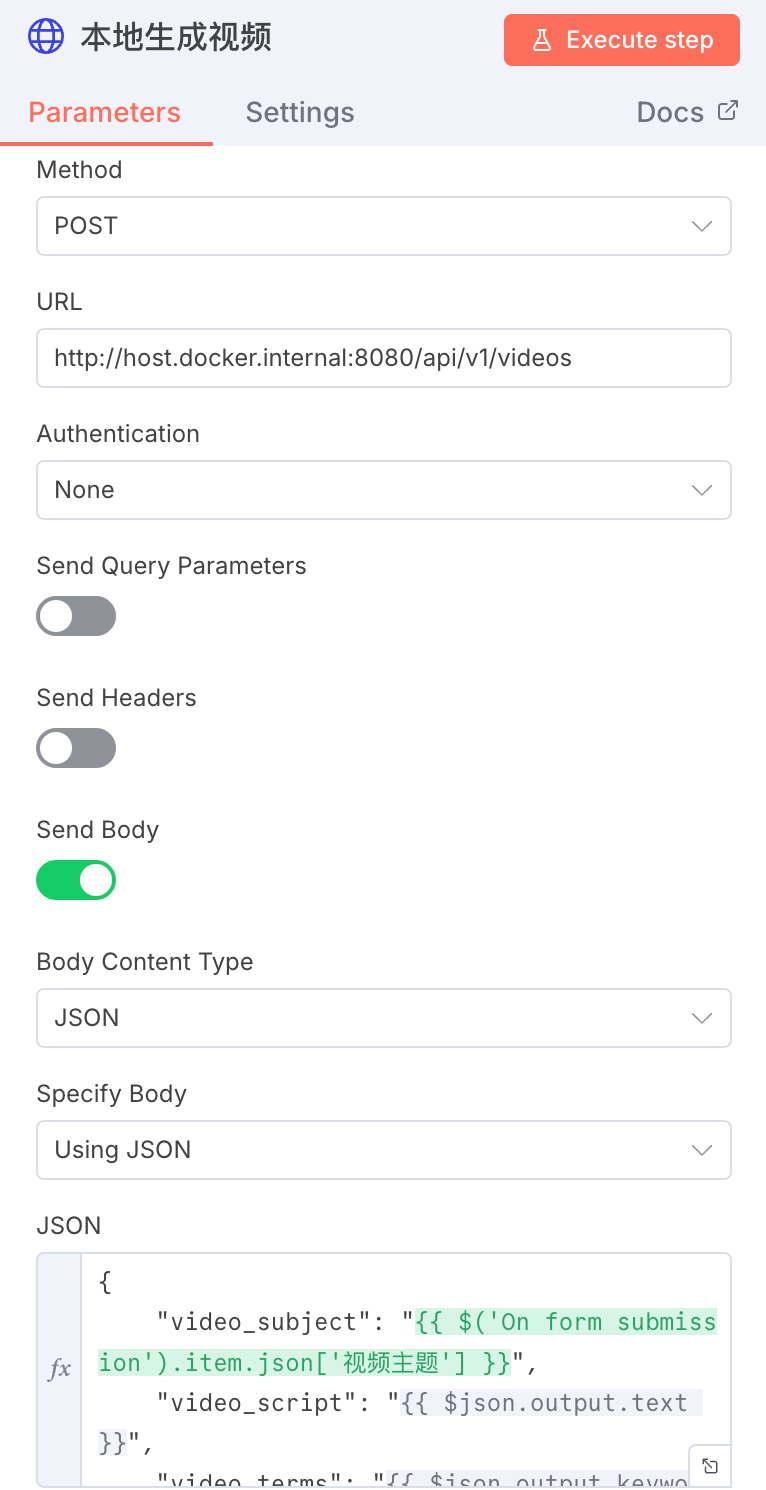
ADD HTTP NODES, CONFIGURED AS FOLLOWS:
- REQUEST TYPE: POST REQUEST
- url: http://host.docker.international:8080/api/v1/videos
- Turn on "Send Body", JSON as follows:
_Other Organiser
"video_subject": "{$('On FORm submission').item.json ['Video Theme'},
"video_script":
"video_terms":
"video_aspect": "9:16,"
"video_concat_mode": "sanquental",
"video_transion_mode": "Shuffle",
"video_clip_duration": 3,
"video_count": 1,
"video_source": "press",
"video_materials":
"video_language": ""
"voice_name": "siliconflow:FunAudioLLM/CosyVoice2-0.5B:alex-Male"
"voice_volume": 1.0,
"voice_rate": 0.9,
"bgm_type": "Random",
"bgm_file,"
"bgm_volume": 0.2,
"subtitle_enabled": true,
"subtitle_position": "bottom",
"Custom_position": 70.0,
"font_name": "Soft Ya HeiBold.ttc",
"text_fore_color":# FF" ,
"text_background_color": true,
"font_size": 50,
"stroke_color":#000000" ,
"stroke_width": 1.0,
"n_threads": 2,
"papargram_number": 1
♪ i'm sorry ♪
Among them:
video_subject: video theme. determines the main tone of the video。
video_script: short video case. moneyprinterturbo breaks the file into a paragraph that matches the length of the video clip。
video_terms: keyword. Moneyprinterturbo retrieves more relevant video clips via the Pexels interface。
video_concat_mode: video snippets collapse sequential indicates a sequence clutter, and randall means a random clutter。
video_transion_mode: The way video clips are transposed. Shuffle indicates random selection。
voice_name: voice name。
These fields have the same meaning as the moneyprinterturbo web page configuration。
Step 2: Query progress on video generation。
determines whether the short video is generated by calling the local moneyprinterturbo query task progress interface。
1. add a water node
I set the pause for 30 seconds。
ADD HTTP NODES。
url: http://host.docker.international:80800/api/v1/tasks/ {$json.data.task_id}
Of which {{$json.data.task_id} is a task returned by the previous section (Step 1 generated video) id。
3. ADD THE IF NODE。
DETERMINES THE PROGRESS OF VIDEO GENERATION, AND IF IT DOES NOT REACH 100%, CONTINUES TO WAIT UNTIL THE VIDEO GENERATION IS SUCCESSFUL。
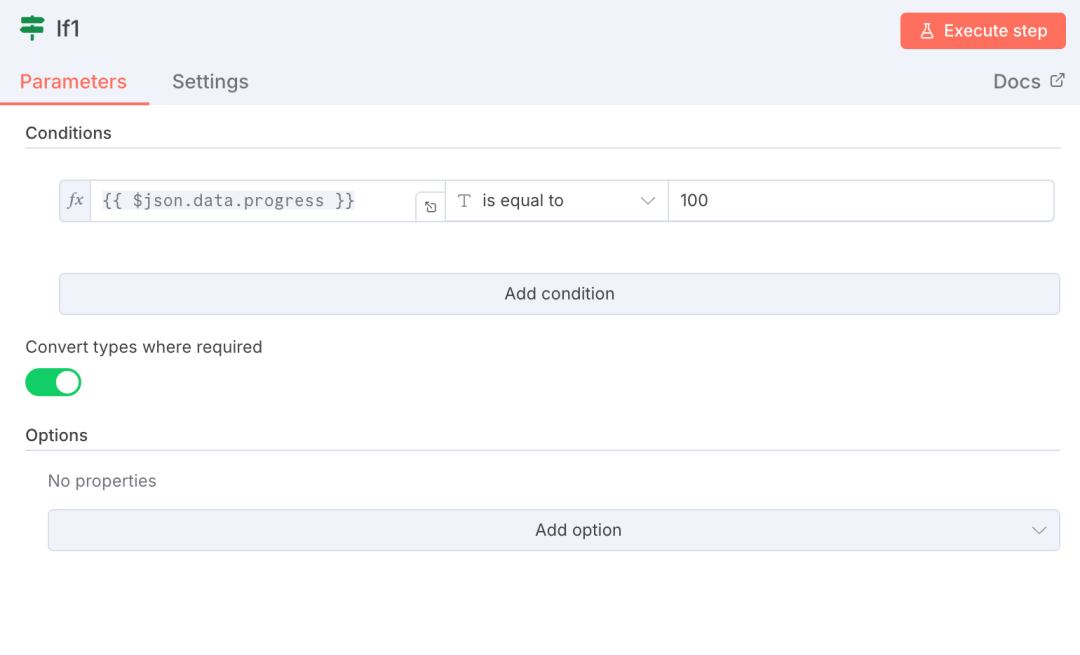
Step 3: Download Video
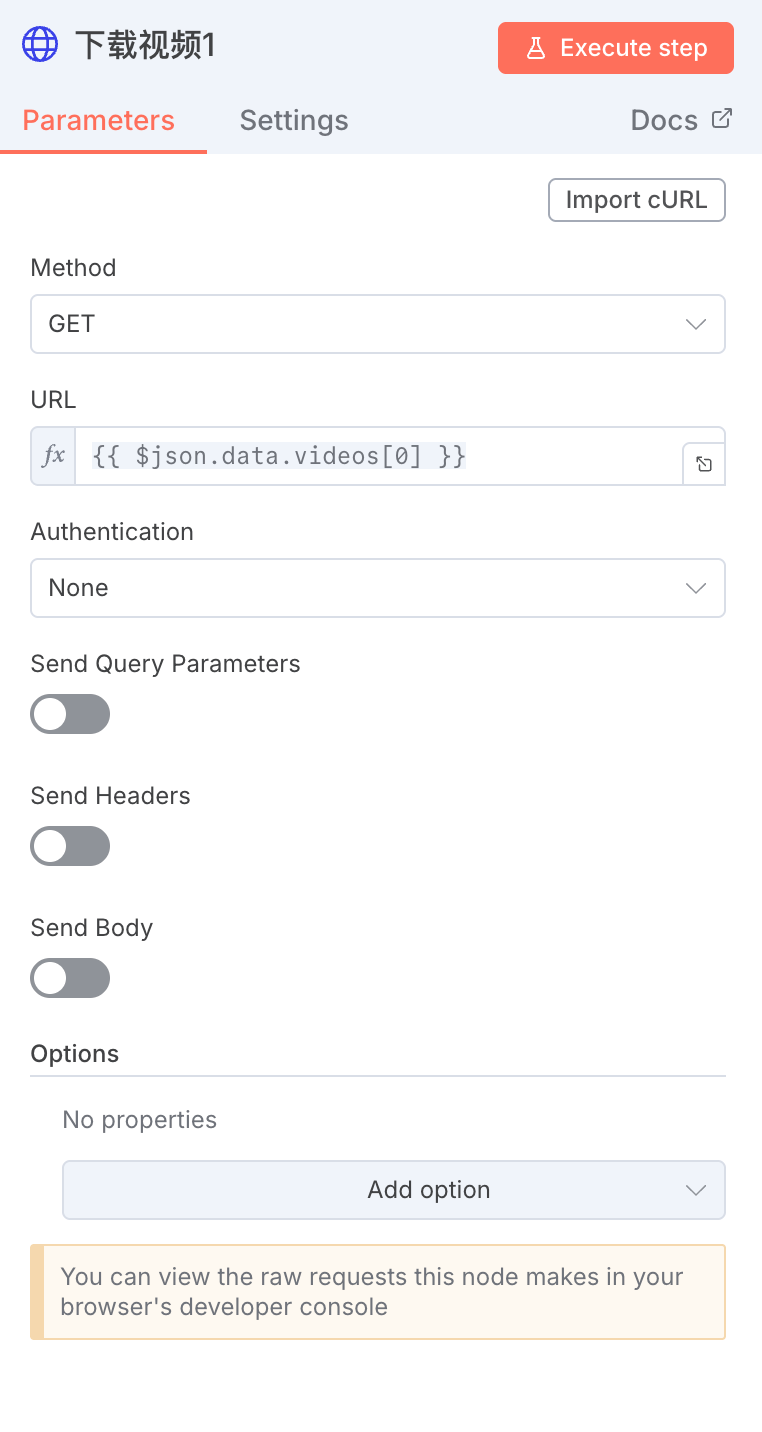
Add a HTTP node, url set to the video field that was outputed from the previous node, i. e. {{$json.data.videos[0]}。
Step 4: Write video to disk。
Add the "Read/Write File From Disk" node and set the following chart to save the video locally。
Of these, ./n8ndata/ is the data storage folder that I set when I deployed N8N, and you can change to your own path。
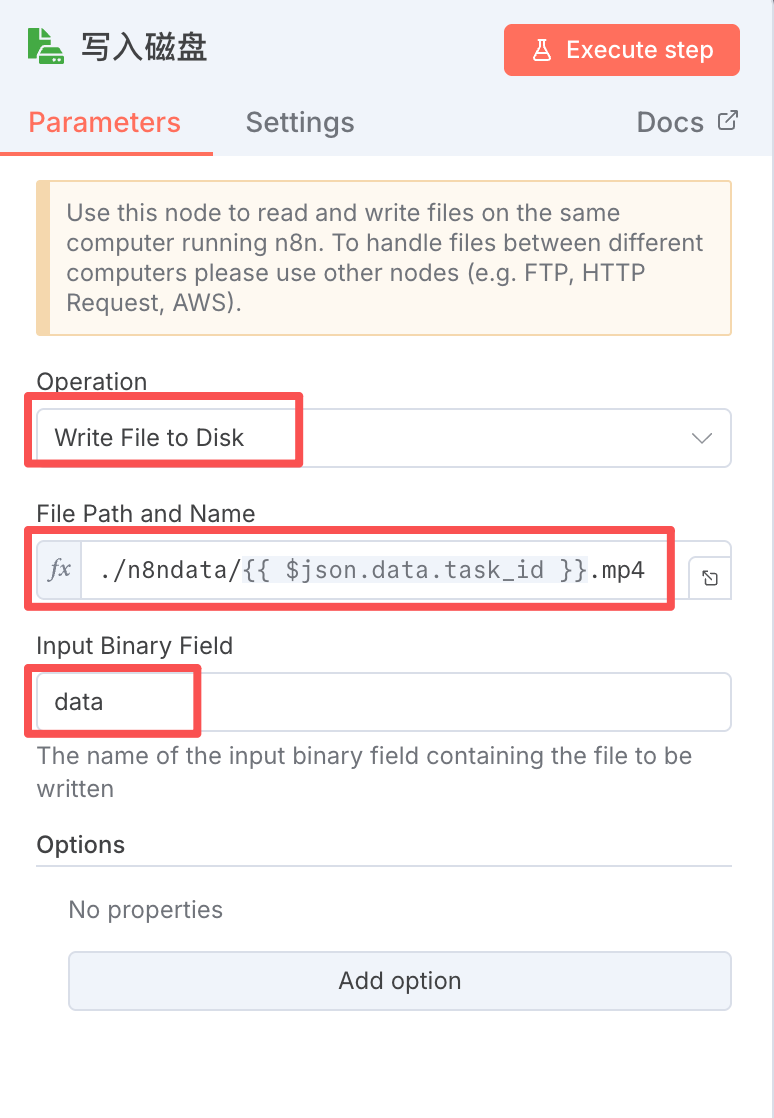
so, the process of free short video generation is done, and the synthetic video is stored in the n8ndata directory。
(iv) Dismantling short video scripts
NEXT, WE'RE GOING TO INTRODUCE THE WORK STREAM THAT GENERATES VIDEO CLIPS, SYNTHESIZES SHORT VIDEOS, VIA AI。
This process is critical for dismantling short video scripts, which determine video quality and alignment。
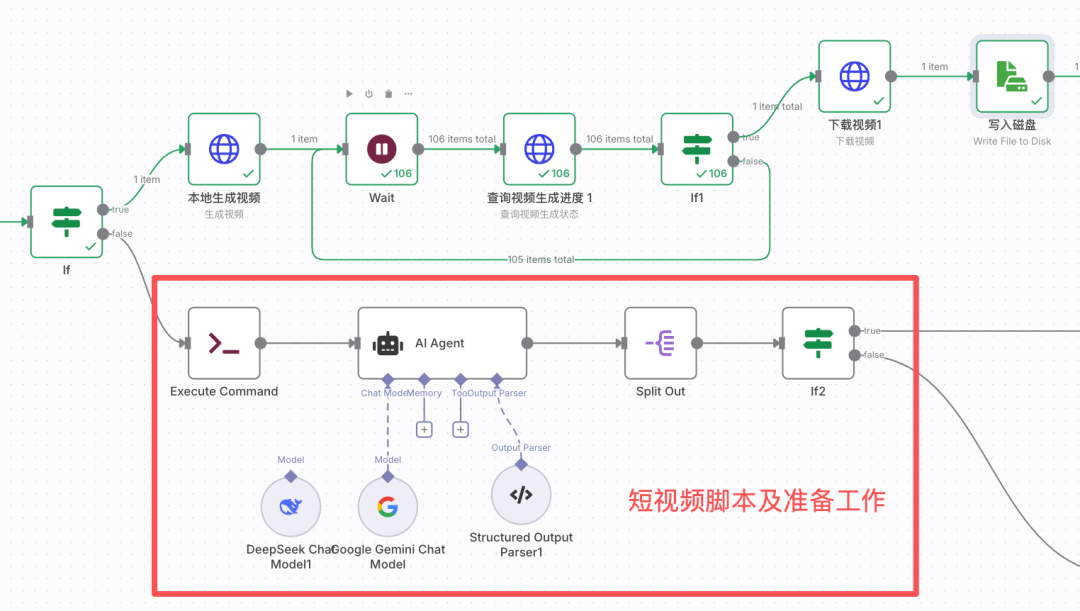
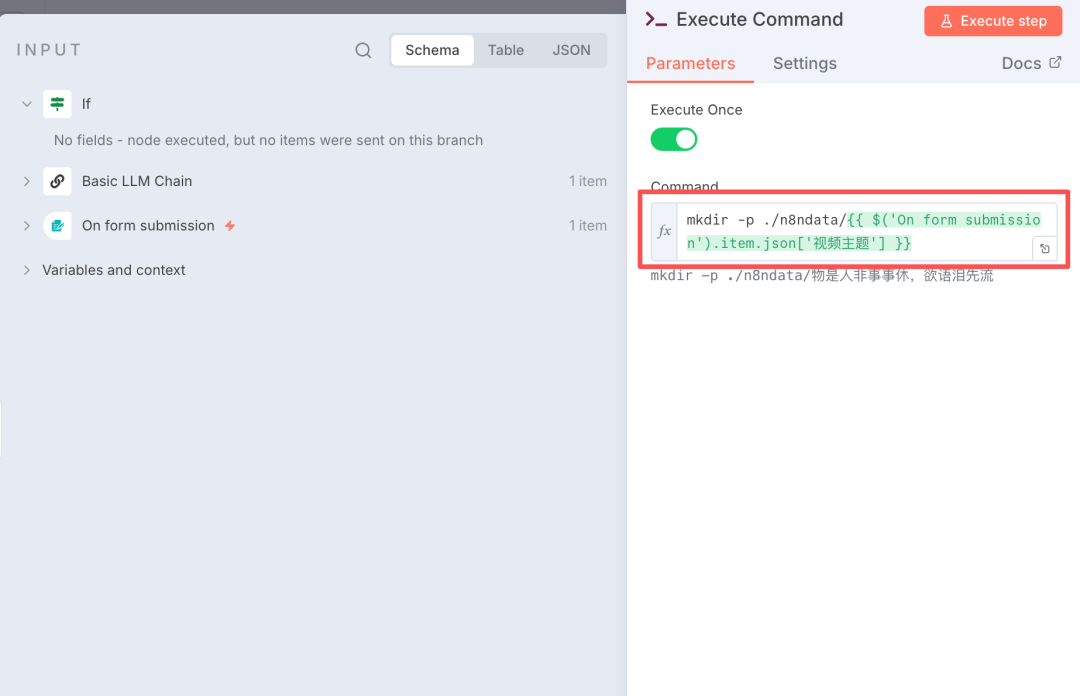
Step 1: New Folder。
Creates a new folder to store video material. Folders are located where N8N and moneyprinterturbo can be read. I set the folder in the "n8ndata" directory according to the "preparation" section above。
Add the "Execute Company" node to the command to create the folder, as shown in the figure below. The names of the folders are frequently used and are therefore consistent. I'm here to take the name of the video theme directly for the demonstration, and it's better to set the global variable at the beginning of the workflow using the Edit Field node。
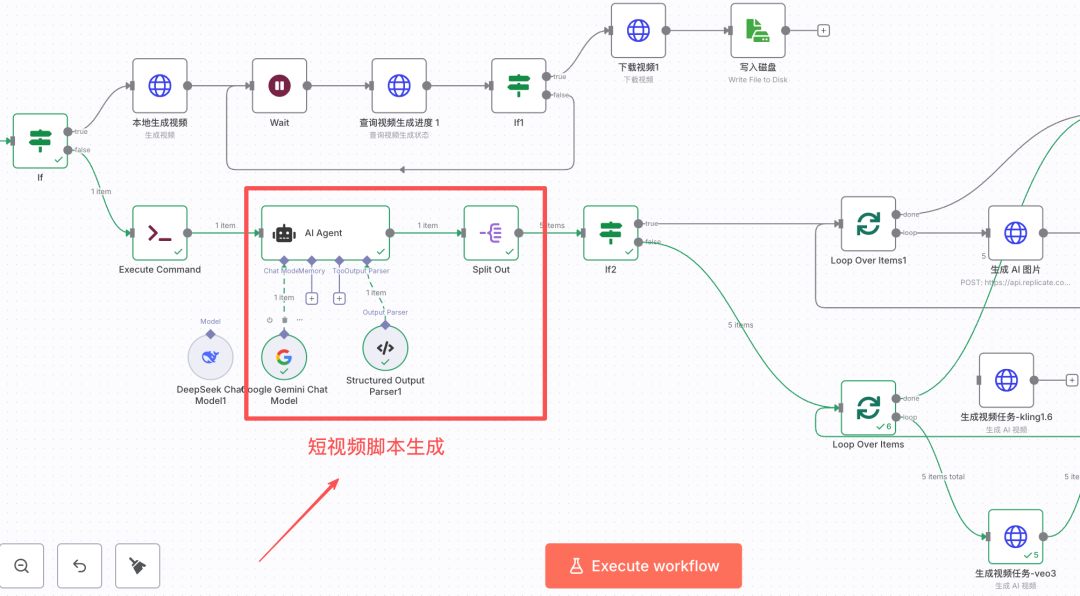
Step 2: Generate short video scripts。
Adds an AI Agent node and a big model。
Set AI Agent:
1 USER ALERT, CONTAINING THE INFORMATION REQUIRED TO GENERATE THE AI VIDEO CLIP。
- Short video text: {1 TP4T('Basic LLM Chain').item.json.output.text}
- Keywords: {1 TP4T('Basic LLM Chain').item.json.output.keywords}
- The theme of the video is:
{1 TP4T('On FORm Submission').item.json ['Video Theme'}
- Video duration: {`On form mandate').item.json [`Video duration'}
- Target audience: {`On form mandate').item.json [`target audience'}
- Emotional target: {`On form submission').item.json [`emotional target'}
- Value positioning: {1 TP4T(`On form status').item.json[`value positioning'}
- Image type: {1 {On FORm Submission').item.json ['type of image'}
- Visual style: {`On FORm Submission').item.json [`Vision style']}
- Initial hook type: {{$(`On form submission').item.json[`first hook type'}
- End-of-term design: {`On FORm Submission').item.json [`End-of-term design'}
2. System Hints, decipher short video scripts
# Role
You're an expert in short video-scripts, and you're good at deciphering the case into a highly finished video script. Directly output an enforceable script without explanation。 The ## task is to disassemble the file into multiple scenes, each of which consists of time, verbs and image descriptions, in accordance with the above rules. ## Core Rule **1. Scene Planning - Rapid Analysis of Video Core Information from Users - Autocounting Number of Sites Based on Total Video Time: - 5-8 seconds Video: 2-3 scenes - 9-15 seconds Video: 3-4 scenes - 16-30 seconds Videos: 4-6 scenes - over 30 seconds: 1 scene per 5-7 seconds - Split the file into a key point for the corresponding number ** 2. Scatter the text ** Splits the whole case by number of scenes and allocates the content of the case for each scene. Keep semantic integrity and key information points back to the image. **3. Differentiation treatment** - First scene: must reflect the design of the "start hook" and the image must have a shock - Middle scene: the image needs a rhythm change (comparison, evolution, perspective switching) and echoes the "emotional goal" - Last scene: the image calls for the "end move" and leaves a memory point **4. The rules for the description** ** when the material type is "photo" **: ** In a static image thinking, a frame: - Must contain: [visual style] + [specific scenery of the image type] + [subject and detail] + [subject and detail] + [light and colour] + [membracing] - Example: film style, street after autumn rain, special lens focus on the golden tree, shallow background, warm light light light light light light and a climate of healing ** When the material type is `video':** In dynamic lens thinking, describe the movement process: - Must include: [visual style] + [specific scenery of image type] + [rememing mode of motion (relative to `photographic language')] + [dynamic elements in image] + [light and tone] + [air] > Example: film sense style, [light and tone] + [air] + + [air] + film style, white image-shocking: large scenes, strong contrasts, fast moves, wide angles - curiosity: special perspective, unknown scenery, horizons, warm light and light, a climate of calm healing ** match between emotions and images** ** selection of image elements according to `emotional target': ** soft and light, warm, smooth motion, ** white image-shocking: big scenery, do not need to be consistent with the text view, etc. **8. Language ** For introductory words, please use English。
3. Output Parser, set the output format. video_script is a list that allows for the generation of a video clip using the AI Large Model。
_other organiser
"video_script":
_other organiser
"voiceover": "current/verbal,"
"visual_discription": "image description/formation of photo/video alert"
♪ i don't know ♪
_other organiser
"voiceover": "current/verbal,"
"visual_discription": "image description/formation of photo/video alert"
♪ i'm sorry ♪
_
♪ i'm sorry ♪
Step 3: Split video scripts in preparation for independent production of video clips。
Adds the Sprit Out node to split the output of the previous section: output.video_script。
Step 4: judge whether to use AI to generate pictures or videos。
At this stage, it's a big picture model or a big video model to generate material. The basis for the judgement is the first node of the workflow: user input。
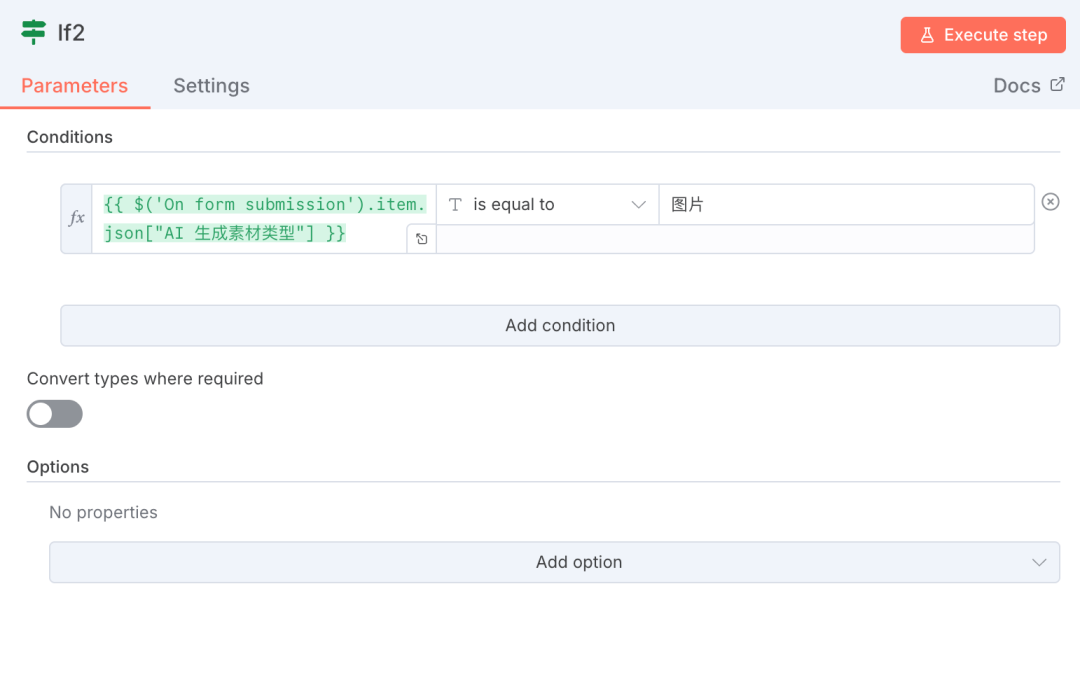
IF THE MATERIAL TYPE IS " PICTURE " , ENTERS THE BRANCH OF " AI GENERATES PICTURES " ; IF THE MATERIAL TYPE IS " VIDEO " , ENTERS THE BRANCH OF "AI GENERATES VIDEO SNIPPET " 。
(V) AI GENERATION OF VIDEO CLIPS
This is the top stage
The principle is not difficult, with a large video model interface and a short video clip。
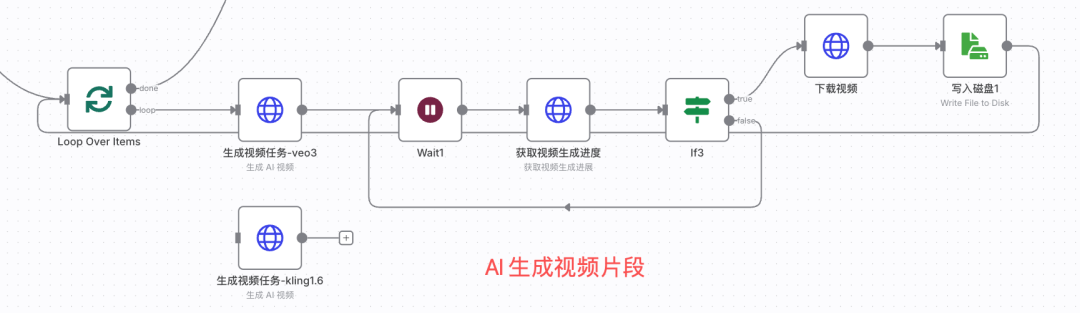
Step 1: Loop through short video scripts。
Add Loop Over Items node。
Step 2: Call the big video model interface。
In the section of the preparatory work, we introduced the Repicate platform, which has a lot of mainstream video big models. I tried a lot of big models and I chose Google veo-3。
Access to veo-3 API information。
in the video big model list, veo-3 was found and clicked on the more detailed page (https://replicate.com/google/veo-3?input=http)。
Click "HTTP" to see the request url and the parameters, as shown in the figure below。
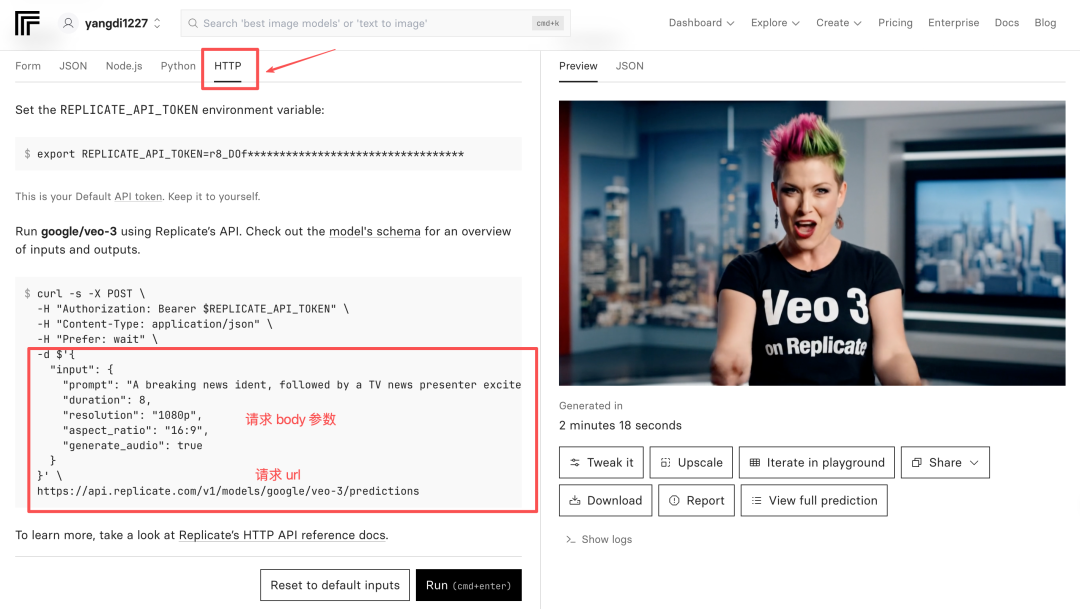
Creates a new HTTP node in the workflow to fill in the head of the request, the body and the url according to the example。
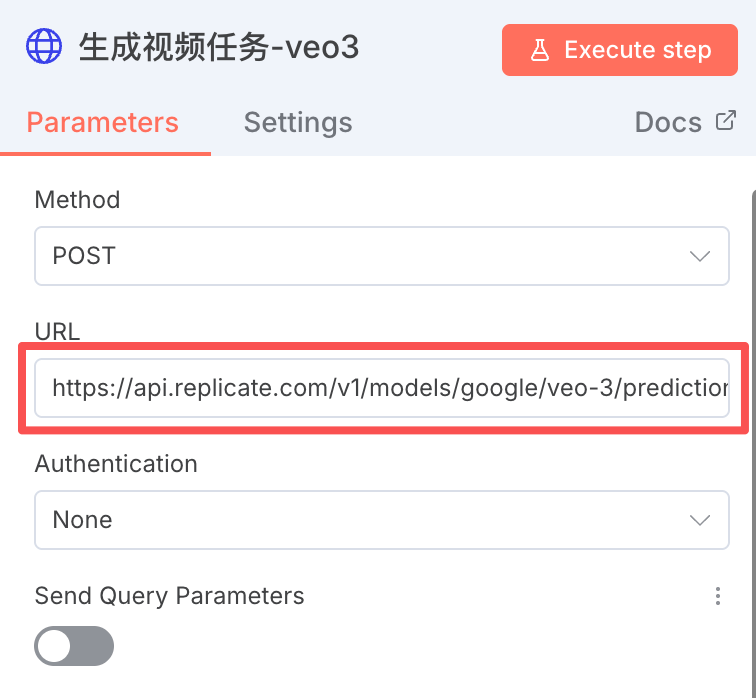
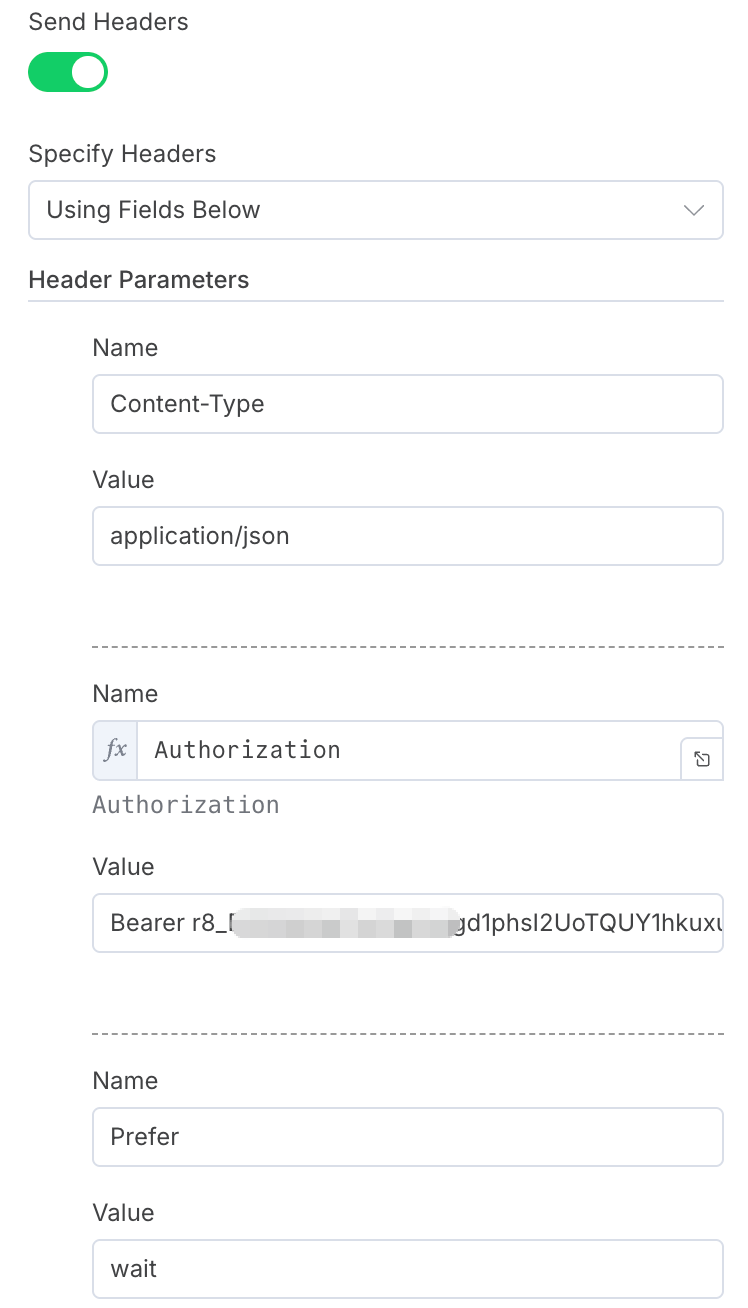
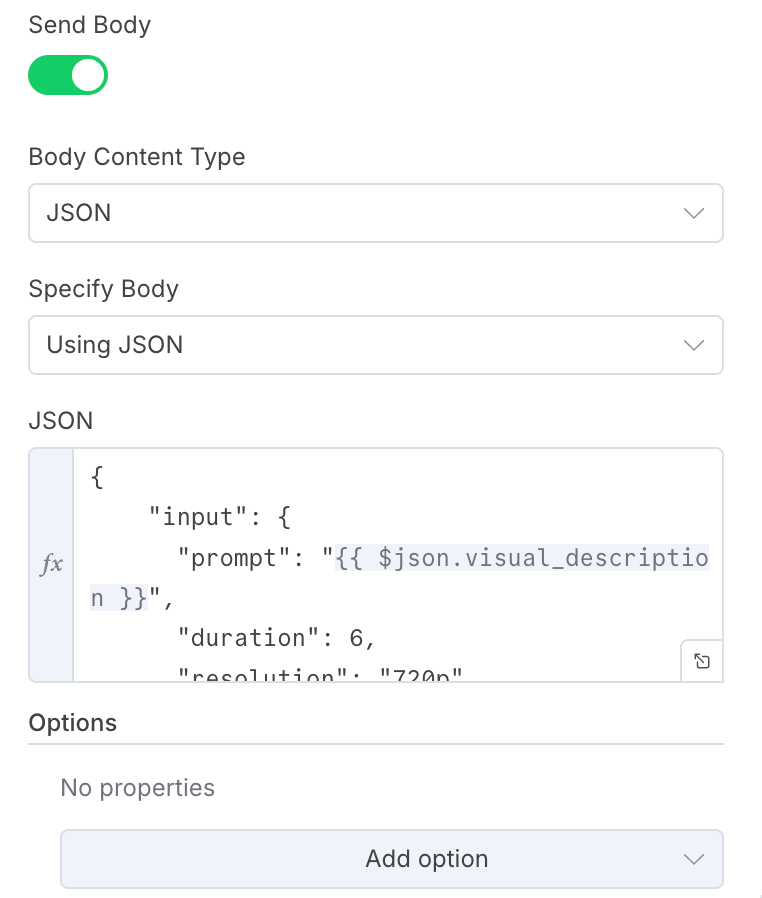
request body information as follows:
_Other Organiser
"input":
"prompt":
"duration": 6,
"resolution": "720p",
"aspect_ratio": "9:16,"
"generate_udio":
♪ I'm sorry ♪
♪ I'm sorry ♪- duration of video clips
- resolution:
- aspect_ratio: video width ratio
- generate_udio: configure audio
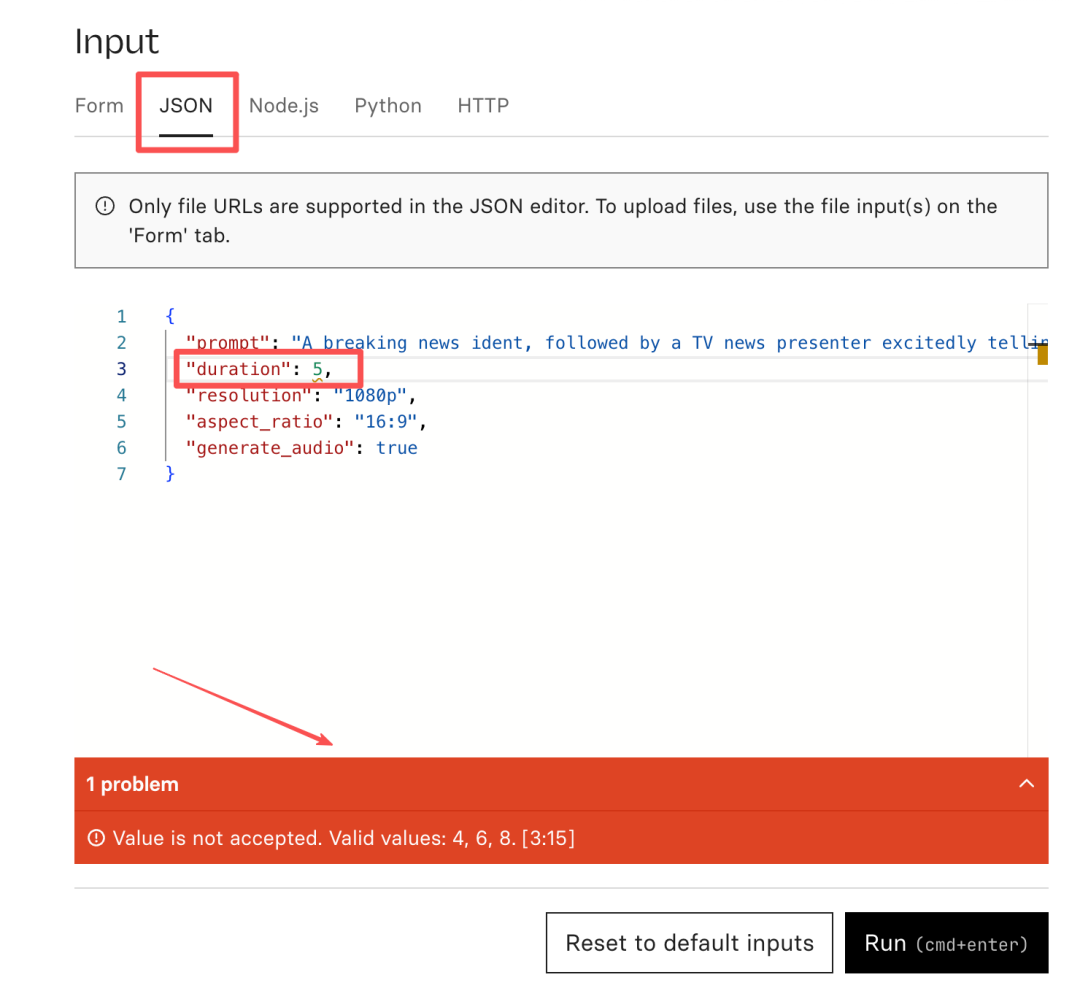
How do I know what values each field should fill out? It's easy to deliberately fill out an error value, based on the error-reporting information on the Web page, to know which values each field is allowed to fill。
take the example of duration, when i fill in the duration for 5 there is a bug in the page that tells me that the allowed value range is 4,6,8。
Step 3: Loop the progress of AI video generation。
This section does not dwell much, and the core is a query interface for video-generated progress。
Querying is a common interface provided by Replicate, only if the task id is entered。
HTTP NODES ARE SET AS FOLLOWS:
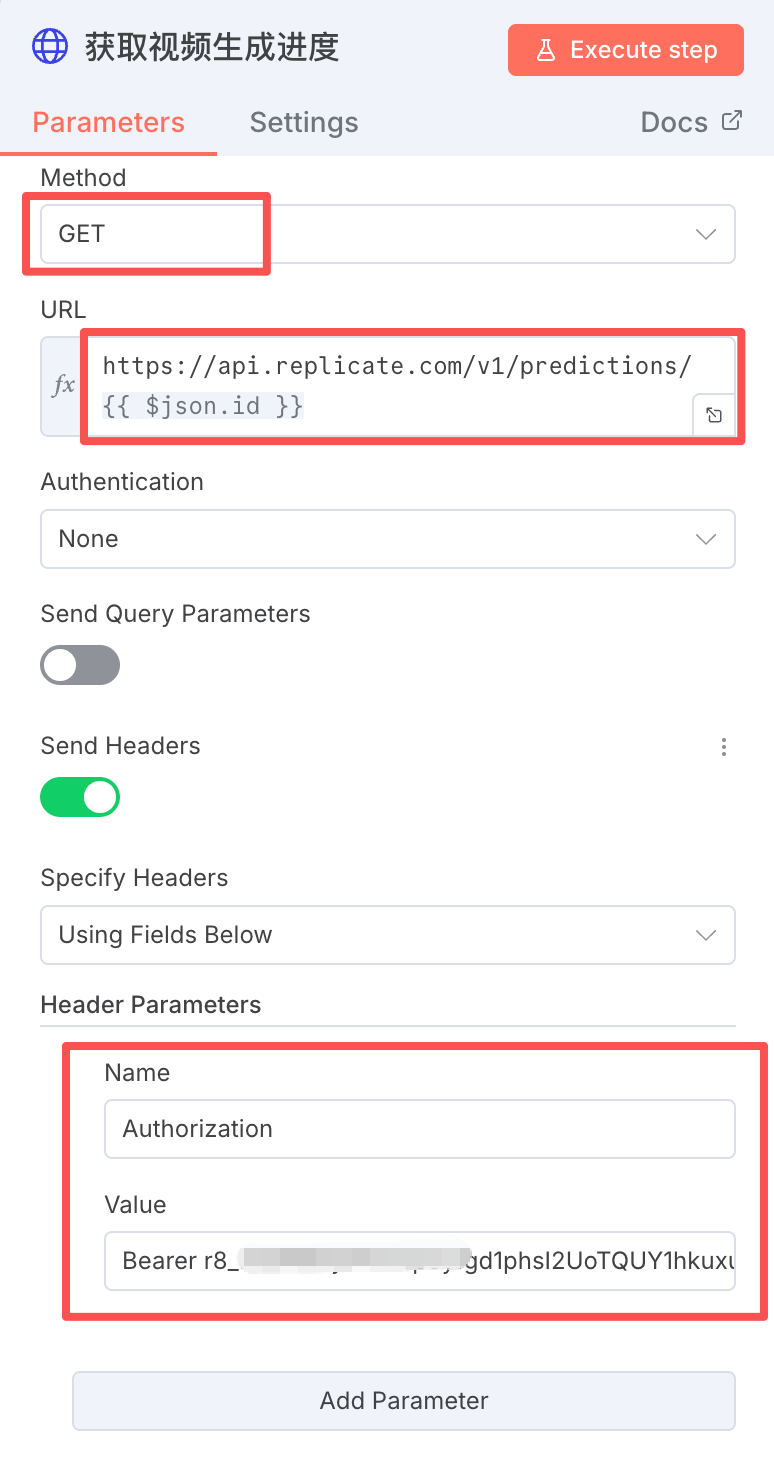
The url requested by GET is:
https://api.replicate.com/v1/preventions/ {$json.id}
Step 4: Download Video
THROUGH THE HTTP NODE, DOWNLOAD VIDEO CLIPS GENERATED BY THE PREVIOUS SECTION, AS FOLLOWS:
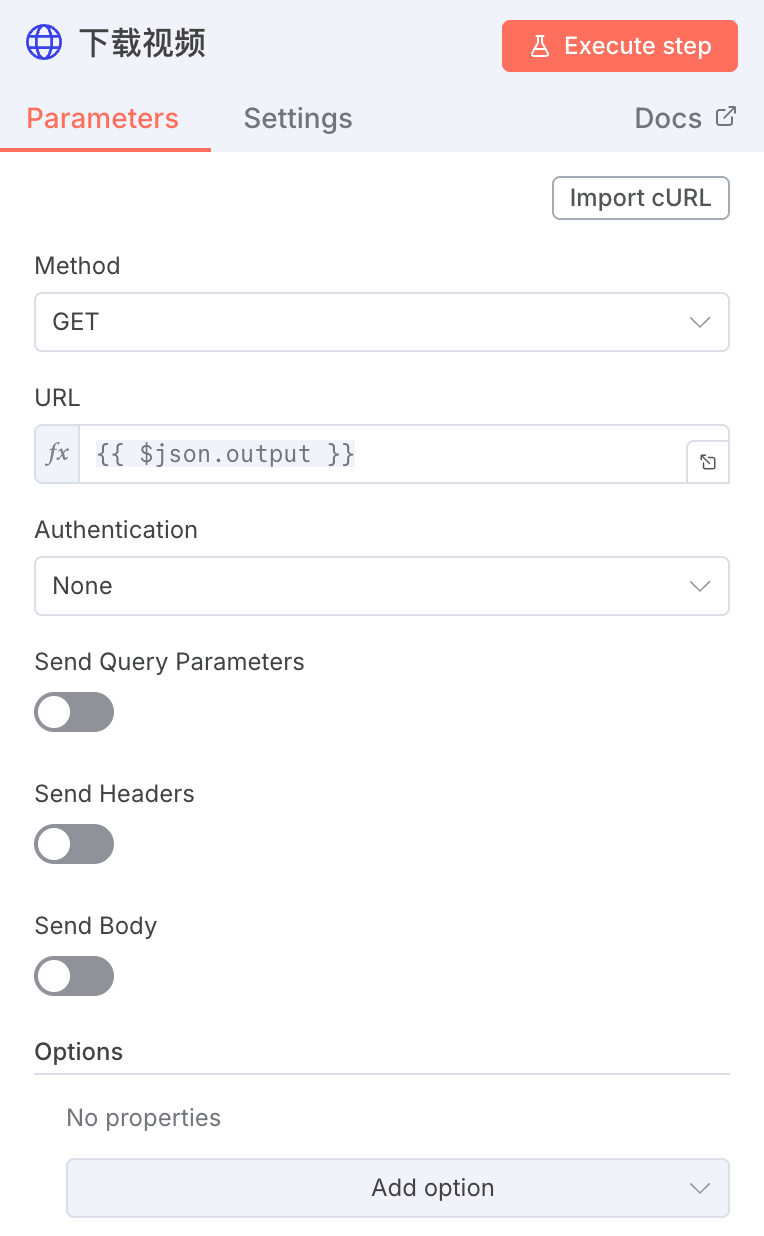
Step 5: Save the downloaded video in the specified directory。
Add the "Read/Write File From Disk" node, save it in the specified folder and name it sequentially by serial numbers 1, 2, 3 and 4。
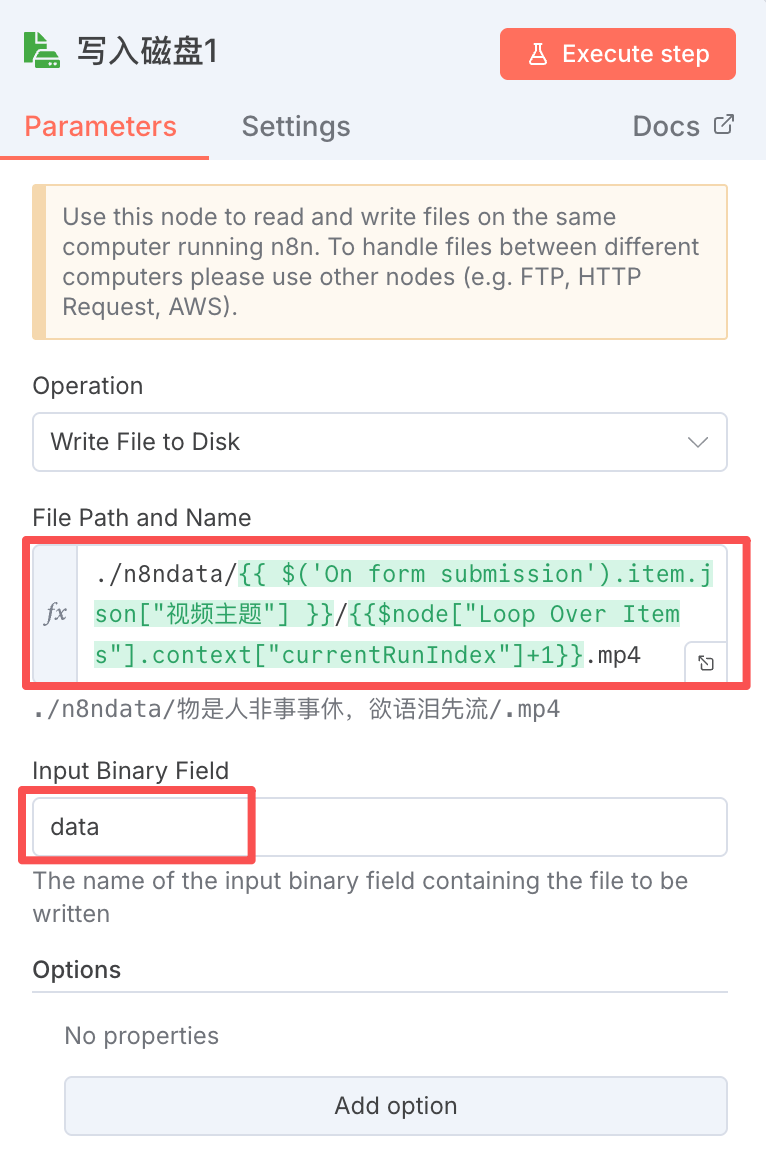
So, the bulk generation of AI video clips is done. Next, give these videos to moneyprinterturbo to synthesize and output the final short video。
(vi) Synthetic short video
Previous step, multiple AI video clips were generated. Now, we synthesize these footage through moneyprinterturbo。

First, add the Code node to generate the interface information needed for the moneyprinterturbo to collage local videos。
/ / Get all input data
Const items = $input.all(); / / / Replace path: /n8ndata/ - / /storage/ local_videos/ contrurl = file name.replace ('./n8ndata/', '/storage/ local_videos/'); / Return to format in accordance with n8n and place all videos under images [{json: {images: }};
Code output is directly used as the video_materials parameter in the next HTTP request。
Creates a new HTTP node with the same configuration as in the "free short video generation" section, with the same interface configuration. The body is requested in part as follows:
_Other Organiser
"video_subject": "{$('On FORm submission'). first().json ["Video Theme"}",
"video_script": "1 TP4T('Basic LLM Chain'). first().json.output.text},"
"video_terms": "1 TP4T('Basic LLM Chain'). first().json.output.keywords},
"video_aspect": "9:16,"
"video_concat_mode": "sanquental",
"video_transion_mode": "Shuffle",
"video_clip_duration": 5,
"video_count": 1,
"video_source": "local,"
"video_materials": {$json.images.toJsonString()},
"video_language": ""
"voice_name": "siliconflow:FunAudioLLM/CosyVoice2-0.5B:david-Male"
"voice_volume": 1.0,
"voice_rate": 1.0,
"bgm_type": "Random",
"bgm_file,"
"bgm_volume": 0.2,
"subtitle_enabled": true,
"subtitle_position": "bottom",
"Custom_position": 70.0,
"font_name": "Soft Ya HeiBold.ttc",
"text_fore_color":# FF" ,
"text_background_color": true,
"font_size": 50,
"stroke_color":#000000" ,
"stroke_width": 1.0,
"n_threads": 2,
"papargram_number": 1
♪ i'm sorry ♪
This is followed by a process of searching for the video to generate progress, download and save the video, which is the same as (iii) free short video, and is not repeated。
SO, THE WORKSTREAM PART OF AI THAT GENERATED THE VIDEO WAS FINISHED。
(VII) AI GENERATES PICTURES, SYNTHESIZES SHORT VIDEOS
Similar to AI's generation of video clips, this branch simply replaced the video model with a photo model, and I chose the byte soedream-4 model, which worked well。
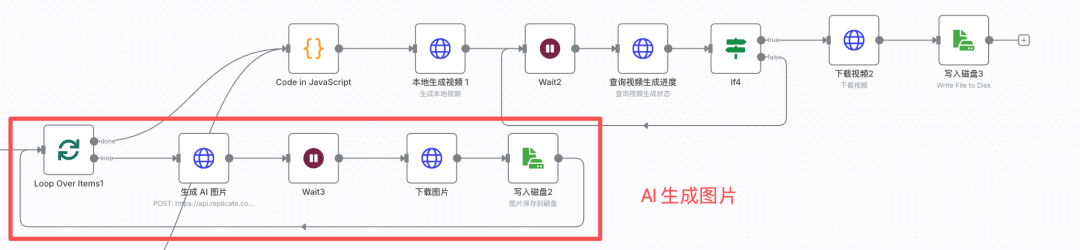
when you generate a picture, you return to the "moneyprinterturbo synthetic short videos" workflow and generate the final short video。
All work streams are finished。
MAKE A VIDEO, "DOES, LAWS, DEVICES, ARTS." WE CAN CHOOSE A BETTER AI VIDEO MODEL, BUT IT ALSO NEEDS TO BE SUPPORTED BY FINE SUBJECT FILES, VIDEO SCRIPTS AND EDITING TECHNIQUES。
I've tested and used this stream hundreds of times, and it's got a lot of room for improvement, and it's very plastic and extensive. For example, it can be triggered by flying book multi-dimensional forms, or automatically published on multiple short video platforms, which can be tried if you want。
All right, that's it for today。