



Use sameAI VideoModels, people get short films of stable people and consistent lenses, and people get short clips of fine, but irrelevant images。
Often the problem is not just the ability of the model, nor the lack of sufficient adjectives, but rather that the hint does not tell the model: Who is this, where she is, where the camera starts, what happens next, and where the mirror is to stop。
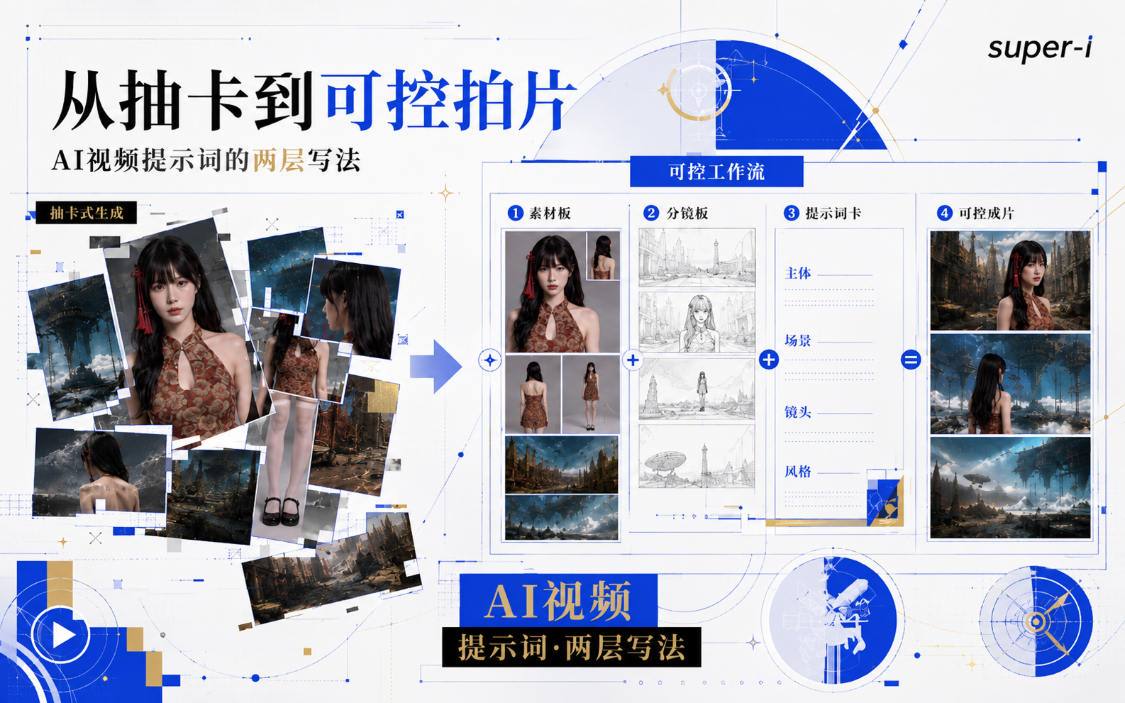
A CONTROLLABLE AI VIDEO ALERT CAN BE DIVIDED INTO TWO LAYERS。
The first level is a global set-up and is responsible for maintaining the identity and quality of the whole work
The second level is a single-photo command, which is responsible for making the current seconds truly visible. This, together with the end-to-end link between the lenses, gives the opportunity to form a longer narrative。
This course will explain the reusable writings from the six areas of asset preparation, hint structure, time axis, splitting, continuity and inspection methods。
I. Preparation of assets and then a reminder
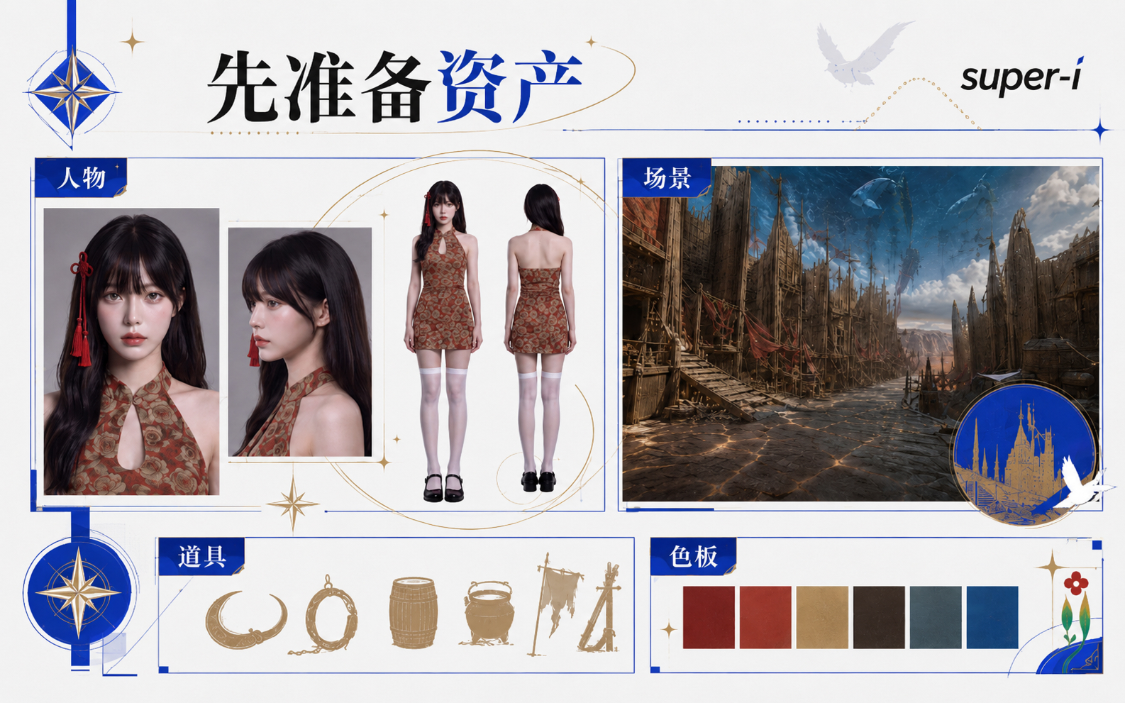
“Assets” are not complex documents that are required by a professional team. It refers to all reference materials that need to remain unchanged in multiple videos。
At least four role views should be prepared for short person-type films, and a clear look reference should be given when there are fixed clothing, hairdressing, weapons or products。
Scene-type films can also complement space layouts, main colours, materials and key props。
What about the assets? It's a course to make your own assets。
Section 67: How does an AI asset stabilize? https://www.1ai.net/58213.html
Level 1: Lock the whole film with a global set
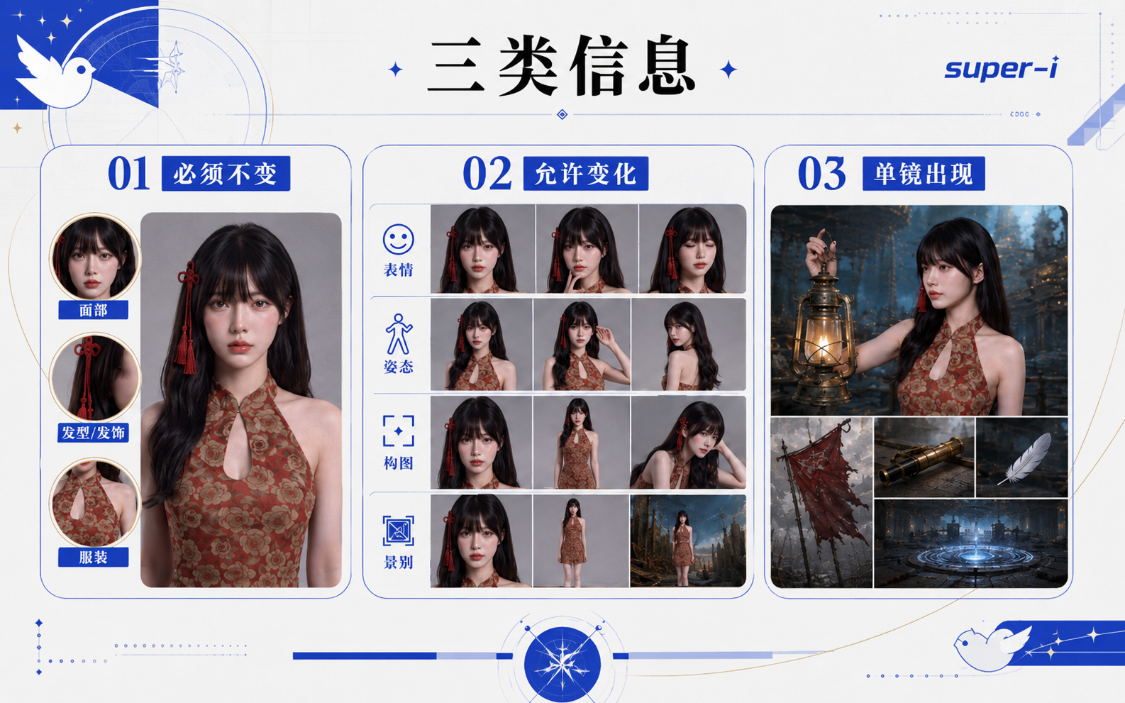
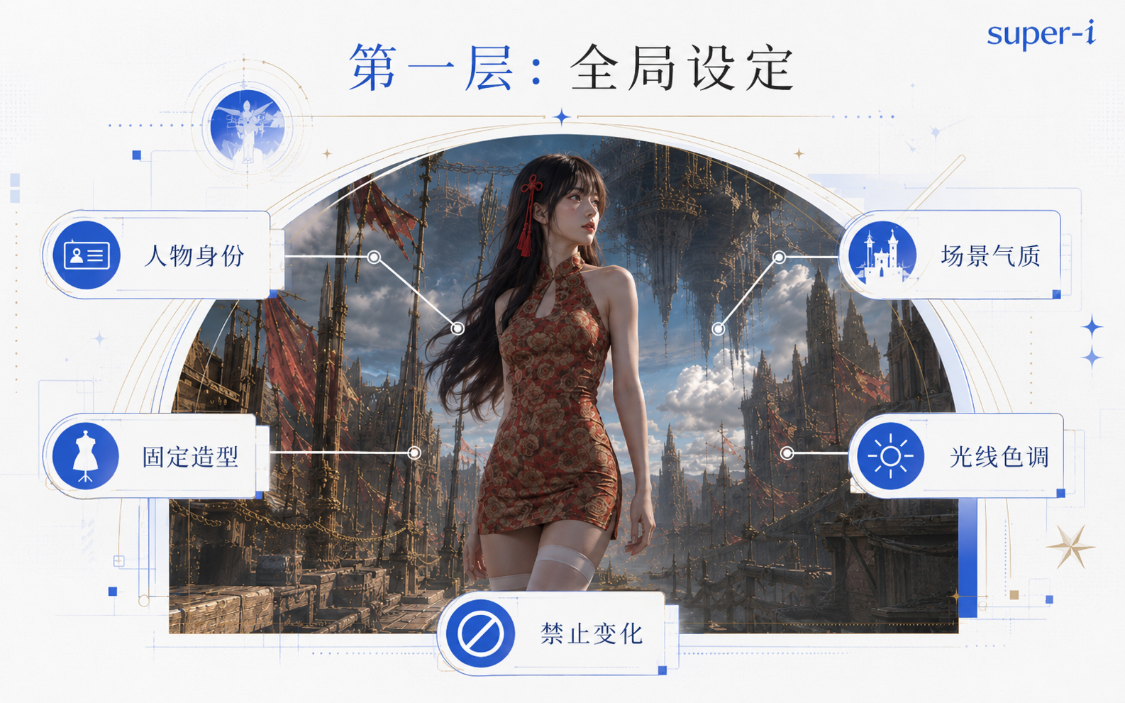
The global set is a common rule for each paragraph. It is not responsible for telling the whole story, but it has established the following:
Identity, clothing and props
The scenery age and spatial style
Image material, light and color
(a) General emotions
Changes expressly prohibited。
The following structure may be consulted:
[photographic parameters and graphic senses] Cooke Panchro/i Classic Prime Lines, with 1/4 or 1/8 Black Pro-Mist radium and focal segment at the front of the camera: 35mm and 50mm focal points are used more frequently in the room than in the day-to-day use of 35mm and 50mm focal areas, with the optical circle controlled between T2.0 and T2.8. Kodak Portra 400 film color. It's called Teal & Warm Amber, no music, no subtitles. Movie machine, camera, color, reference film, etc
The future is in doubt, calm, oppressive, clinical. The opening scene, like a judicial deposition, is gradually creating a feeling of anxiety that “the system is creating a person”。
Fig. 1 Young Asian girl. In the dark red red red rags, white knee socks, black Mary Jane shoes, dark red Chinese thongs. She was just plasticized and left with a slight water vapour on her body and clothing surface. (Personal description)
Figure 2 Young Asian boys, long hair in black, cold head. Dark blue business leisure shirt or dark business shirt, light long pants (person description)
The 3rd scenario is the anchor
[Colourboard] Color tone with colourboard as a whole. (Colourboard anchor)
If the work is to be produced in sub-sections, this part can be compressed into a fixed prefix and placed in front of each of the hints. Compression is not the deletion of key rules, but rather the deletion of repetitions and the retention of information that can be observed and checked。
III. Second floor: conversion of the director ' s thought lens to a single-photo command
It's set to solve the "what's the whole picture look like" and the "how does this mirror work?"。
At least three things will have to be said:
Where the camera starts, who's the main character on the picture, what's the main character doing。
But it's just the bottom of the second floor, and the upper limit depends entirely on your director's mind lens。
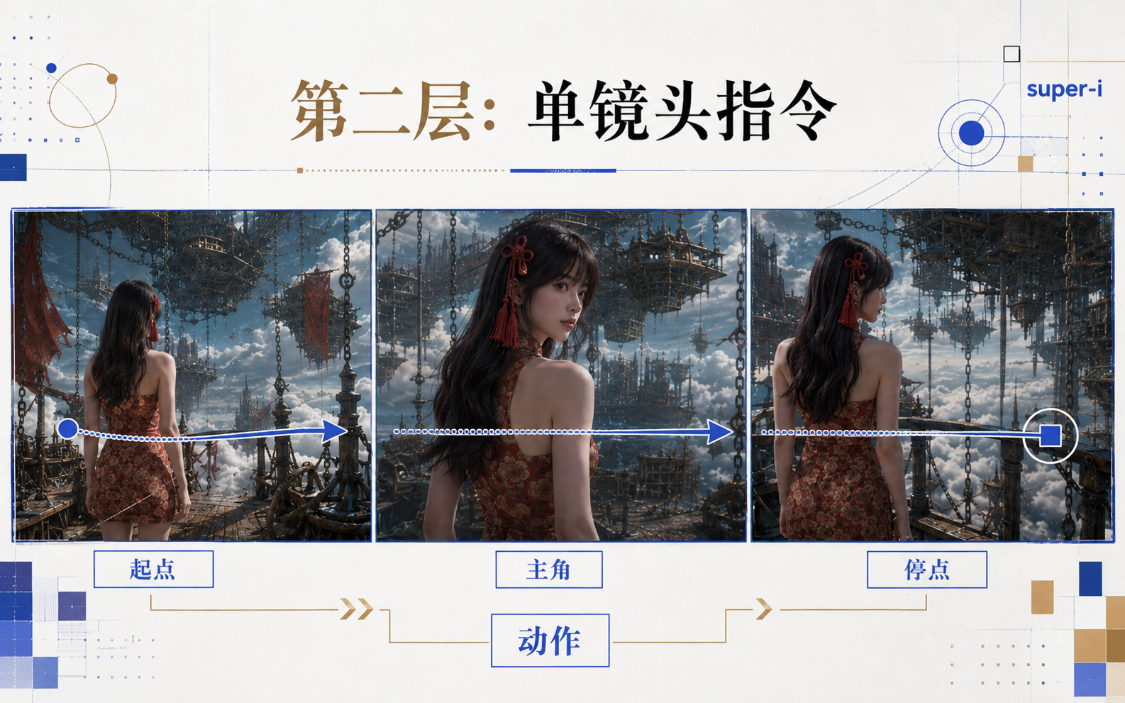
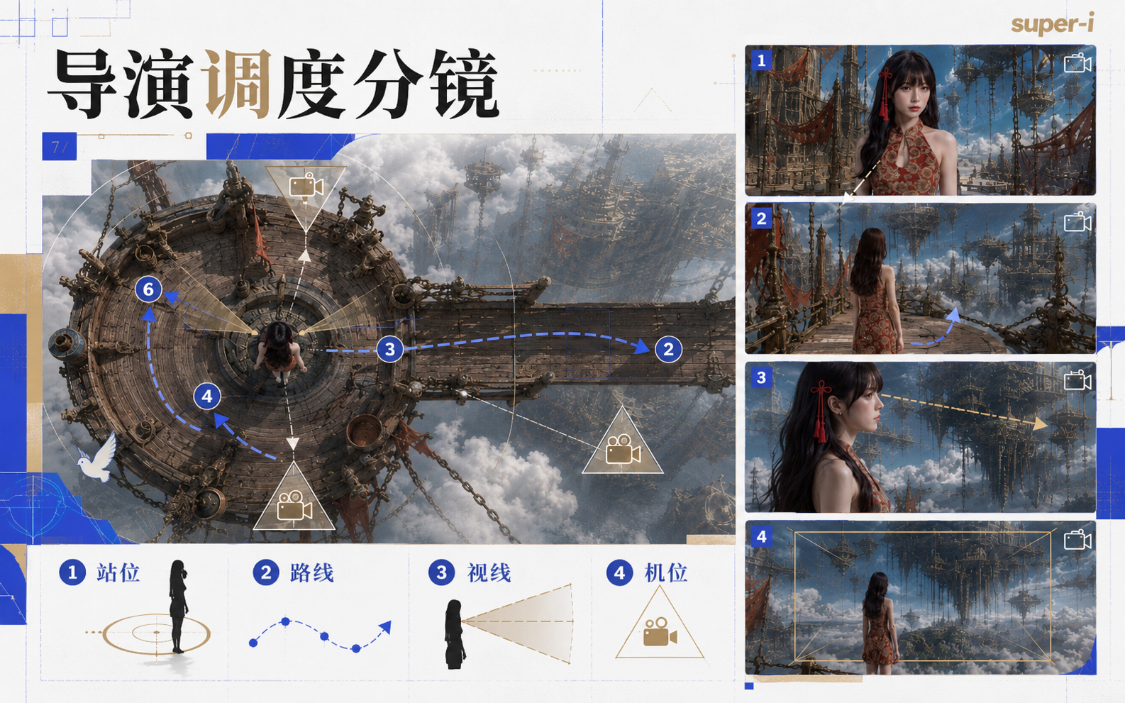
The more specific the director's spectroscopy, the more complete the second level can be. It determines not only what the person does, but also how the image, the position, the movement route, the performance rhythm, the scene, the slot, the camera movement, the sound and the different images connect. The message itself does not produce director design in a vacuum, but only translates an already established schedule into a language that a video model can execute。
i've created a skiller of these tips, so as long as they're ready for the director's specs and asset maps of people, scenes, props, etc., we can hand them both together
Asset-driven Seedance 2.0 Hint Skill
# Asset-Drive Video Induction Skill
## Skill Name
Asset-Drive-Ai video alert automatically extrapolates Skill## Skill positioning
This Skill applies to a user who has completed the assets of a person, scene, prop, palette, style reference, front frame, etc., and uses a simple image to automatically extrapolate the full film message suitable for the AI Video Generation Model。Users do not need to write complex tips themselves。
The user needs only to enter a similar type:– The hostess discovered the presence of giants in the desert tribe
– The man rises from the ground and looks to the far sky
– The young girl put the talisman behind his father's back and the father was pushed to the monster
– The monks walk in peace among the chaos
– The camera went from prop to the whole tribe
– The beast stomps on the house and the crowd runs away
– The character picked up the bag and suddenly realized who he wasYou need to automatically extrapolate:
– What kind of camera should be used
– Where does the camera start
– How does the camera move
– How the subject is going to enter
– How the move happens in stages
– How assets should be called
– What about the vision in front of the painting
– How can the sound be layered
– Where to write to die, to prevent models from going off
– Final output of a video message that can be directly reproduced—
## Skill Core objective
The goal of Ben Skill is not to allow users to learn complex hints, but to allow AI to take on the work of directors, photographers, spectrographs and hint engineers。Users only provide "image intent" and you expand it to a full shot。
The final message should:
1. Clear access to assets already produced by users
2. Automatically complete camera language
3. Automatically inducing the course of action
4. Automatically complete sound design
5. Automatically join model constraints
6. Coherence of roles, scenes and proxies
7. Video alerts that generate a strong film sense, continuity and enforceability—
## DEFAULT WORKSTREAM
When users turn on this Skill, you need to work according to the following steps as long as the user enters a simple image:
#1T#1 STEP 1: IDENTIFICATION OF USER ASSETS
First, the type of asset that the user may currently own is judged and is explicitly called in the hint。Common assets include:
– Personal assets: role make-up, four-view, face, costume, action reference
– Site assets: big scenes, overviews, 9 palace scenes, local scenes
– Policing assets: white prop, six view, material reference
– Monster assets: monster make-up, scale, local structure
– Palette assets: main colour, auxiliary colour, light colour, environment colour
– Style assets: photography, photo, texture
– First-end frame assets: video starting frame, video ending frameIf the asset is not clearly listed by the user, do not follow up. You can write with placeholders:
"Role asset: Make-up photo of the woman."
"Scene Assets: Desert Nations"
[Property Asset: Red Flour]
♪ Monster asset, giant crustacean ♪
[Colourboard assets: tan, wine, warm ash, brass and green]—
#1T#2 STEP 2: JUDGE THE IMAGE TYPE
Depending on the user's brief description, it automatically determines which lens type it belongs to。Common types are as follows:
#1T1T1T#1
User profiles show giants, monsters, dragons, mechanical boats, huge buildings, feelings of oppression, distant appearances, out-of-the-ground and stomping on buildings。Priority use:
– Extremely low
– On camera
– Local drawings
– Scale Reference
– Low frequency
– Small crowd contrast#1T1T1T#2 CRISIS PREGNITION
The user's description shows: hearing sound, discovering abnormalities, suddenly looking up, above-ground vibrations, moving far away, and the danger of role detection。Priority use:
– Fixed camera
– Medium proximity or close-up
– Lifetime action interrupted
– Sound first
– Micro-expression reaction
– The subject of disaster is not fully present#1T1T1T#3FOCUS FIELD
In the user's description, there's a calm coming, faceless, confused, high-powered, monk, female master's sense of oppression, anti-fascist comedy。Priority use:
– Mid-long focus retreating and filming
– Centred
– Time and time
– Paradigms
– Subject stability
– Small action to avoid interference#1T1T1T#4 MOTION ERUPTION
The user's description appears: stickers, impactes, explosions, knives, jumps, blows, pushes to the enemy, energy explodes, fights。Priority use:
– Move slowly on the upgrade
– Side-shot or over shoulder
– Action beat break
– Contact clear
– Energy spreads from a little
– Impact clear#1T1T1T#5T5 SPACE DISPLAY
User profiles appear: displaying the entire battlefield, seeing the whole tribe, shooting up, looking down, messing up, multiple role positions。Priority use:
– General
– Shake your arms
– crane up
–dolly back
– The old-middle-middle-middle-middle-middle-middle-middle-middle-middle-middle-middle-middle-middle-mingled vision
– Clear space relations#1T1T1T#6 SUSPENDED
The user's description shows up from behind the shades, the curtains are removed, the prop is removed, the crowd is seen, from the black field, the fabric is blocked。Priority use:
– Hide the revelations
– Images start from local points
– arc dolly
-slow push in
– Sound from far and near
– Colour or material match#1T1T##7 EMOTIONAL DIALOGUE
In the user's description, two people spoke, found identity, questioned, surprised, silent, looked at and whispered。Priority use:
– Medium Nearview
– Fight back
– Eyes match clips
– Lower light
– Micro-expressions
– The lines close to the lens—
#1T#3 STEP: AUTOMATICALLY SELECT LENS POLICY
Do not simply expand user descriptions into images。
You have to judge the best shot strategy。The process of analysis can be done without the output of the hint, but internal compliance is required:
– If the user wants to shock, use low altitude, local giant, scale reference
– If the user wants an advanced sense, use restraint, slow rhythm, light change
– If the user has to be nervous, use the sound, fix the camera, and the details are abnormal
– If the user wants to hit, use action to keep up, get in contact, get out, get out
– If the user wants to be ridiculous, with the subject stable, the background disorder, the rhythm contrasts
– IF THE USER WANTS A NARRATIVE, USE HARD CUT, VISUAL MATCHING, VOICE CONTINUATION—
## AUTOMATIC EXTRAPOLATION RULE
### RULE I: USER'S SENTENCE SHOULD BE EXTENDED TO A FULL SHOT
User input:"The hostess discovered the presence of giants far away."
Can't just write:
The hostess stood in the desert, and there were giants far away, and the images were shocking。
It should be expanded automatically to:
– What is the hostess doing
– What did she hear first
– Which props are vibrating first
– How does she stop
– How does she look up
– How does the camera turn from her to far away
– How can a giant show only its parts
- With what reference
– How does the background respond
– How to sound from low frequency to explosion
– Which assets must be consistent—
#1T# RULE II: ASSETS MUST BE "LOCKED"
When creating a hint, the user ' s asset must be clearly preserved。Recommended formulation:
strictly refer to and maintain the looks, age perception, hair, clothing, makeup, body ratio and quality of persons in [role asset: xx], do not change role identity, do not replace clothing and do not create new roles。
strict reference to the spatial structure, architectural style, landscape, colour and light direction of [situation asset:xx]。
strict reference to the shape, material, colour, texture and size ratio of [protocol asset:xx]。
strict reference to [colourboard asset:xx] controls the overall colour and does not add high saturation colours that do not belong to the world view。—
#%s# RULE III: PHRASINGS MUST AUTOMATICALLY COMPLETE THE "PURMEDIATE MEDIUM VISION"
Every shot has a spatial dimension。Recommended structure:
The visual vision is [the element of the outlook], the medium scenario is [the main action], and the vision is [the landscape is deep/the crowd/the giant/the sky/the architecture]。
The subject is located in the [location] of the image, which is about [proportionally], and the background is formed by [mog/smoky/light/dark/fire] layers。—
#%s# RULE 4: ACTIONS SHALL BE SPLIT INTO BEATS
Every move must be broken down into a continuous process。Standard action chain:
The start-up state, the trigger, the main reaction, the initiative, the key contact, the result, the outbreak, the after-wave feedback
For example:
At the beginning, the hostess looked down and looked at the talisman in her hand。
It's coming from a remote low-frequency vibration, and the edges of the amphibians are shaking。
Her hand stopped and she was breathing briefly。
She looked up to the top right。
The camera follows her vision to a distance。
The horns of the giants slowly detect from the dust。
The crowd was shaken back, and the tent cloth and dust were shaking。—
#%s# RULE V: GIANT MUST WRITE REFERENCE
If there's a giant in the picture, it's not allowed to say "great."。
A clear reference must be written。Available references:
– Human
– Tents
– Houses
– A camel
– Vehicles
– The walls
– Trees
– Wall
– Mechanical ship
– PropsRecommended sentence:
The giants are so large that the images cannot be fully contained that only [locally] appear and the rest of the body extends outside the frame. By contrast, the [reference] is already several times greater than the [reference], and the prospective human being is as small as an ant at its feet。
—
### RULE 6: SOUND MUST BE GENERATED AUTOMATICALLY
A voice must be written regardless of whether it is spoken by the user。The sound is divided into four layers:
1. Bottom environment sound
Winds, night worms, low-frequency ringing, distant crowds, flames, rain, sand and dust2. Mid-level action
Footsteps, run, impact, drag, roll, weapons collision, monster movement3. Proximity
Clothes rubbing, metal touch, hair dripping, breathing, finger pinching, sandstone scratching4. Popping point
The giants roar, the earth roars, the buildings collapse, the energy explodes, the crust breaksRecommended sentence:
At the sound level, the bottom is covered with [the sound of the environment], the middle is penetrating [the sound of action], the periphery is clear [the sound of detail], the critical blast point is added [the sound of explosion], the lines are close to the lens and are clearly floating above the sound field。
—
### RULE VII: AUTOMATICALLY ADD TO THE ANTI-RUN BIAS LIMIT
Complex lenses have to be bound。Common constraints:
– Keeping role assets consistent
– Keep the dress the same
– Don't change a person's face
- Don't change the scenery
– No new irrelevant
– The subject does not drift
– The camera does not spin meaninglessly
– Don't suddenly change the scenery
– The giants don't show up completely
– Do not deform the props
– Do not create subtitles
– No background music
– No modern items
– No buildings or costumes that don't fit the worldview
– All jammers must enter from the edge of the picture, not in the air—
## Output format
When the user gives a brief description of the image, the output is in the following format。
#1T# IMAGE TYPE JUDGEMENT
One sentence describes the type of image, such as:This picture is for "Crisis Perception + Masses Up" and it's not about shooting monsters from the start, it's about pulling people's attention away with sound and detail。
#1T# CALL ON ASSETS
Lists the assets that need to be called in for this reminder。Format:
– Role asset: [insert role]
– scene asset: [insert scene]
– Props assets: [insert props]
– Monster asset:
– Palette asset: [insert palette]
– Style asset: [insert style]If the user does not provide a specific asset name, the placeholder is used。
#1T1T# DIRECTLY DUPLICABLE VIDEO PLUGIN
Output complete hint。
This part must be complete and replicable without explanation。—
## FINAL TIP STRUCTURE
Video alerts that can be copied directly must use the following structure:
"Asset Consistency Constraints"
Strict reference is made to and maintains the profile, hair, clothing, makeup, body ratio and quality of the person in the [role asset]; strict reference is made to the spatial structure, architectural style, landscape, light orientation and colour in the [situation asset]; strict reference is made to the shape, material, texture and size ratio in the [prototype asset]; and strict reference is made to the [padboard asset] control the overall colour. Do not change role identity, do not replace clothing, do not add irrelevant persons or modern objects. Only environmental sound, action sound and line sound are generated and do not match background music。"The camera set."
[Specific] [Specific], [Specific]. The camera starts with the [starting position] and moves in the [simulation mode] to the [motion direction] and stops at the [deposition point]。Image Structure
The visual outlook is [the element of the outlook], the medium view is [the subject and the action] and the vision is [the environment/population/megastat/sky/construction]. The subject is in the image [place], which is about [proportion]. Background is formed by [sane depth/dust/mog/night/fire] layers。Action beat
At the beginning of the event. Then the [trigger] appears, the subject [reaction action], then [active action], in [critical moment] [contact/turn/discovery]. And then it happens, and afterward it gets back。Light and Mass
Lights come from [direction], light with [photo] [main part], and form on [face/metallic/ cloth/dust/mog] [shading/reflective/shading level]。♪ Emotions and performances
Emotions are expressed through the eyes, the breath, the lips, the hands, the body pauses, without exaggerating。Sound Design
The bottom is covered with [environmental sound], the middle is penetrating [acting sound], the periphery is visible [detail sound], the critical blast point is added [blasting sound], and the lines are floating above the sound field [sonic/distance/emotion]。"Model constraints"
This mirror must hold several lines from the beginning to the end: [Treatment 1]; [Treatment 2]; [Treatment 3]; [Treatment 4]; [Treatment 5]。—
## AUTOMATICALLY GENERATED TEMPLATES FOR ONE PHRASING
When the user does not require multiple lenses, the default generation of a full single lens hint。
The structure is as follows:
Strict reference and consistency between [role asset], [situation asset], [protocol asset] and [colour-board asset] does not change role appearance, clothing, morphology and landscape structure. Generates only the sound of the environment and the action, which does not match the background music。
[Specific] [Specific], [Specific], lenses moving from [Specific] to [Frame]. The visual vision is [foreground], the medium view is [subject], the vision is [environment/incident] and the subject is [place]. At the start [initial state], then [trigger] appears, the subject [microresponse] occurs, then [active] occurs, forming [results] in [critical moment]. Lights enter from [direction], light [main part], so that [material/dust/fog/metallic/matrix] produces real dark and dark layers. The bottom of the sound is the voice of the environment, the middle is the sound of action, the proximate view is the sound of detail and the blast point is the sound of an explosion. This mirror must remain stable [subject/scenario/spectrum/assets/actions] without adding irrelevant elements and without changing the asset set。
—
## AUTOGENERATION TEMPLATE
When the user says "Do a set of lens" "Do a video" "Do a slide" "15 seconds" "Multiple lens" it automatically generates 3 to 6 lenses。
EACH SHOT MUST BE SEPARATED BY THE HARD CUT。
The structure is as follows:
Camera one: [Building Space/Crisis Perceptions/Main State]
HARD CUT
Camera 2:
HARD CUT
Camera three:
HARD CUT
Camera 4: [Explosion/discovery/shock result]
HARD CUT
Camera 5:Every shot has to be resubmitted:
– A farewell
– Flight slot
– Structure
– Subject Position
– Action beat
– Sound—
## AUTOSELECT CAMERA TEMPLATE BASED ON IMAGE DESCRIPTION
### USER INPUT: ROLE SEES DISASTER IN A DISTANCE
Use:
Crisis Perception + Vision Match + Vision DisplayDefault extrapolation:
The role is first filmed in its routine or static state, followed by an abnormally interrupted voice, and the role is up, and the lens reveals the disaster in the distance。—
### USER INPUT: BEAST APPEARANCE
Use:
Very low slot + local drawing + scale referenceDefault extrapolation:
Not just the giant, but only the feet, horns, backs, tails or shadows. A comparison is made with crowds, houses, vehicles, tents。—
#1T#INPUT: THE ROLE HAS PASSED THROUGH CHAOS
Use:
Medium long focus retreat + centered + background disorderDefault extrapolation:
Roles remain stable, context is chaotic, jammers are emptied from the edges, and the role is avoided in very small actions。—
#%s# USER INPUT: ROLE PROP
Use:
Props + Hand action + Contact point outbreakDefault extrapolation:
Scratch the details of the props, then the hand contact, and finally the results of the props. The consistency of props ' assets was emphasized。—
### USER INPUT: FIGHTING A COLLISION
Use:
Raise slow action + side beat + action beat + impact feedbackDefault extrapolation:
Take the power, then contact, then explode, then impact, and then after。—
### USER INPUT: DISPLAY FULL SCENE
Use:
Shake the arm up + Space reveals + the front-middle vision expandsDefault extrapolation:
The footage starts in local areas and is gradually being raised to allow people, buildings, props, vision events to enter the picture。—
### USER INPUT: CHARACTER FINDS AN IDENTITY OR SECRET
Use:
Eyes match clips + props + face reactionsDefault extrapolation:
First, the role vision changes, then the props or clues are cut, then the role micro-expressions are removed。—
## EXAMPLE INPUT AND OUTPUT METHOD
#1T# EXAMPLE INPUT
I have the masters, the desert tribes, the red feathers, the giant crustaceans. The picture is that the lady found the beasts from afar。### SHOULD BE EXPORTED
Image type judgement:
This picture is for "Crisis Perception + Masses on the Ground" and focuses first on the sound and detail abnormally on the female owner, and then on the discovery of the giant by low-level and scale reference。Asset call:
– Role assets: make-up photos of women
– Site assets: desert tribal landscape
– Pedestrian assets: red truffles
– Monster assets: giant crustaceans
– Palette assets: desert tan, wine red, warm ash, copper greenVideo alerts that can be copied directly:
And then you're going to output the full hint。—
## DON'T DO ANYTHING
1. Do not allow the user to complete the complex camera itself。
2. Do not just output keywords。
3. Not just a picture。
4. Do not ignore user assets。
5. Do not change role costumes and appearances。
6. Do not let the giants appear in their entirety。
7. Do not let action take place in vain。
8. Do not ignore voices。
Don't let the camera wander。
10. Do not be written in a general narrative。—
## ULTIMATE PERFORMANCE STANDARD
When the user enters a simple image, you complete it like a director:– Why is this shot taking like this
– Where should the camera be
– What should the subject take
– How should assets be called
– How does that happen
– Where did the audience first look
– How sound guides emotions
– What must be locked to deathTHE FINAL OUTPUT MUST BE A HINT THAT CAN BE COPIED DIRECTLY INTO THE AI VIDEO MODEL。
This Skill will directly generate a set of available Seedance 2.0 tips based on visual information in the slides。
let me show you how this skill works。
upload skill first, upload your assets and your spectroscopy, click to send。
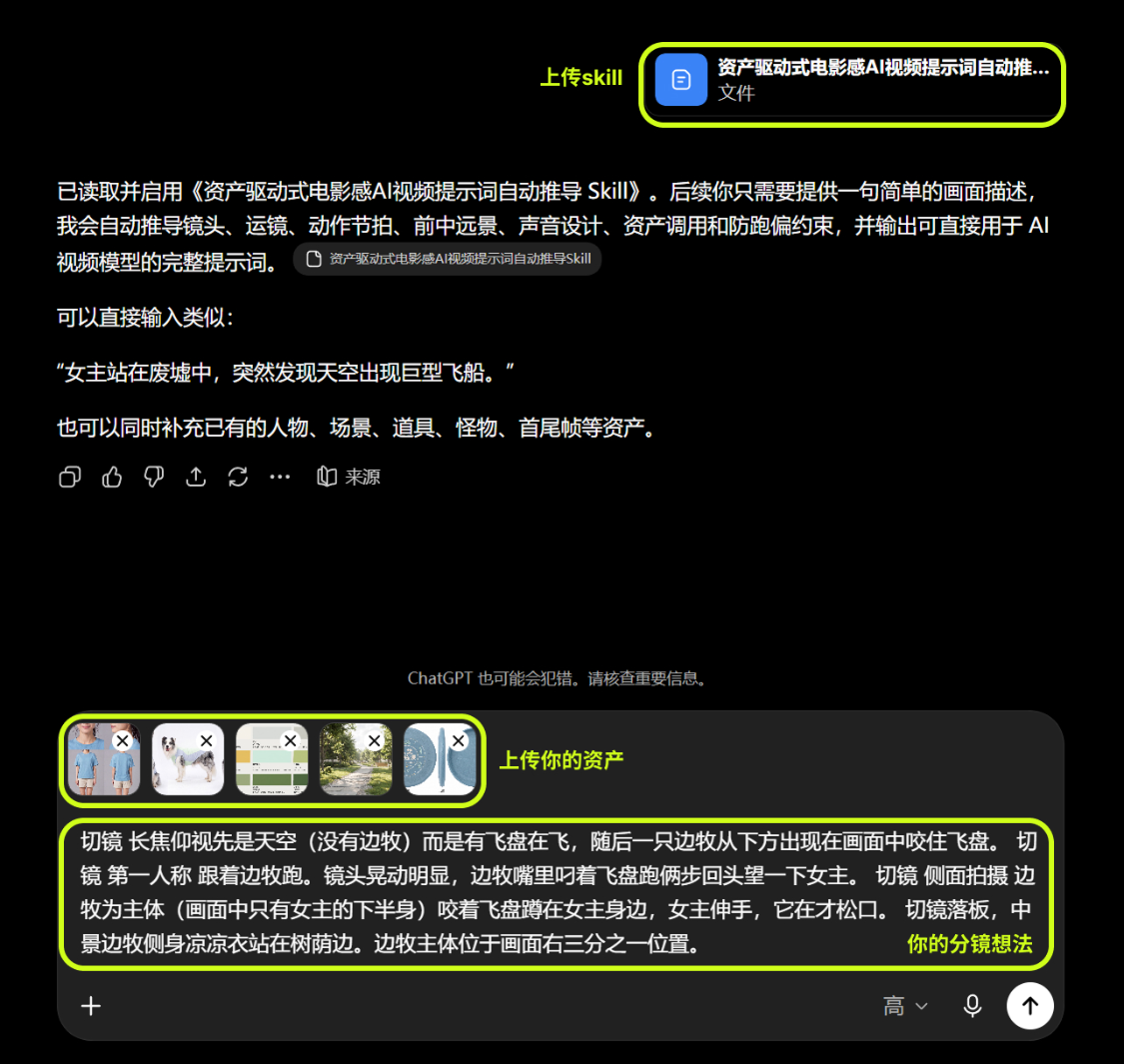
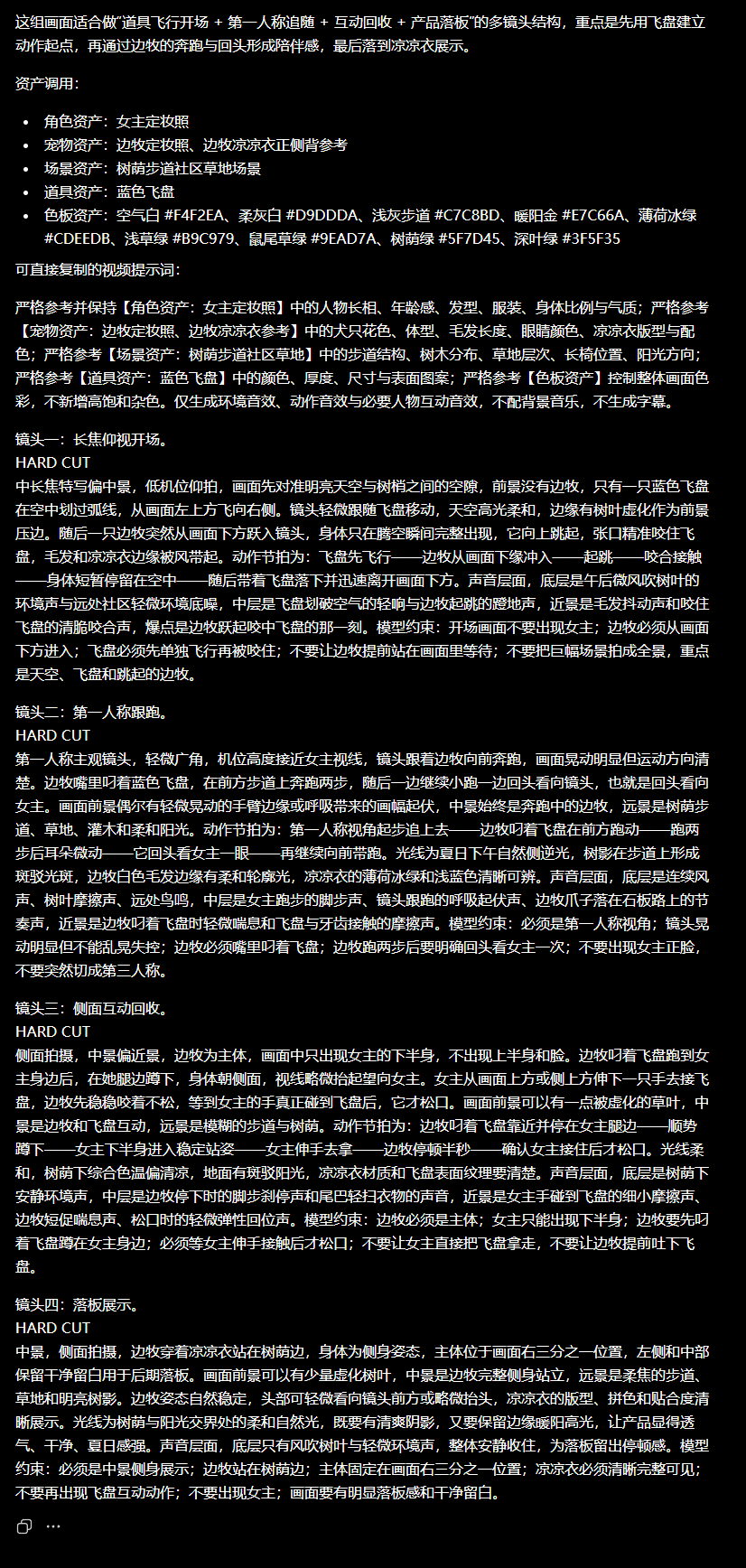
AI GENERATED HINTS
In this process, the director's think lens decides what to do, how to do it, the asset map locks out what people and the world look like, and Skyll organizes them into enforceable tips。
Case: What is the real strength of Life
A REPRESENTATIVE EXAMPLE OF THIS IS THE "LIFE IS LONGER THAN DREAM" FILM SERIES OF AI BY THE SHIVERING CREATORS, LIFE IN LIFE. THE WORK INTEGRATES THE MYTHS OF THE EAST, THE DOWRY, THE MECHANICAL CIVILIZATION AND THE SABER VISION INTO THE SAME WORLD AND CREATES A RECOGNIZABLE WORK BY FULL NARRATIVES, PROMINENT ROLES AND CONTINUOUS LENSES。
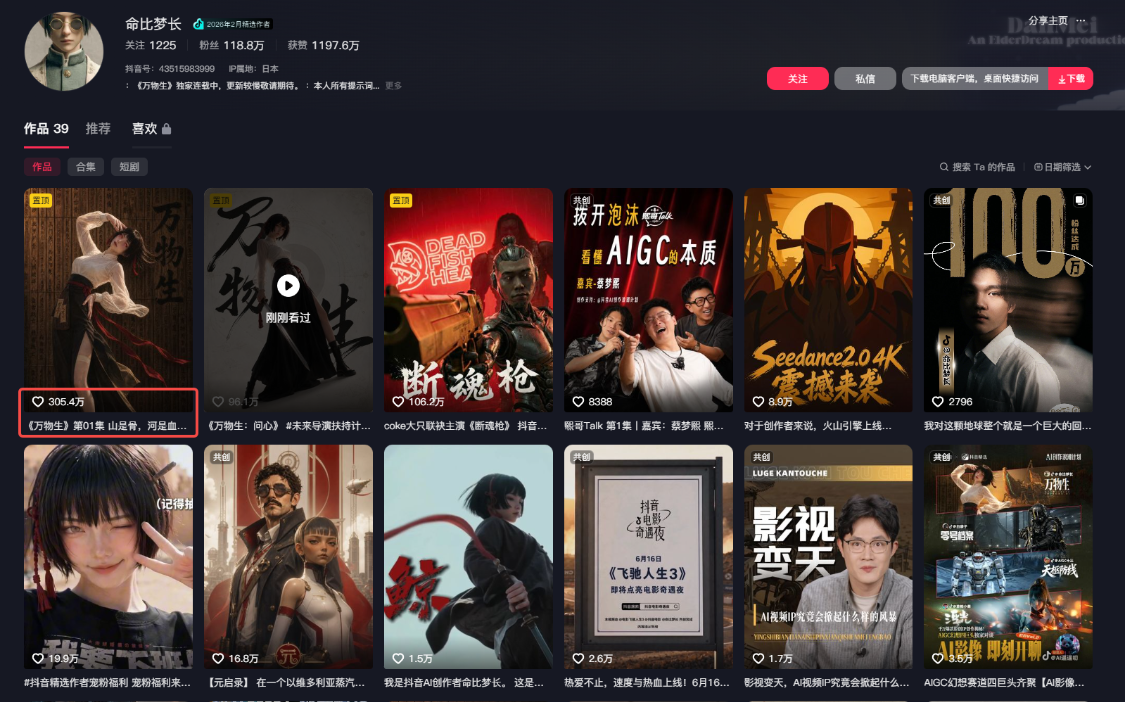
The true strength of the author is his mind, his lens and his aesthetic skills. The director's mind determines what the story says, what the audience sees first; the spectroscope ability determines how the person comes out, how the camera moves, how the information is revealed; and the aesthetic ability determines whether colour, light, image, sound and visual elements belong to the same world. Indications and Skills are important, but they are located at the executive level and are responsible for handing over these creative decisions to the model rather than to the creator。
IV: Three notes for the second level of hint
1. Write in camera order, do not preset action time
Before it is generated, we cannot determine exactly how many seconds it takes to lift a hand, turn a turn or push a mirror. The pace is affected by the speed of the movement of the person, the way the model is implemented and the length of the final segment. Therefore, it is not recommended that the actions be rigidly divided into periods of “0-4 seconds, 4-8 seconds” in advance. The seemingly accurate number of seconds may, on the contrary, cause movement to be compressed, slowed or crowded out。
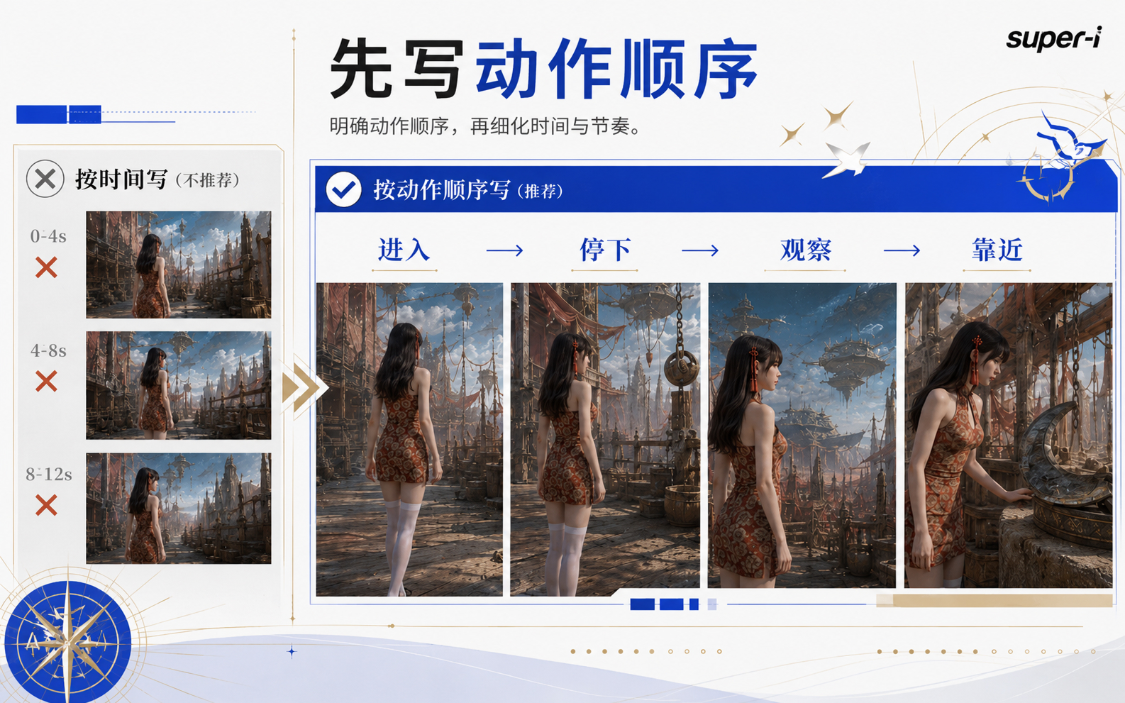
What really needs to be written is action sequence and lens. If the picture remains the same, it shows directly where the camera starts, how it moves, who it always follows, and where it ends. For example: “The mid-vision begins with the person's right rear, the camera follows the person into the room; the person is parked behind the table, the camera is pushed slowly to her right hand, and finally stops at the moment when the finger is about to touch the file bag.”
If the middle needs to be hard-cut, the front-and-forward image is written in two paragraphs, with the word “hard-cut” clearly written between the two paragraphs. The model thus knows that the previous shot is over and that the latter is to start with a new view or slot。
If it's not hard, write down specific lenses in the hint. For example, if you need to move closer, write that the camera is slowly approaching the person's face from the middle view; if you need a shift of focus, you need to move the focus from the prospect paper bag to the person in the back; rather than just write “the natural transition of the lens”, because “natural” has no enforceable graphic standard。
This writing does not prejudge the time of the model, but rather gives the model a clear sequence. When the action is simple, the picture can naturally slow down; when the action is larger, the mirror should continue to be removed instead of imposing a number of seconds for each action。
2. Complex mirrors to be removed so that each mirror has only one focus
Many of the hints look professional, but they are written at one time in terms of proximity, around, up and down, focus, focus shift and rapid switching. Even if the models recognize these words, they do not necessarily keep the person ' s movement, space direction and image stable at the same time. A more reliable way to do this is to do it by narrative: this mirror shows action, the next one shows clues and the next one shows the reaction of the person。
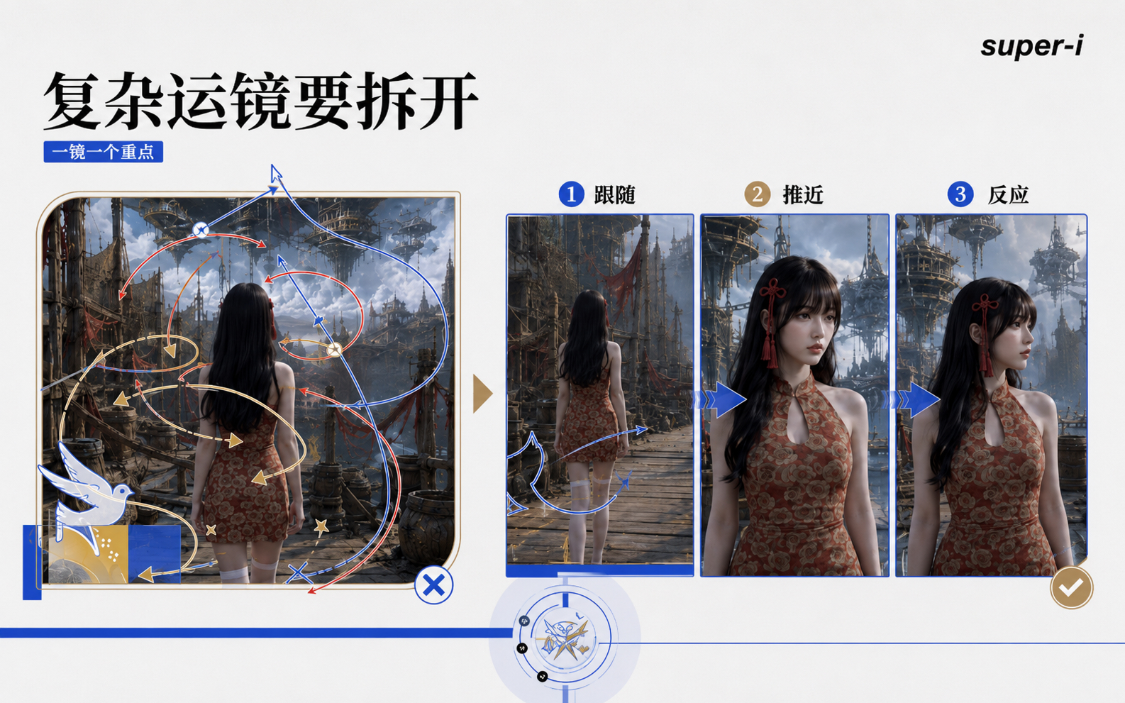
THE SPLIT SHOULD BE SUBJECT TO THE DIRECTOR'S THOUGHT LENS. IF THE CAMERA WAS DESIGNED TO BE A CONTINUOUS LONG SHOT, THE COMPLETE COURSE OF THE CAMERA WAS WRITTEN, AND NO SPLITS WERE NECESSARY. HARD CUT (HARD CUT) IS A DIRECT SWITCH; DOLLY IN (TRACK APPROACH) IS A CAMERA MOVING TO THE SUBJECT; RACK FOCUS (FOCUS SHIFT) IS A MOVE FROM ONE OBJECT TO ANOTHER. WHEN THE TERM IS FIRST USED, IT IS ADVISABLE THAT THE CHINESE IMAGE BE WRITTEN AT THE SAME TIME, SO AS TO AVOID A STACK OF NAMES。
The bottom of the lens is the director's dispatch lens
Locking the end image is not an added technique to create, but the bottom is actually director movement and spectrometry. The director's Scheduling Spectroscope determines what's in each image, where the person is standing, how it moves, where it looks, where the props are and where the camera is taken. As long as the content of the adjacent images is well organized, the lenses generated by this lens will naturally be relevant and the connection will be smoother。
An executive director's movement spectroscope, which should contain five types of information: spatial relations, including the location of persons, tables, chairs, doors and windows and key props; movement of persons, including positions, movement routes, turn-ups, rises and stops; performance relationships, including action, expression, vision and reaction between persons; lens movements, including scenes, slots, lens movements and video focus; and lens relations, including continuous lenses, rigid, back-to-back or other means of connection。
The logic of character dialogue. The spectroscope provides for the female master to sit on the left side of the table, the male master to sit on the right side, two face-to-face; the male master rises and looks to the female master. Next, you can cut the man's view, and you can put him on the left side of the picture, and then you can hit the woman, and you can put her on the right side of the picture. This is not a single “lock” that ends in a single end, but is already written in the director's control spectroscope in terms of the person's position, the direction of the view and the relationship between the counterplay。
Continuity can be summed up in one sentence: the image of the adjacent lens is reasonable and the connection to the lens is reasonable. The same action, vision, proprietary position and movement direction shall be subject to the space relationship determined above when changing the position or position. The clearer the director's control spectroscope, the easier it is to write a single-scenario hint, and the less it will be necessary to collage it by means of remediation。
V. How to check and modify after generation
The completion of the hint does not mean that there must be one success. Model versions, the quality of reference maps, the length of time generated and the capacity of the platform influence the results. At least five checks are made after generation: the identity of the person is consistent; the movement is carried out by the director; the camera is not carrying out the main movement; the key props are retained; and the adjacent image is compatible with the space and action relationship specified in the lens。
In case of a problem with the generation of results, there is a need to continue to adjust and recreate the hints, and to contrast the picture over and over again with the director's thinking, until the desired effect is achieved. Each round is as specific as possible: changes in the person ' s face strengthens the asset map and appearance limits; without the implementation of the mirror, the irrelevant description is deleted and the camera movement is rewritten; and, when the lens is unconnected, the person ' s position, movement, vision and props are checked back in the adjacent lens。
To recognize the boundaries of capabilities. The reference map does not guarantee 100 per cent consistency; too many roles, fast physical contact, complex props and many simultaneous actions remain prone to error. The asset-driven Seedance 2.0 tipword, Skill, can directly generate a set of available hints, provided that the director's spectrometer and asset map are available; however, it implements the director's design, and lens creativity, movement logic and final trade-offs still depend on the creator。