



IPAdapter is a very powerful plugin with three main features:
First isface replacement.
IPAdapter can accurately recognize the facial features of the people in the reference map and introduce the features to the resultant map to achieve the face replacement effect.

The second is material migration.
In addition to recognizing the facial features of a person, IPAdapter is also able to recognize the material of the reference image and apply it to the resultant image.

Finally, there is style migration.
IPAdapter, in addition to the above two functions, recognizes the style of the reference graph and migrates the results to the result graph.

IPAdapter Local Deployment
I. Plug-in Installation
If you are using the Autumn Leaves Integration Pack, the IPAdapter_plus plugin is already installed by default, so you don't need to install the plugin again.

If you don't have IPAdapter plugin installed locally, you can install it by searching the manager and installing the first "IPAdapter_plus".
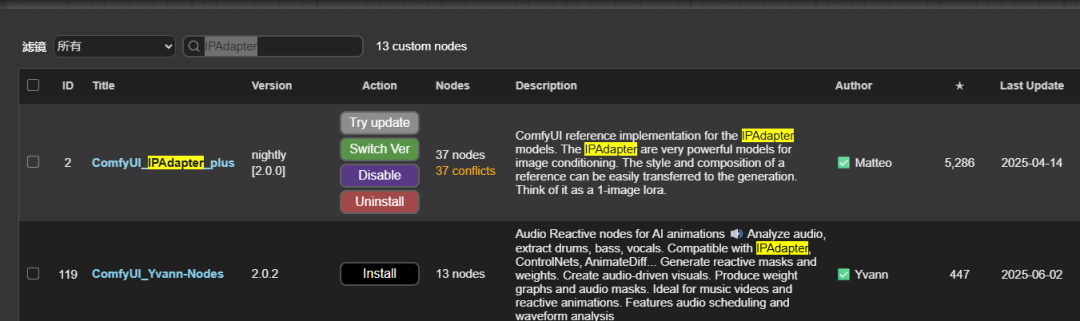
You can also install it via the github link
https://github.com/cubiq/ComfyUI_IPAdapter_plus.git

For more plugin installation methods, see the article:
AI Painting ComfyUI Getting Started Tutorial, ComfyUI Workflow Custom Node Installation
2. Download the model
Ipadapter's plugin is better to install, the hard part is the model installation, you must be more careful when installing.
Still open the Ipadapter's github page and scroll down to see the download link for its models, which are divided into 4 main categories.
(https://github.com/cubiq/ComfyUI_IPAdapter_plus.git)
1、Download the visual model, place the path:/ComfyUI/models/clip_vision
(Note: the name of the downloaded model needs to be renamed to be the same as the name in blue in the picture below)

2、Download the basic model, facial model, etc., model placement path: /ComfyUI/models/ipadapter, if there is no ipadapter this folder, create a new one yourself.
(Discarded models may not be downloaded)

3、Download the basic faceid model, etc., model placement path: /ComfyUI/models/ipadapter
(Discarded models may not be downloaded)

4、Download the lora model, place the path: /ComfyUI/models/loras

III. Simple use of workflows
Come to the comfyui_ipadapter_plus plugin directory, find the examples folder, this folder has a lot of sample workflows, load a default workflow.
Key point: the presets in the IPAdapter loader actually represent models with different weights, here we use light, standard, medium, high intensity, etc. to help you understand better.
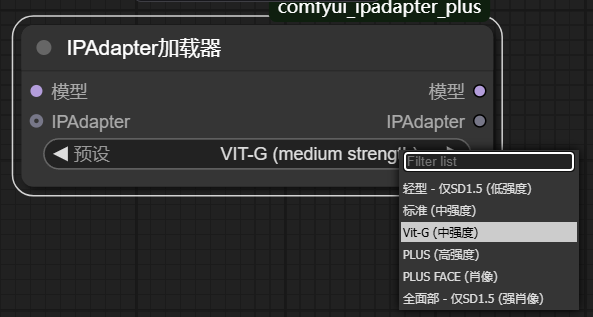
Change the preset in "IPAdapter Loader" to medium intensity and add a prompt:
Cue word: closeup of a fierce warrior woman wearing a full armor at the end of a battle, high quality, detailed)
Click Generate Image.
The generated images do not follow the cue words, but the style, color, and composition of the generated images are very similar to the reference image.

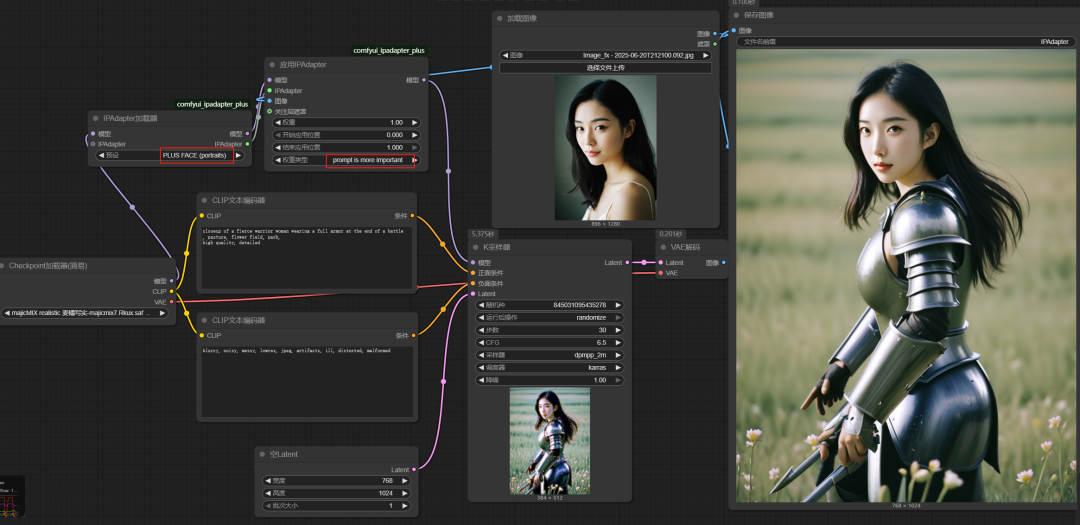
At this point, change the weight type in the "Apply IPAdapter" node to "Prompts are more important".

The images generated now follow the cue word more closely, while the style also takes into account the characteristics of the reference image.

We then change the weight type to style conversion, which is now the style conversion effect on the reference image.

Change the "IPAdapter Loader" preset to Portrait, and change the "Apply IPAdapter" weight type to Cue word is more important, and then load a frontal portrait, and the generated image is following the cue word for the character scene, but the face is Refer to the picture. This realizes face replacement.
These are the main points of today's post, which focuses on the installation of the IPAdapter plugin and model, as well as the simple usage of workflows.